Back to featured insights
10 Best Backup Plugins WordPress for Hong Kong Websites
This article explores the best backup plugins WordPress for Hong Kong websites, explaining why backups matter, how to choose the right plugin, and how to set up a WordPress backup plugin step by step.
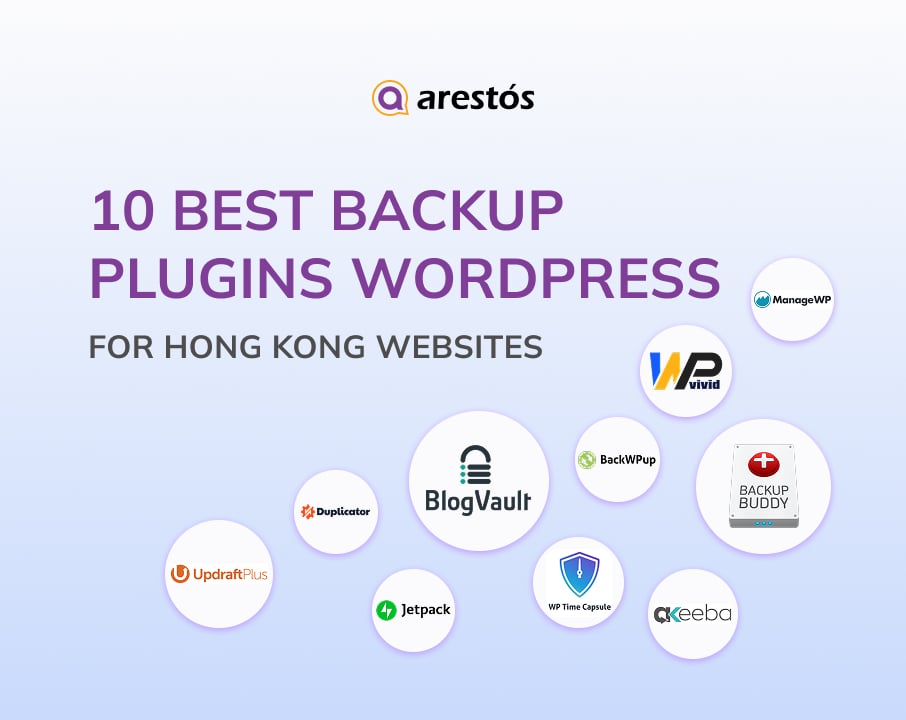

Table of Content
Share
Protecting your website with the best backup plugins WordPress is essential for every site owner. These plugins help safeguard your data, prevent downtime, and ensure fast recovery in case of errors or cyberattacks. This guide is perfect for Hong Kong website owners, bloggers, and eCommerce businesses looking to keep their sites secure.
In this article, we’ll walk you through why backups matter, how to choose the right plugin, and step-by-step instructions to set up automated backups.
What Are WordPress Backup Plugins and Why Your Website Needs Them?
WordPress backup plugins are tools that automatically create copies of your website’s files, database, and settings so they can be restored if something goes wrong. These backups protect your site from common risks such as hacking, server failures, plugin conflicts, or accidental data loss.
In today’s digital environment, websites are constantly exposed to security threats, software updates, and technical failures. Businesses, bloggers, and online stores all rely on their websites to generate traffic, sales, and customer trust. Without a proper backup system, even a small error can result in lost data, broken pages, or long periods of downtime.
For Hong Kong websites specifically, the risks are even higher due to heavy traffic, international customers, and fast-moving online competition. Many Hong Kong businesses also use cloud or overseas hosting providers, making off-site and automated backups essential. A reliable WordPress backup plugin helps ensure quick recovery, protects customer data, and keeps business operations running smoothly in this demanding market.
Top 10 Backup Plugins WordPress Reddit Recommended for Hong Kong Websites
This section features 10 WordPress backup plugins widely discussed on Reddit and considered among the best backup plugin WordPress Reddit recommendations for Hong Kong websites, evaluated for performance, restore efficiency, cloud integration, and local hosting compatibility.
- UpdraftPlus
- BackupBuddy
- Jetpack Backup
- BlogVault
- WP Time Capsule
- Duplicator Pro
- WPvivid Backup
- BackWPup
- Akeeba Backup
- ManageWP Backups
Below, we’ll take a closer look at each of these backup plugins to help you understand their features, strengths, and which type of Hong Kong website they are best suited for.
UpdraftPlus

UpdraftPlus is one of the most popular WordPress backup plugins in the world, trusted by millions of users. It offers a reliable and easy-to-use backup and restore system that works well across different hosting environments, including servers in Hong Kong and the Asia-Pacific region.
For Hong Kong businesses running eCommerce, multilingual websites, or high-traffic platforms, UpdraftPlus provides a cost-effective way to protect website data and reduce downtime.
Key features
- Scheduled automatic backups
- On-demand manual backups
- Cloud storage integration (Google Drive, Dropbox, Amazon S3, etc.)
- One-click restore
- Full site and database backups
- Backup encryption

BackupBuddy

BackupBuddy is a premium WordPress backup plugin designed for businesses that need a complete and reliable website protection system. It not only creates full backups of your WordPress site but also includes built-in tools for site migration and recovery.
For Hong Kong businesses running WooCommerce stores or business-critical websites, BackupBuddy is a strong choice because it focuses on data safety, fast restoration, and smooth site transfers across different hosting environments.
Key features
- Full website backups
- Scheduled automatic backups
- Secure cloud storage (Stash, Google Drive, Amazon S3, etc.)
- One-click site restore
- Website migration and cloning tools
- Malware scanning and file repair

Jetpack Backup

Jetpack Backup is a real-time WordPress backup solution developed by Automattic, the company behind WordPress.com. It is designed to automatically save every change made to your website, making it ideal for high-activity sites such as WooCommerce stores and business websites.
For Hong Kong websites that receive frequent orders, content updates, and customer interactions, Jetpack Backup helps ensure that no critical data is ever lost.
Key features
- Daily automated backups
- One-click restore
- Cloud-based off-site storage
- WooCommerce order and customer data backup
- Activity log for site changes
- Built-in WordPress integration

BlogVault

BlogVault is a powerful and reliable WordPress backup solution known for its off-site backups, incremental backup technology, and fast restoration capabilities. It stores backup data on its own storage network, reducing load on your primary hosting server — a plus for Hong Kong websites with high traffic or limited server resources.
Especially for business websites and eCommerce stores, BlogVault delivers robust backup performance and recovery options that help protect critical site data and minimize downtime.
Key features
- Incremental backups to save server resources
- Off-site cloud storage separate from hosting
- Smart scanning for backup health check
- Staging environment for testing changes
- Real-time backups (on higher plans)
- WooCommerce support

WP Time Capsule

WP Time Capsule is a lightweight WordPress backup plugin focused on incremental backups, meaning it only backs up files and database changes as they occur instead of creating full backups every time.
This approach reduces server load and storage use, making it ideal for Hong Kong websites with frequent updates, such as blogs, news sites, and content-heavy business platforms. Its easy restore capabilities and integration with popular cloud storage services also make it a strong choice for site owners who want simple but efficient backup management.
Key Features
- Incremental backups to save storage
- Cloud storage support (Google Drive, Dropbox, Amazon S3)
- One-click restore points
- Automatic backup on content change
- Scheduled backup settings

Duplicator Pro

Duplicator Pro is a powerful WordPress plugin designed primarily for site migration and cloning, but it also includes robust backup features. Unlike traditional backup tools, Duplicator Pro excels at making full copies of your website for moving between hosts or creating staging environments.
For Hong Kong agencies and developers managing multiple client sites, or site owners who frequently move their websites between local and cloud hosts, Duplicator Pro offers both flexibility and reliability.
Key Features
- Full-site backup and restore
- Site migration and cloning tools
- Scheduled backups
- Cloud storage support
- Multisite support

WPvivid Backup

WPvivid Backup is an all-in-one WordPress backup and migration plugin that combines essential backup tools with site staging and migration features. It offers both free and premium versions, making it a flexible choice for Hong Kong website owners who want reliable backups without high costs.
With support for scheduled backups, cloud storage, and easy restore options, WPvivid helps ensure data protection and business continuity for blogs, business sites, and eCommerce platforms.
Key Features
- Scheduled automatic backups
- Manual one-click backups
- Cloud storage integration
- Site migration and staging tools
- Database backup
- Email notifications

BackWPup

BackWPup is a popular WordPress backup plugin known for its simplicity and solid performance, especially as a budget-friendly solution. It allows users to schedule automatic backups and store them on various cloud services, helping website owners protect their data without complex setup.
For Hong Kong websites with straightforward backup needs — such as blogs, small business sites, or portfolios — BackWPup delivers reliable backup capabilities without over-complicating the process.
Key Features
- Scheduled automatic backups
- Cloud storage support (Dropbox, Amazon S3, FTP, etc.)
- Database backup
- Backup file compression
- Log report after each backup
- WordPress cron jobs support

Akeeba Backup

Akeeba Backup is a long-standing and reliable WordPress backup solution originally inspired by the Akeeba platform for Joomla. Known for its flexibility and control, it allows advanced users to configure backups down to granular levels.
While it’s a strong choice for developers and tech-savvy site owners, it also works well for Hong Kong websites that require custom backup setups, full site snapshots, and secure off-site storage.
Key Features
- Full site backup and restoration
- File and database backup control
- Cloud storage support (Dropbox, S3, Google Drive, etc.)
- Backup retention management
- Password-protected backup archives
- Command-line interface support

ManageWP Backups

ManageWP Backups is a cloud-based WordPress backup service included as part of the ManageWP website management platform. It centralizes backups for multiple WordPress sites on one dashboard, making it especially useful for agencies, freelancers, and developers managing several Hong Kong websites at once.
With automated backups, convenient restores, and off-site storage, ManageWP helps keep WordPress data safe while simplifying ongoing maintenance tasks.
Key Features
- Centralized backups for multiple sites
- Scheduled automated backups
- One-click restore
- Off-site backup storage
- Backup retention control
- Activity logs and reporting

How to Choose the Right Backup Plugin for Your Hong Kong Website
This section outlines the key factors Hong Kong website owners should evaluate when choosing a WordPress backup plugin, based on real-world usage, performance expectations, and insights commonly shared in best backup plugin WordPress Reddit discussions.
- Check compatibility with Hong Kong hosting providers: Make sure the plugin works smoothly with servers located in Hong Kong or nearby regions like Singapore for faster backup and restore speeds.
- Look for reliable cloud storage options: Choose plugins that support Google Drive, Dropbox, Amazon S3, or Alibaba Cloud, which are widely used by Hong Kong businesses.
- Prioritize fast restore and downtime recovery: Hong Kong websites, especially eCommerce and corporate sites, cannot afford long downtime—one-click or instant restore is critical.
- Support for large and multilingual websites: Many Hong Kong sites run in English and Traditional Chinese, so the plugin must handle large databases and multilingual content efficiently.
- Automatic and scheduled backups: The plugin should back up your website daily or in real time without manual effort.
- Off-site backup storage: Never rely only on your hosting server—off-site backups protect your data if the local server fails.
- Security and encryption features: Choose a plugin that encrypts backup files and protects them from unauthorized access.
- Scalability for business growth: As your Hong Kong business grows, your backup system should handle more traffic, more products, and larger databases.
How to Set Up a WordPress Backup Plugin
This section provides a step-by-step overview of how to set up a WordPress backup plugin, from installation to automation.
- Step 1: Installing the Plugin
- Step 2: Setting Up the Plugin
- Step 3: Running Your Backup
- Step 4: Setting Up Automatic Backups
- Step 5: Verify and Test
Below, we’ll break down each step so you can easily follow and apply it to your Hong Kong website.
Step 1: Installing the Plugin
Log in to your WordPress admin panel, go to Plugins → Add New, then enter “Updraft” in the search field.

For this tutorial, we chose UpdraftPlus because it’s one of the most trusted and widely used WordPress backup plugins. It offers all the essential features while remaining easy to use. After finding the plugin, click “Install Now”, then “Activate” once the installation is complete.

Once the plugin is activated, you can proceed to the setup.
Step 2: Setting Up the Plugin
After activating the plugin, click the “Press here to start” button in the pop-up to begin the setup.

If the pop-up doesn’t appear, go to Settings → UpdraftPlus Backups from your WordPress dashboard.

You can keep the default settings, but for more complete backup control, go to the “Settings” tab, where you’ll find a wide range of available options.

Here’s what these settings control:
- Files Backup Schedule: Lets you choose how often your site files (themes, plugins, and uploads) are backed up and how many versions are stored. Content-heavy sites should adjust this based on available storage.
- Database Backup Schedule: Determines how frequently your WordPress database is backed up and how many previous versions are kept.
- Remote Storage: Allows you to save backups outside your hosting server, which is essential in case your server becomes unavailable.
You can choose from several remote storage options, including Google Drive, Microsoft OneDrive, Amazon S3, FTP, email, and other cloud services.
- Include Files in Backup: Select which files should be included or excluded from each backup.
- Database Encryption: Enable encryption to protect sensitive data in your backup files.
- Email Notifications: Receive an email alert whenever a backup is completed.
- Expert Settings: Advanced options such as debug mode, archive splitting, directory paths, and SSL settings for technical users.
Once everything is configured, click “Save Settings” to apply your backup plan.
Step 3: Running Your Backup
After setting up the plugin, go back to the main plugin page and click “Backup Now” to create your first backup. Make sure both the database and files options are selected.

Click “Backup Now” again in the pop-up window to start the backup process and view its progress.

The backup time depends on your website’s size and may take anywhere from a few minutes to about an hour. Once it’s complete, your backups will appear in the Existing Backups section.

When needed, you can click “Restore” or download specific backup files directly from this section. You can also delete old backups here. If your backups don’t appear, use the “Rescan” option to search your local or remote storage.
Step 4: Setting Up Automatic Backups
A key goal of this guide is to help you automate your backups. With UpdraftPlus, you can easily set up scheduled backups by going to the “Settings” tab and choosing how often your files and database should be backed up.

You can also specify how many backup versions to keep at a time, depending on the capacity and type of your storage location.
Step 5: Verify and Test
After setting up and running your first backup, it’s crucial to verify that everything works correctly. Check that your backup includes both files and database.
Next, perform a test restore on a staging environment or a local server to ensure the backup can be successfully restored without errors. This step ensures that your backups are reliable and that you can quickly recover your site in case of an issue.
Regularly testing your backups also helps you catch any configuration problems early and gives you confidence that your Hong Kong website is protected.
Frequently Asked Questions
1. Why do I need a backup plugin for my WordPress site in Hong Kong?
Even with reliable hosting, unexpected issues like server crashes, hacking, or plugin conflicts can happen. A backup plugin ensures your website can be quickly restored, minimizing downtime and protecting customer data.
2. How often should I back up my WordPress site?
The frequency depends on your site activity. High-traffic or eCommerce sites may need daily backups, while small blogs might suffice with weekly backups.
3. Can I store backups outside my server in Hong Kong?
Yes, most plugins support remote storage options like Google Drive, OneDrive, Amazon S3, or FTP, which is highly recommended for Hong Kong websites to ensure data safety if the local server fails.
4. Are free backup plugins reliable for business websites in Hong Kong?
Free plugins can handle basic backups, but premium versions offer features like automated scheduling, cloud storage, and priority support that are better suited for business-critical
Conclusion
In this guide, we’ve explored the importance of WordPress backups for Hong Kong websites, reviewed the top backup plugins, and provided step-by-step instructions for setting up automated backups. Implementing a reliable backup strategy ensures your site stays secure, minimizes downtime, and protects your valuable data.
At Arestós, we help Hong Kong businesses design, build, and manage WordPress websites with robust backup and security strategies. Our team ensures your site is optimized, protected, and scalable for growth.
Secure your website today—contact us to get expert WordPress backup and management solutions tailored to your business needs.
Subscribe to our newsletter!
Get updated to
the lastest IT trends
Related Posts
Update the latest technology trends for your business