Back to featured insights
What Is a WordPress AI Assistant? The Complete Guide
WordPress AI Assistants are transforming the way websites are built and managed. From generating blog content and images to improving SEO and automating repetitive tasks, these AI tools can save time and boost productivity. If you want to work smarter and manage your WordPress site more efficiently, this guide will help you get started.

Table of Content
Share
WordPress AI Assistant is changing the way users create content, design websites, and manage WordPress more efficiently. It helps automate content creation, improve SEO, generate images, and streamline many website management tasks.
This tool is especially useful for bloggers, marketers, business owners, and beginners who want to build and manage websites faster without technical skills. In this article, we will provide a complete overview of WordPress AI Assistants and how they can improve your workflow and website management.
What Is a WordPress AI Assistant?
A WordPress AI Assistant is an artificial intelligence tool that helps users create, edit, optimize, and manage website content directly within WordPress. Instead of performing tasks manually, users can simply enter prompts, and the AI will generate content, improve writing, suggest layouts, or assist with SEO tasks.
WordPress AI Assistants can be used for a variety of tasks, including content creation, content editing, SEO optimization, image generation, translation, and website management. This makes them valuable tools for bloggers, marketers, businesses, and developers who want to improve productivity and streamline their workflow.
Benefits of Using a WordPress AI Assistant
Using a WordPress AI Assistant offers multiple benefits that help streamline workflows and improve overall website performance.
- Time-saving: Automate content creation, editing, and optimization tasks to reduce manual effort.
- Increased productivity: Produce more content in less time without needing additional resources.
- Improved content quality: Enhance readability, tone, and structure with AI-powered suggestions.
- Cost-effective: Minimize the need for large content, SEO, or design teams.
- Beginner-friendly: Easily use advanced features without technical or writing expertise.
- Consistent output: Maintain a regular publishing schedule and brand voice.
- All-in-one functionality: Manage content, SEO, design, and translation within a single tool.
Top Features of WordPress AI Assistants
Let’s explore the key features that make a WordPress AI Assistant so powerful.
- AI Content Generation
- AI Image Generation
- SEO Assistance
- Layout & Design Suggestions
- Multilingual & Translation Support
- Block notes
AI Content Generation
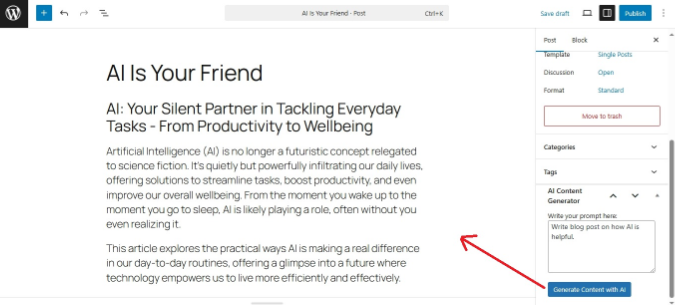
AI Content Generation is one of the most valuable features of a WordPress AI Assistant, helping users create content quickly and efficiently. Instead of writing everything manually, you can input a simple prompt and receive well-structured content within seconds, making it ideal for scaling your content production.
Key capabilities include:
- Blog post creation: Generate full articles, outlines, or specific sections based on a topic
- Product descriptions: Write compelling and conversion-focused descriptions for eCommerce
- Landing page copy: Create engaging headlines, CTAs, and persuasive content
- Tone customization: Adjust writing style (formal, casual, SEO-focused, etc.)
- Content expansion & rewriting: Improve or rephrase existing content
While this feature significantly speeds up the workflow, it’s still essential to review and refine the output to ensure quality, accuracy, and brand consistency.
AI Image Generation
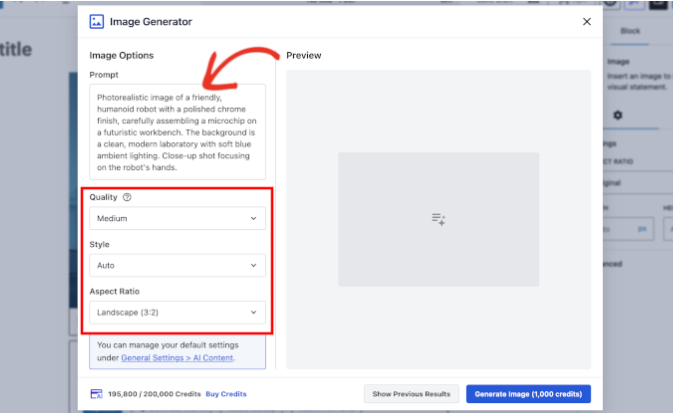
AI Image Generation is a powerful feature of WordPress AI Assistants that allows users to create images directly within the WordPress editor using simple text prompts. Instead of searching for stock photos or creating graphics manually, users can generate custom images that match their content, branding, and website style in just a few seconds.
This feature is especially useful for blog posts, landing pages, product pages, and marketing content where visuals are important for user engagement. It helps save time, reduce design costs, and ensure that images are unique and relevant to the content.
Key capabilities include:
- Generate images from text prompts: Create images by describing what you want
- Create blog featured images: Quickly generate visuals for articles
- Customize image styles: Choose different styles such as realistic, illustration, or minimal
- Generate marketing visuals: Create banners, backgrounds, and promotional images
- Save time and design costs: Reduce the need for stock images or graphic designers
SEO Assistance
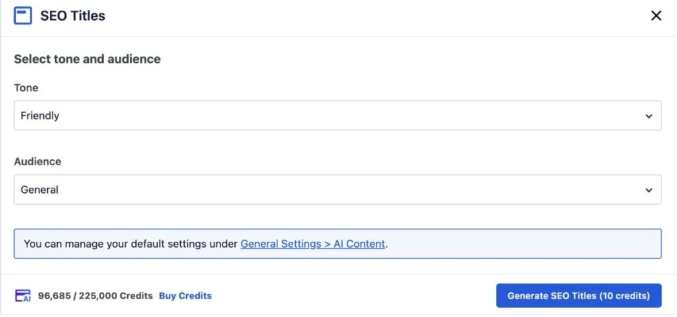
SEO Assistance is an important feature of WordPress AI Assistants that helps users optimize their content for search engines more easily and efficiently. Instead of manually analyzing keywords, readability, and structure, the AI can provide suggestions to improve on-page SEO and increase the chances of ranking higher in search results.
This feature is especially useful for bloggers, marketers, and website owners who want to improve their SEO performance but may not have advanced technical knowledge. AI tools can analyze content, recommend keyword placement, improve meta descriptions, and suggest better headings and structure.
Key capabilities include:
- Keyword suggestions: Recommend relevant keywords based on your topic
- Meta title and description generation: Create SEO-friendly meta tags
- Content optimization: Suggest improvements for readability and structure
- Heading structure recommendations: Improve H1, H2, H3 organization
- Internal linking suggestions: Recommend related posts or pages to link
- SEO score and analysis: Evaluate content SEO performance
Layout & Design Suggestions
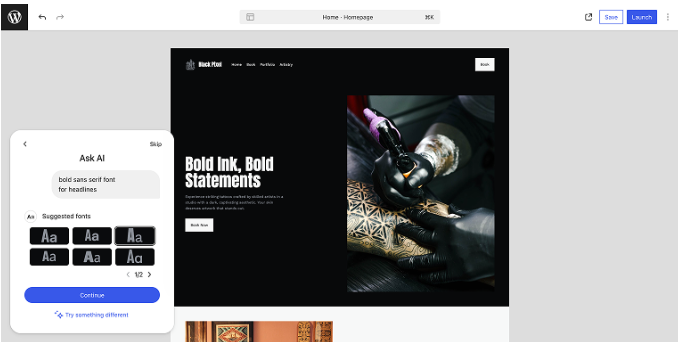
Layout and Design Suggestions is a useful feature of WordPress AI Assistants that helps users improve the visual structure and layout of their website pages. Instead of manually adjusting layouts or struggling with design decisions, users can ask the AI for layout ideas, section structures, color suggestions, and overall design improvements.
This feature is especially helpful for beginners or non-designers who want their website to look more professional without hiring a designer. The AI can recommend page sections, spacing, font combinations, and layout structures to improve user experience and readability.
Key capabilities include:
- Page layout suggestions: Recommend section structures for pages and posts
- Color palette recommendations: Suggest color combinations for branding
- Font pairing suggestions: Recommend font combinations for readability and style
- Section ideas: Suggest sections like testimonials, FAQs, CTAs, and feature blocks
- Spacing and layout improvements: Improve readability and page structure
- Landing page structure ideas: Help design high-converting landing pages
Multilingual & Translation Support

Multilingual and Translation Support is a valuable feature of WordPress AI Assistants that helps users translate content and create multilingual websites more easily. Instead of manually translating content or using multiple tools, users can quickly translate posts, pages, and website content directly within the WordPress editor.
This feature is especially useful for businesses, bloggers, and eCommerce websites that want to reach international audiences. AI can translate content into multiple languages while maintaining tone, meaning, and readability, making global content management much more efficient.
Key capabilities include:
- Translate content into multiple languages: Quickly translate posts, pages, and product descriptions
- Rewrite content for different audiences: Adjust tone and wording for different regions
- Maintain tone and context: Keep the original meaning and writing style
- Create multilingual content faster: Reduce time spent on manual translation
- Support global websites: Help websites reach international audiences
- Improve content consistency: Ensure consistent messaging across languages
Block notes
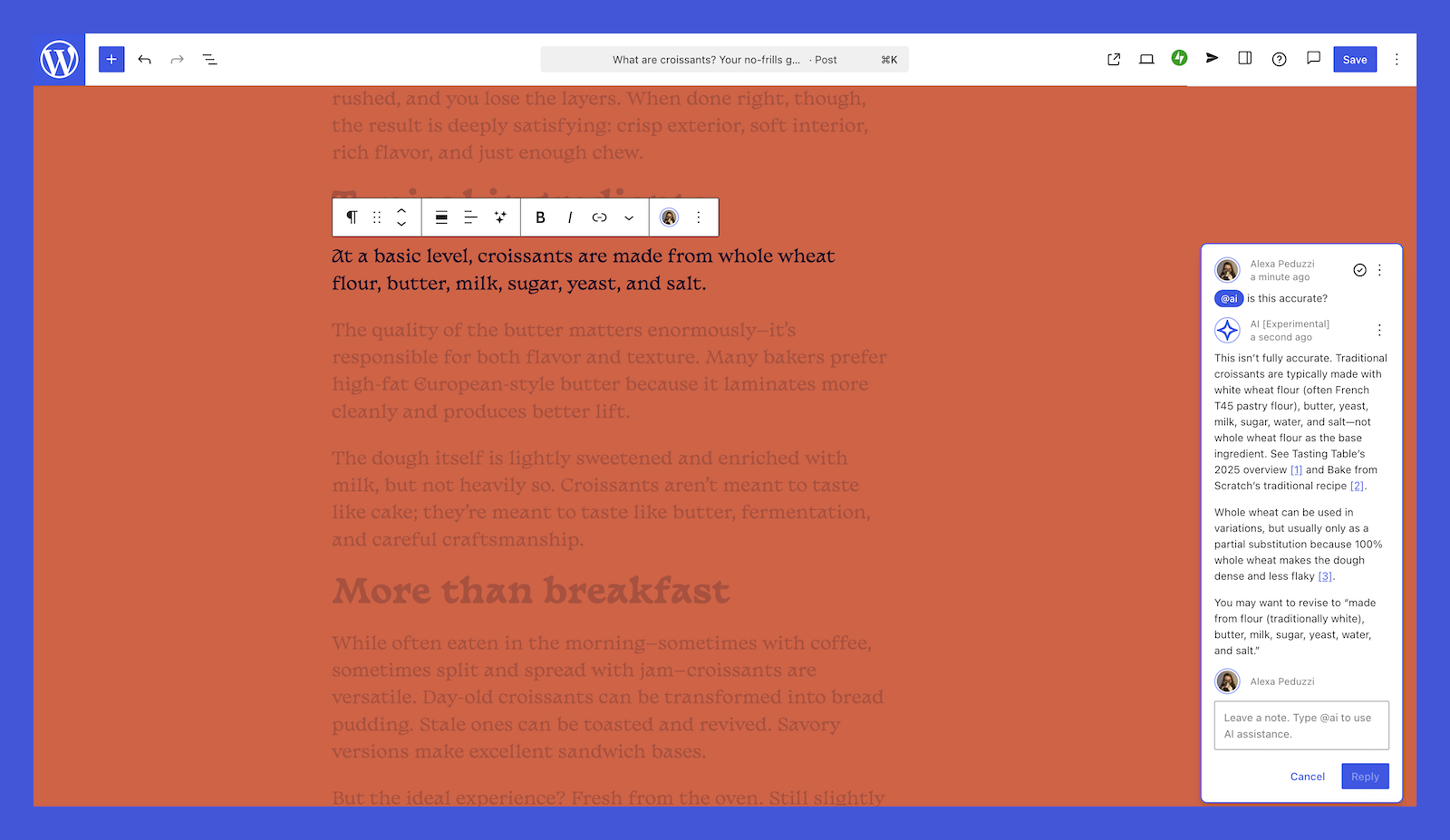
Block Notes is a helpful feature in WordPress AI Assistants that allows users to generate, edit, summarize, and manage content directly within the WordPress block editor. Instead of switching between different tools, users can work inside content blocks and use AI to write paragraphs, create lists, summarize text, or rewrite sections instantly.
This feature improves workflow efficiency because users can interact with AI while building pages or writing blog posts. It is especially useful for drafting content, creating outlines, rewriting paragraphs, and organizing ideas within the editor.
Key capabilities include:
- Generate text inside blocks: Create paragraphs, lists, and sections instantly
- Summarize content: Turn long text into short summaries
- Rewrite or paraphrase text: Improve readability and tone
- Create outlines: Generate blog outlines or section structures
- Expand content: Add more details to short paragraphs
- Edit content directly in the editor: Work without switching tools
How to Enable the WordPress AI Assistant
Enabling the WordPress AI Assistant is a simple process, especially if you are using WordPress.com or the Jetpack plugin.
Follow these steps:
- Log in to your WordPress dashboard: Access your WordPress.com account or your self-hosted WordPress admin panel.
- Open the Block Editor: Create a new post or page, or edit an existing one.
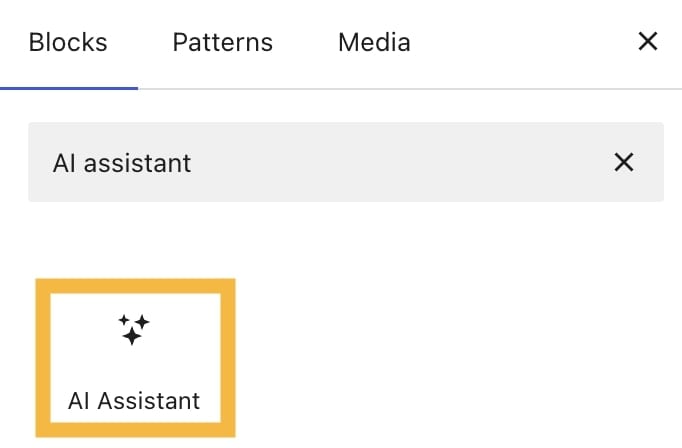
- Add the AI Assistant block: Click the “+” icon to add a block and search for “AI Assistant.”
- Enable the AI feature: If prompted, activate Jetpack AI or connect your WordPress.com account.
- Enter a prompt: Start typing a request such as “Write an introduction for this blog post.”
- Review and insert content: Edit the generated content and insert it into your page or post.
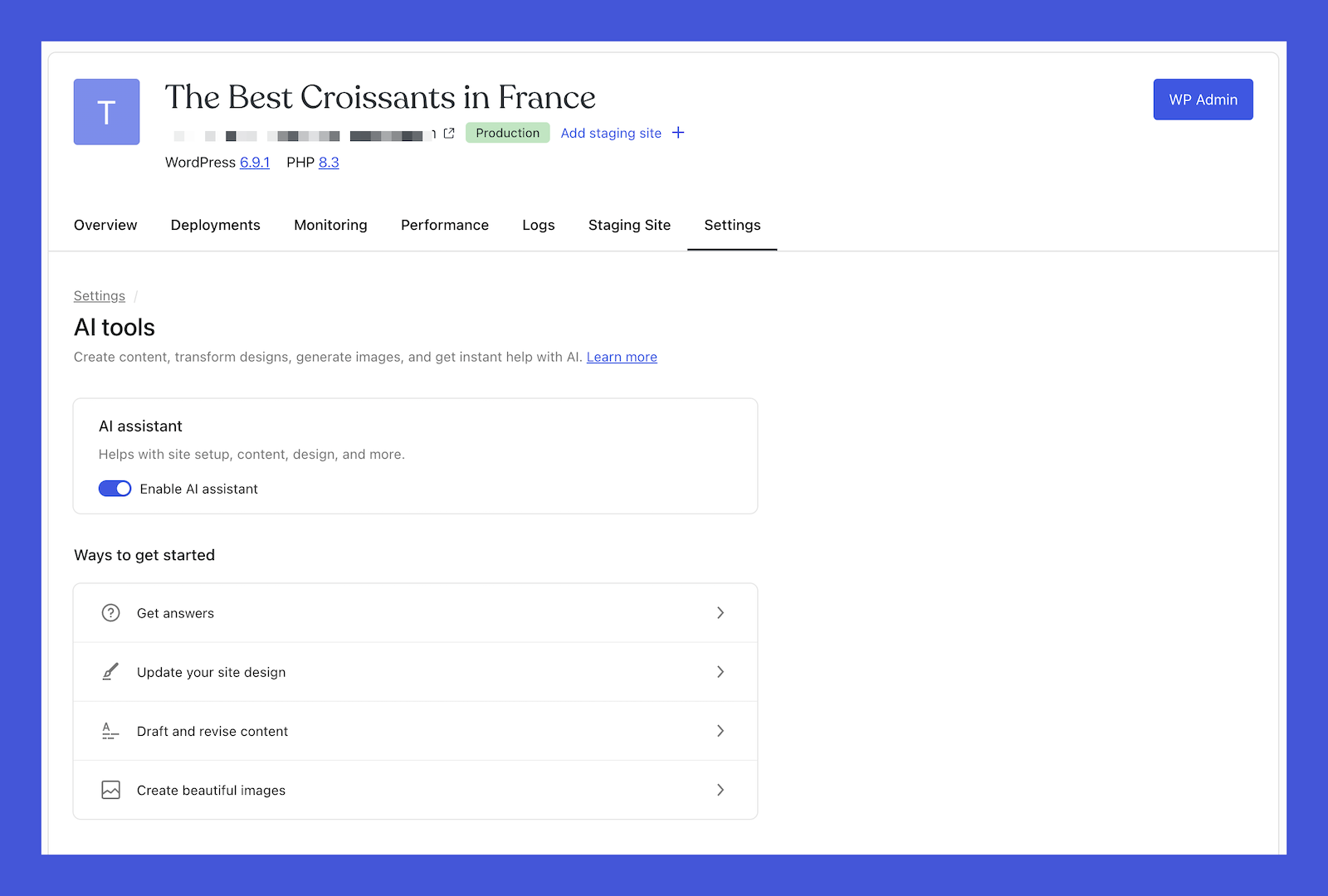
Once enabled, you can use the AI Assistant anytime directly inside the WordPress editor to generate or improve content.
For those looking to explore more options and find the right tools for different use cases, check out our guide on Top 7 WordPress AI Plugins.
How to Use a WordPress AI Assistant Efficiently
To maximize the benefits of a WordPress AI Assistant, you should use it strategically as a support tool rather than relying on it entirely, combining automation with your own expertise for the best results.
- Write clear prompts: Provide detailed and specific instructions so the AI can generate more accurate, relevant, and high-quality outputs.
- Review and edit content: Always refine AI-generated content to ensure it aligns with your message, accuracy, and brand standards.
- Combine AI with human input: Use AI for brainstorming, drafts, and structure, then enhance it with your own insights and creativity.
- Use it for repetitive tasks: Automate time-consuming tasks like rewriting, formatting, and summarizing to improve efficiency.
- Optimize SEO manually: Double-check keywords, headings, internal links, and structure to ensure strong search performance.
- Maintain brand voice: Adjust tone, style, and wording so all content remains consistent with your brand identity.
- Experiment and iterate: Try different prompts and approaches to discover what delivers the best results.
- Avoid over-reliance: Treat AI as a tool to assist your workflow, not a full replacement for human judgment and creativity.
Frequently Asked Questions
1. Is a WordPress AI Assistant free?
Some WordPress AI Assistants offer free plans with limited usage, but most advanced features, higher usage limits, and premium tools require a paid subscription. Many tools follow a freemium model, allowing users to try basic features before upgrading to paid plans.
2. Is AI-generated content good for SEO?
AI-generated content can be good for SEO if it is properly edited, optimized with relevant keywords, structured with headings, and provides useful information for readers. AI should be used to assist content creation, but human editing is still important to ensure quality and originality.
3. Will AI replace WordPress developers or content writers?
AI is unlikely to replace developers or content writers completely. Instead, it helps automate repetitive tasks, generate content drafts, and improve productivity. Developers and writers are still needed for strategy, creativity, technical customization, and content quality control.
4. Do I need coding skills to use WordPress AI Assistant?
No, most WordPress AI Assistants are designed for beginners and non-technical users. They usually work through simple prompts inside the WordPress editor, so coding knowledge is not required.
5. Will AI slow down my WordPress website?
Most WordPress AI tools run through external APIs, so they typically do not slow down your website significantly. However, installing too many plugins or poorly optimized plugins may still affect website performance.
Conclusion
In summary, a WordPress AI Assistant is a powerful tool that helps users create content, optimize SEO, generate images, and manage websites more efficiently. By automating repetitive tasks and improving workflow, AI assistants can save time, increase productivity, and make WordPress easier to use for beginners and professionals alike.
If you are looking to build, optimize, or manage your WordPress website more effectively, Arestós offers professional WordPress services including website development, optimization, maintenance, and migration to help your business grow online.
Contact us today to see how we can support your WordPress projects and improve your website performance.
Subscribe to our newsletter!
Get updated to
the lastest IT trends
Related Posts
Update the latest technology trends for your business