Back to featured insights
How to Use a WordPress AI Plugin: The Complete Guide
WordPress AI plugins are transforming how websites are built and managed by automating content creation, SEO, and design tasks. In this guide, you’ll learn how to use WordPress AI plugins, explore the best tools, and discover best practices to manage your website more efficiently with AI.
Table of Content
Share
How to use a WordPress AI plugin is becoming an important skill for website owners who want to automate content creation, improve SEO, and manage their websites more efficiently. These AI tools can save time, increase productivity, and help websites grow faster with less manual work.
Whether you are a blogger, marketer, business owner, or web developer, WordPress AI plugins can help simplify many website tasks. In this guide, you will learn what WordPress AI plugins are, how to use them step-by-step, and the best practices to get the most out of them.
What is WordPress AI Plugin and Why Use it on WordPress?
A WordPress AI plugin is a tool that integrates artificial intelligence into a WordPress website to automate tasks such as content writing, SEO optimization, image generation, chatbot support, and even code assistance. These plugins help website owners manage content and improve website performance more efficiently without requiring advanced technical skills.
Using AI plugins on WordPress helps save time, increase productivity, improve SEO, and automate repetitive tasks like writing meta descriptions, product descriptions, and blog drafts. AI tools are best used as assistants to support content creation and website management, helping businesses and website owners grow their websites faster and more efficiently.
Top WordPress AI Plugins for Your Website
With the rapid growth of AI technology, many WordPress AI plugins are now available to help website owners automate content creation, improve SEO, design pages faster, and enhance user experience. Below are some of the top WordPress AI plugins you can use for your website:
- AI Engine: Generate blog posts, create AI chatbots, generate images, and integrate with OpenAI or Claude for content automation and website AI features.
- Bertha AI: AI writing assistant that helps create blog posts, landing page content, product descriptions, and marketing copy directly inside WordPress.
- All in One SEO (AIOSEO): AI-powered SEO plugin that generates meta titles, meta descriptions, keyword suggestions, and helps optimize content for search engines.
- Divi AI: AI tool for Divi Builder that can generate website text, images, code, and layouts to speed up website design and content creation.
- Rank Math AI: SEO plugin with AI content generation, keyword suggestions, SEO scoring, and automated meta tag generation for better search rankings.
- Elementor AI: Built-in AI for Elementor that helps generate text, images, custom CSS, and layout content directly in the page builder.
- JetPlugins AI: AI features for dynamic websites, including content generation, form automation, and dynamic field content for complex WordPress sites.
If you want a more detailed comparison and full feature breakdown, check out our complete guide to the best WordPress AI plugins here.
How to Use a WordPress AI Plugin Effectively
To help you better understand how it functions in practice, the workflow of a WordPress AI plugin can be broken down into a series of simple, easy-to-follow steps.
- Step 1: Installing and Setting Up Plugin AI for WordPress
- Step 2: Open the AI Assistant Block
- Step 3: Enter a Thoughtful Prompt
- Step 4: Generate & Review the Text
- Step 5: Expand & Enhance Your Article
- Step 6: Fact-Check & Personalize
- Step 7: Write Your SEO Title & Meta Description
One of the easiest ways to understand the power of an AI plugin is by seeing how it works in real scenarios.
In this example, I’ll walk you through a typical content creation process, from generating an SEO-friendly title to optimizing your blog post, all within the WordPress editor.
For demonstration purposes, we’ll use the AI Assistant feature from All in One SEO (AIOSEO), one of the leading SEO plugins for WordPress.
Step 1: Installing and Setting Up Plugin AI for WordPress
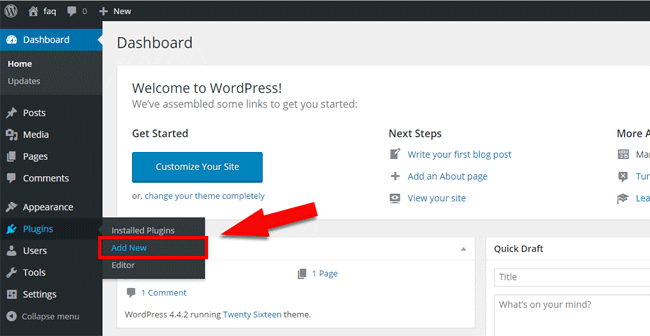
To install the plugin, start by logging into your WordPress dashboard. From the admin menu on the left, navigate to Plugins and then click Add New. This will take you to the plugin marketplace where you can search and install new plugins for your website.
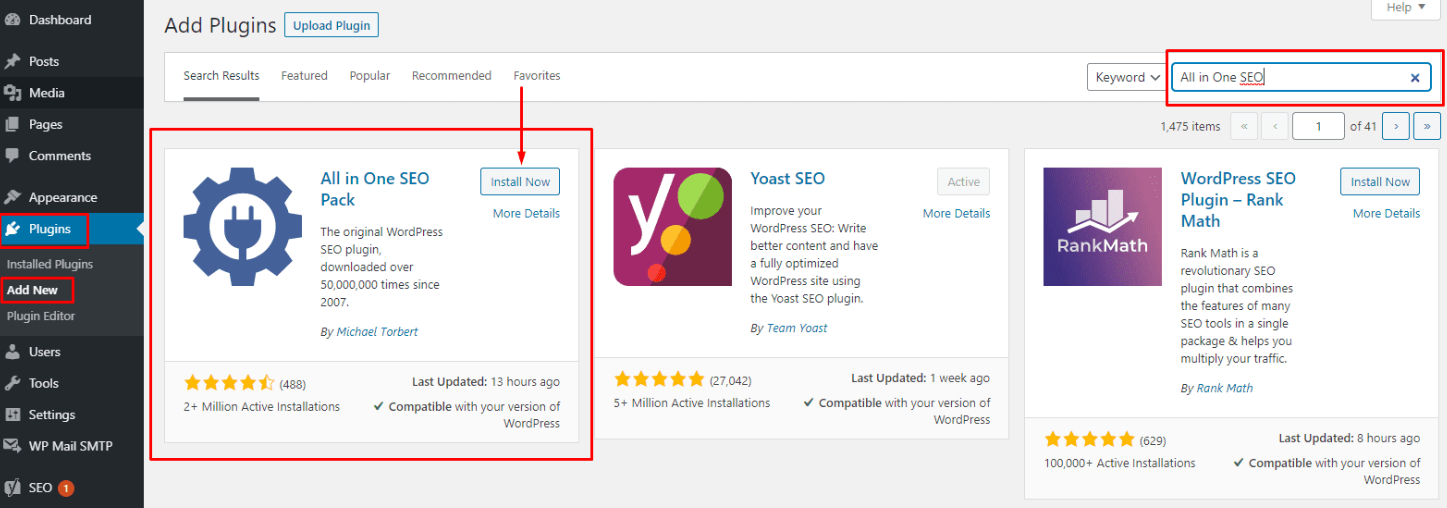
In the search bar, type All in One SEO, then click Install Now next to the plugin. Once the installation is complete, click Activate to enable the plugin on your website. After activation, the All in One SEO setup wizard will appear to help you configure the basic SEO settings.
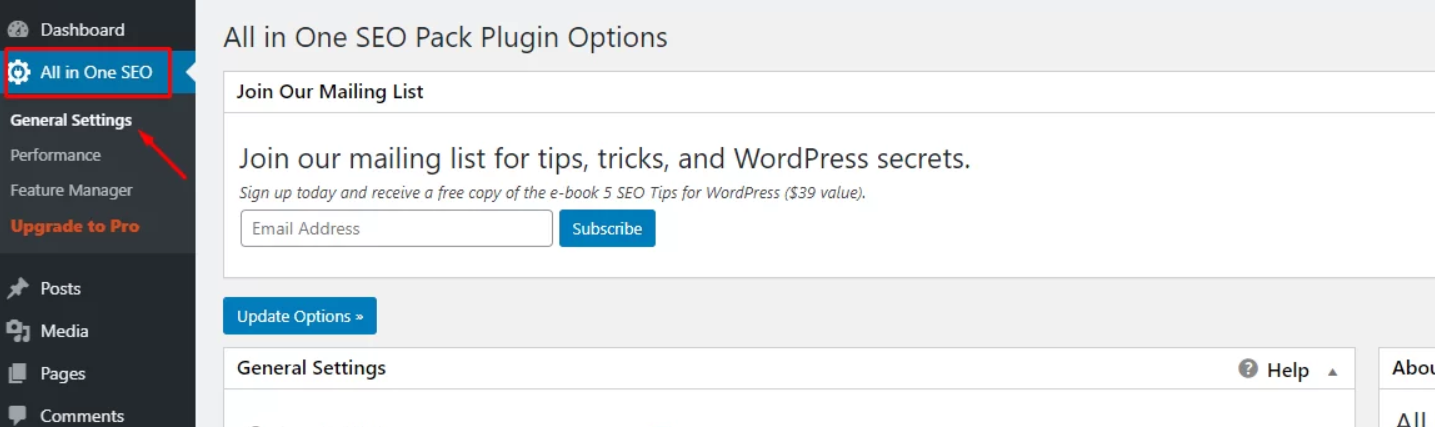
Next, open the plugin settings page to complete the initial setup. Some AI plugins require you to connect to an AI service using an API key, while others may have a setup wizard to configure basic settings such as language, content preferences, or automation features.
After completing the setup, your WordPress AI plugin will be ready to help with content creation, SEO optimization, chatbot support, and website automation.
Step 2: Open the AIOSEO – AI Assistant Block
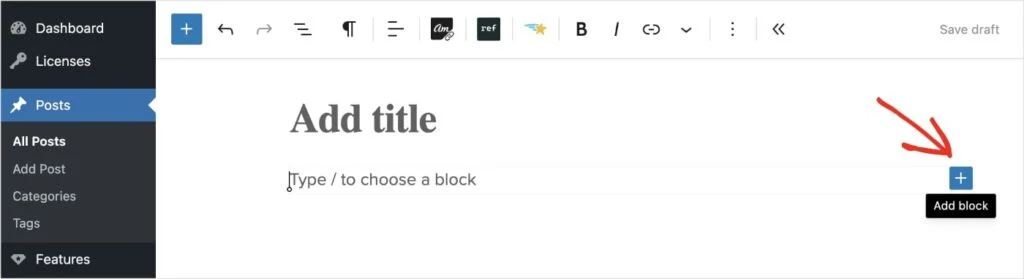
To begin, open any post or page in the WordPress editor. Next, click the plus (+) icon to add a new block, and a search bar will appear.
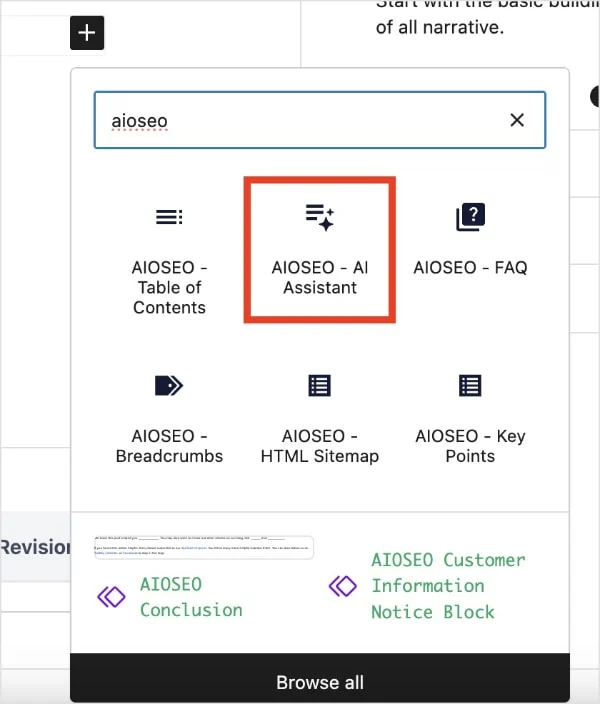
In the search bar, enter “AI Assistant” or “AIOSEO.” When the AIOSEO AI Assistant block appears, simply select it.
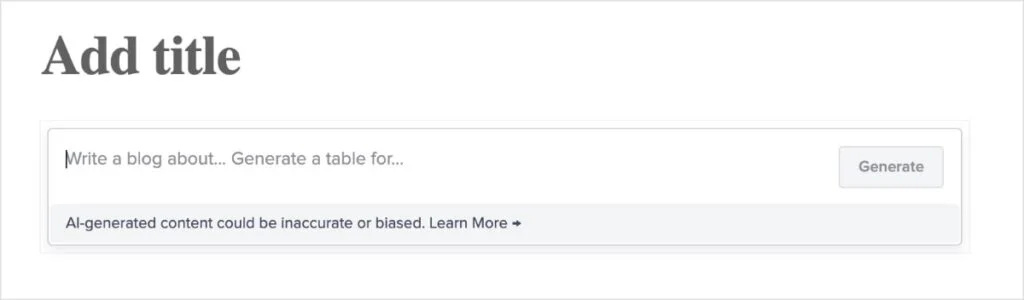
This will insert a new block into your post, where you can enter your prompt or command.
Next, let’s explore how to write effective prompts.
Step 3: Enter a Thoughtful Prompt
In today’s era of AI-powered content creation, it’s essential to remember that the quality of the output depends heavily on the quality of your prompt.
Rather than simply relying on the AI, you should guide it like a director. Well-structured and detailed prompts will consistently deliver more accurate and valuable results compared to vague instructions.
Here are some practical tips to help you craft better prompts:
- Be specific and clear: Providing detailed instructions helps the AI generate more relevant and precise content.
- Define your audience: Let the AI know who your content is for so it can adjust the tone and complexity accordingly.
- Set the tone of voice: Whether you prefer a casual, professional, or friendly style, specifying this ensures consistency with your brand voice.
- Include target keywords: Adding your focus keywords helps the AI align the content with your SEO goals.
Below is an example of a well-crafted prompt that applies all of these tips:
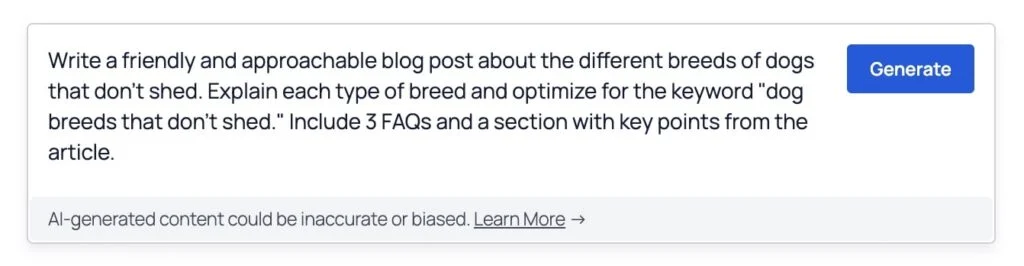
Once you’re ready, enter your prompt into the field and click the Generate button.
Step 4: Generate & Review the Text
After you click Generate, the AI Writing Assistant will produce content based on your input.
In this example, the result was generated in just one to two seconds.
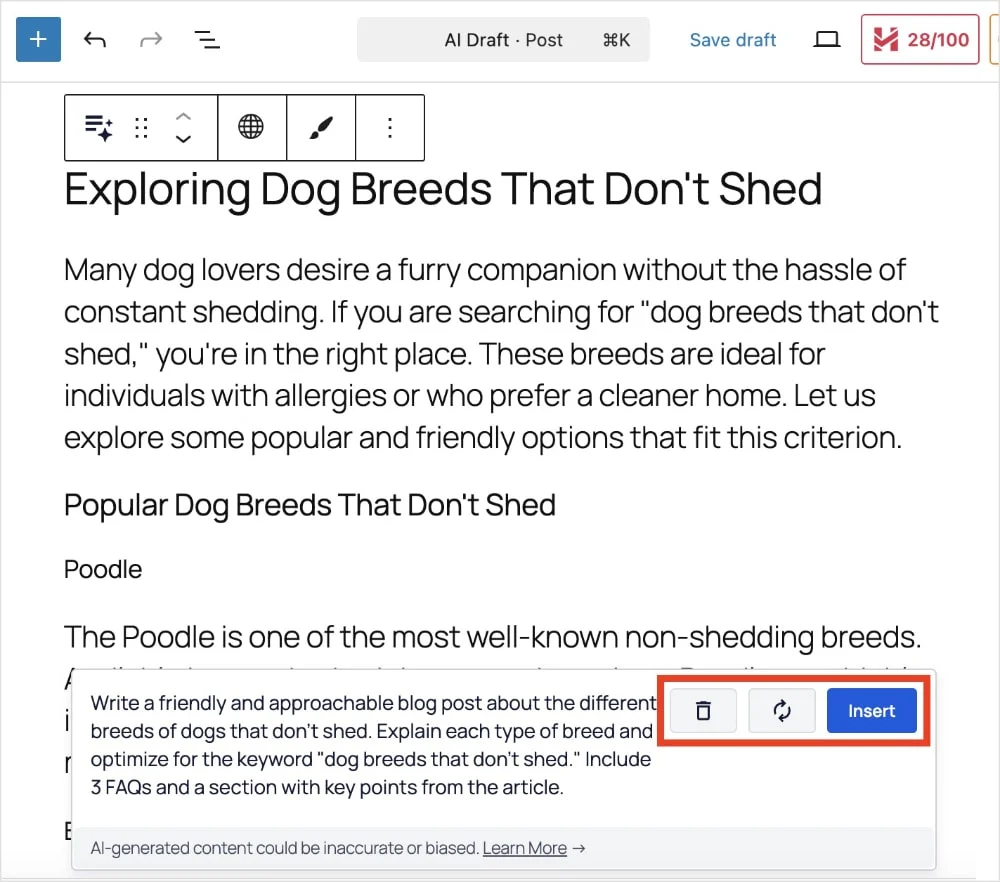
After the content is generated, I usually review it to see if any immediate adjustments are needed. For instance, I might feel the tone isn’t quite right and want it to sound more professional, or I may find the readability too complex and prefer to simplify it.
If I need to make quick changes, I simply update the prompt and click the regenerate icon to generate a new version.
If the output doesn’t meet my expectations at all, I can delete it and start fresh.
Once I’m satisfied with the result, I click Insert to add the content into editable blocks within the post.
Step 5: Expand & Enhance Your Article
This is the step that helps turn a decent draft into something truly high-quality.
At this stage, the goal is to add more value and depth to your content so it becomes more useful for your readers.
There are many ways to approach this, but here are a few of methods:
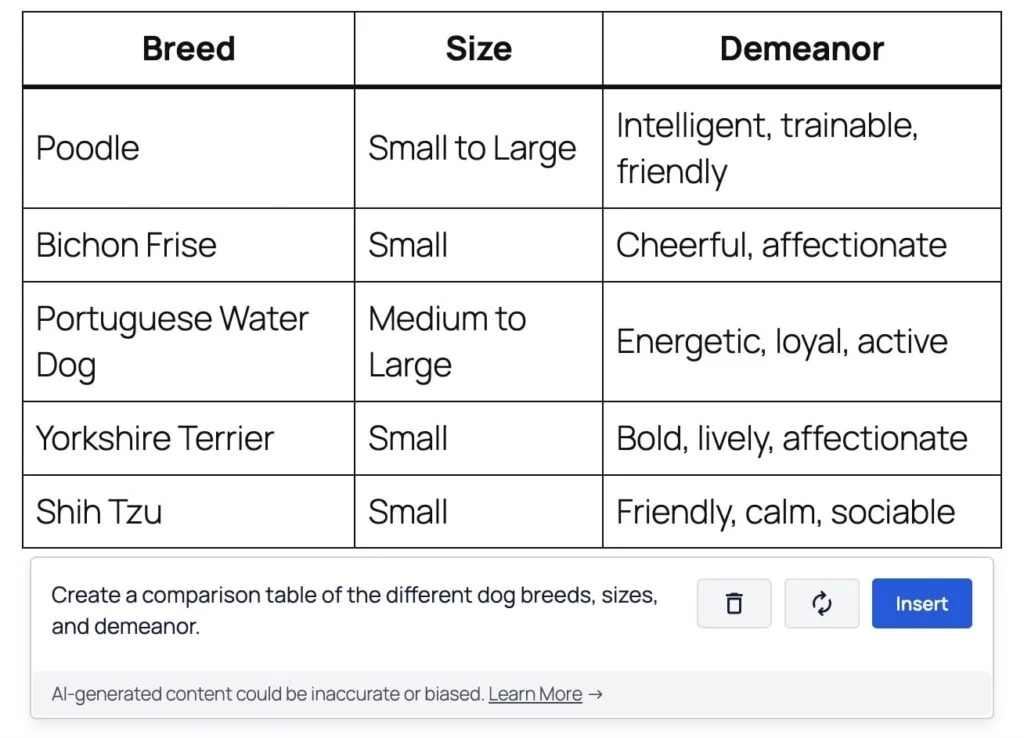
Add a Comparison Table
If you’re creating a product roundup or comparing different services, your readers may not always have time to go through detailed reviews.
That’s where comparison tables become especially useful, as they allow you to present key differences and similarities in a quick and easy-to-scan format.
Here’s an example of a prompt and the table generated using AI:
Include FAQs
Frequently asked questions (FAQs) are a powerful way to benefit both users and search engines. They allow you to address common queries while also improving your chances of appearing in Google’s People Also Ask section.
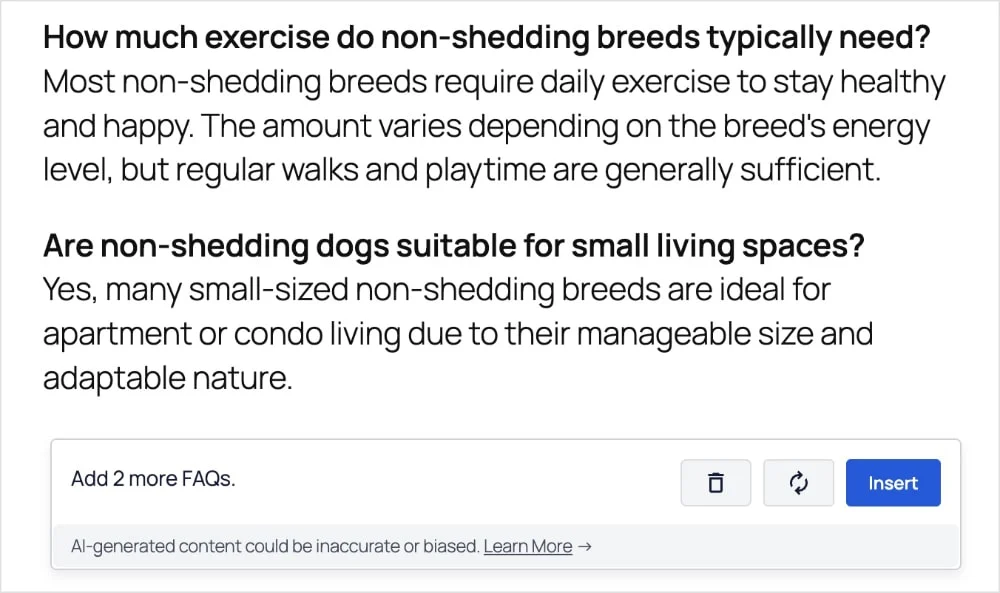
In this example, the AI Assistant was initially instructed to include three FAQs in the original prompt. However, it became clear that the post could benefit from additional questions, so two more FAQs were requested in a follow-up prompt.
One notable advantage of an AI writing assistant is its flexibility, allowing content to be easily expanded and refined throughout the writing process.
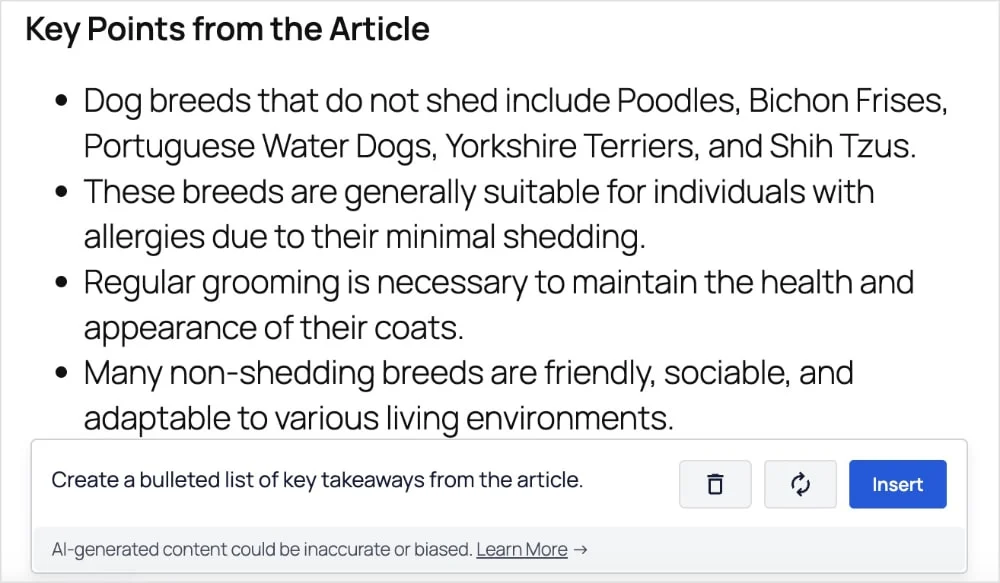
Create Key Takeaways
Key takeaways are often included to help readers quickly identify the main points of the article. This makes it easier to scan the content without needing to read the entire page.
Expand Specific Sections
If the first draft introduces a subtopic worth exploring further, it can easily be expanded with the help of AI.
Simply prompt the AI to go deeper into a specific topic, and it will generate additional content focused on that area.
This approach is highly effective for increasing topic coverage and strengthening the overall authority of the article.
Step 6: Fact-Check & Personalize
A key principle when using AI writing assistants is to always verify the accuracy of the content.
While AI tools are highly capable, they are not true subject-matter experts and may occasionally produce incorrect or outdated information. Taking the time to fact-check statistics, dates, names, and specific claims helps ensure the content remains reliable and trustworthy.
Equally important is adding the human element that AI cannot replicate. This is what transforms a basic draft into a compelling article that genuinely connects with readers.
Here are some effective ways to incorporate a human touch:
- Act as an editor, not just a writer: AI often generates multiple variations for elements like titles or meta descriptions. The role here is to evaluate and select the option that best aligns with the audience’s intent and the brand’s voice, making the final strategic decision rather than relying on the first output.
- Incorporate unique expertise: Instead of simply adding personal anecdotes, look for opportunities to enhance the AI-generated content with specialized knowledge. This could include inserting a short expert tip, presenting a counterpoint, or adding specific insights that reflect real experience in the field.
- Refine flow and transitions: When content is generated in sections, maintaining a smooth and logical flow is essential. Reviewing the full draft, adding transition phrases, and connecting ideas between paragraphs helps create a cohesive reading experience.
A useful final step is to read the entire article out loud. This method makes it easier to identify awkward phrasing or disconnected sections. If something feels unnatural when spoken, it is likely to feel the same to readers.
Step 7: Write Your SEO Title & Meta Description
At this stage, the blog post or landing page is nearly ready for publication.
Before going live, it’s important to complete a few final on-page SEO checks, including crafting a compelling SEO title and meta description that can attract clicks.
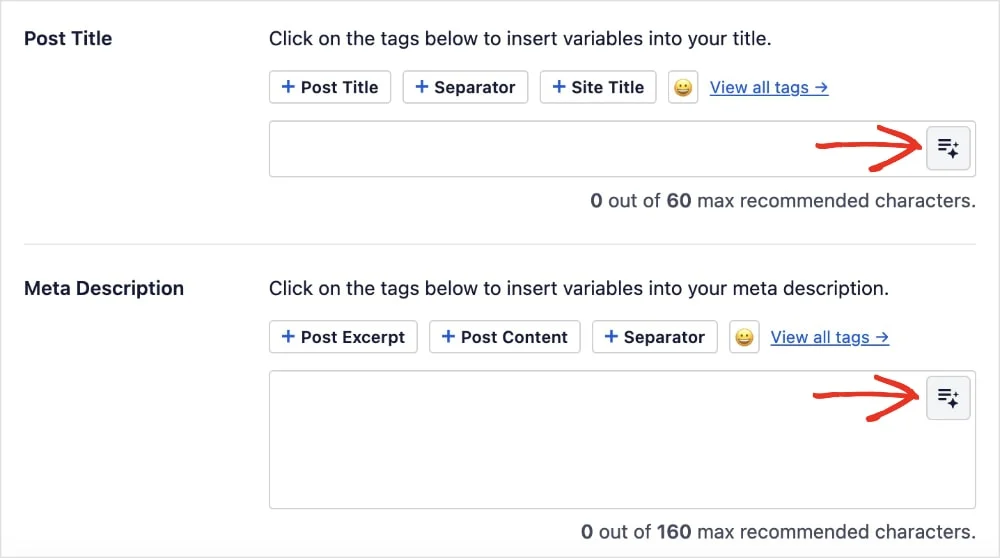
This process can be handled quickly using All in One SEO. Simply click the AI button next to the Post Title and Meta Description fields to get started.
From there, the tone and target audience can be selected using the available dropdown options.
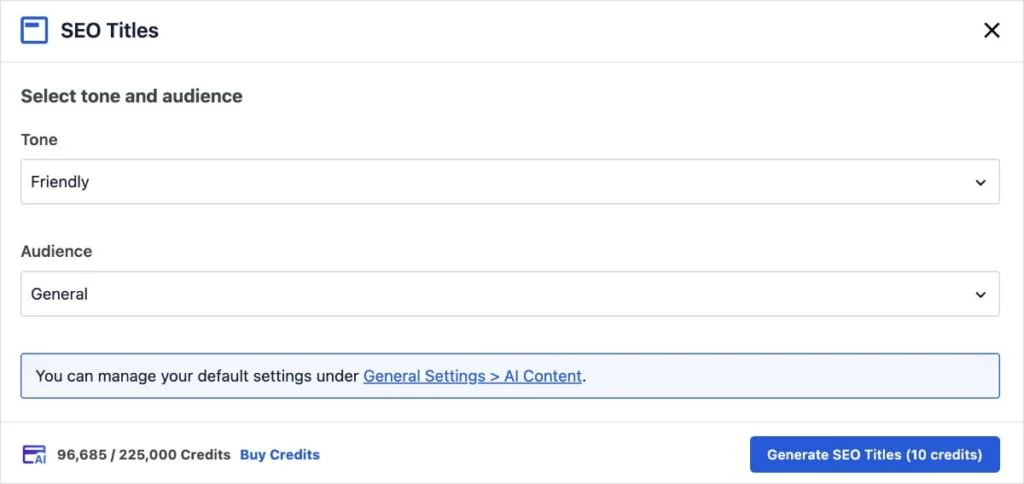
After making the selections, click Generate SEO Titles.
The WordPress AI Assistant will then provide five title suggestions for the article. Simply select the preferred option by clicking the plus (+) icon, or use the Regenerate button to generate more ideas.
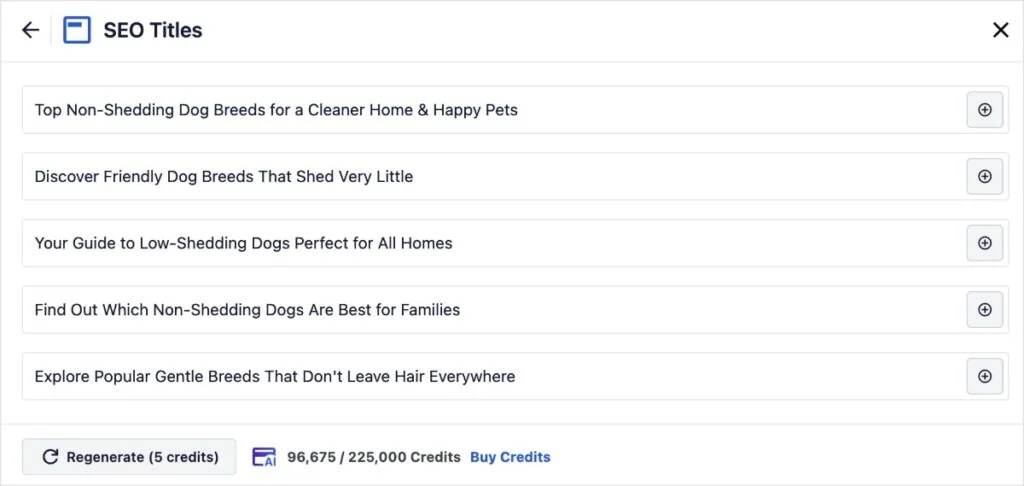
This provides a quick and efficient way to generate engaging titles that can help improve click-through rates (CTR).
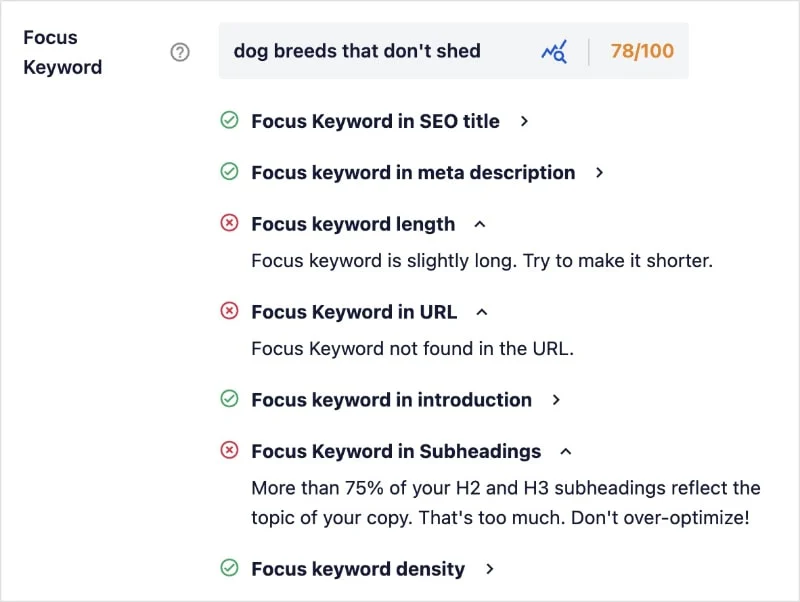
In addition, the TruSEO Analysis tool offers valuable feedback by scanning the entire page for the focus keyword and highlighting any missing elements. This is especially useful during the final stage of content optimization.
Bonus Step: Add AI-Generated Images
While the content may be fully optimized, visual elements are just as important for creating an engaging article.
After completing the writing and editing process, sourcing suitable images can often feel time-consuming and uninspiring, especially when browsing through stock photo libraries that may require additional costs.
To address this challenge, All in One SEO integrates an AI Image Generator directly into WordPress, making it easier to create visuals without leaving the editor.
To use this feature, follow the same steps as adding an image through the standard image block. However, instead of uploading a file or selecting from the media library, choose the Generate with AI option.
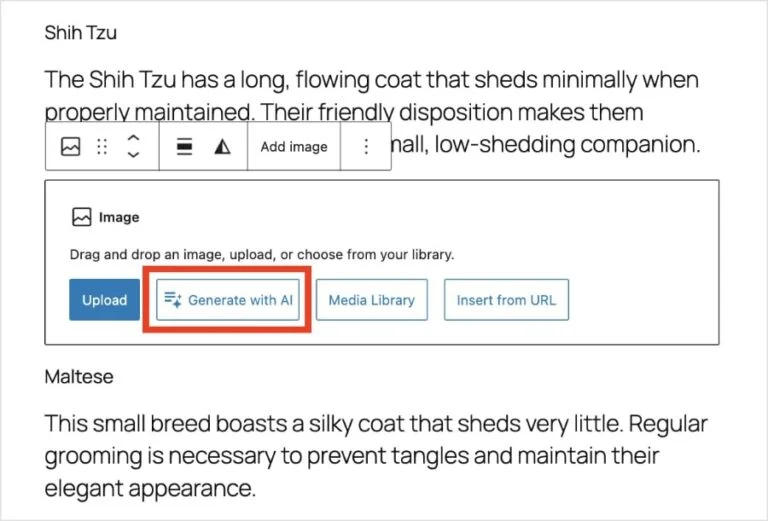
This will open the Image Generator, where you can add a prompt for your image request.
You can also select the quality, style, and aspect ratio.
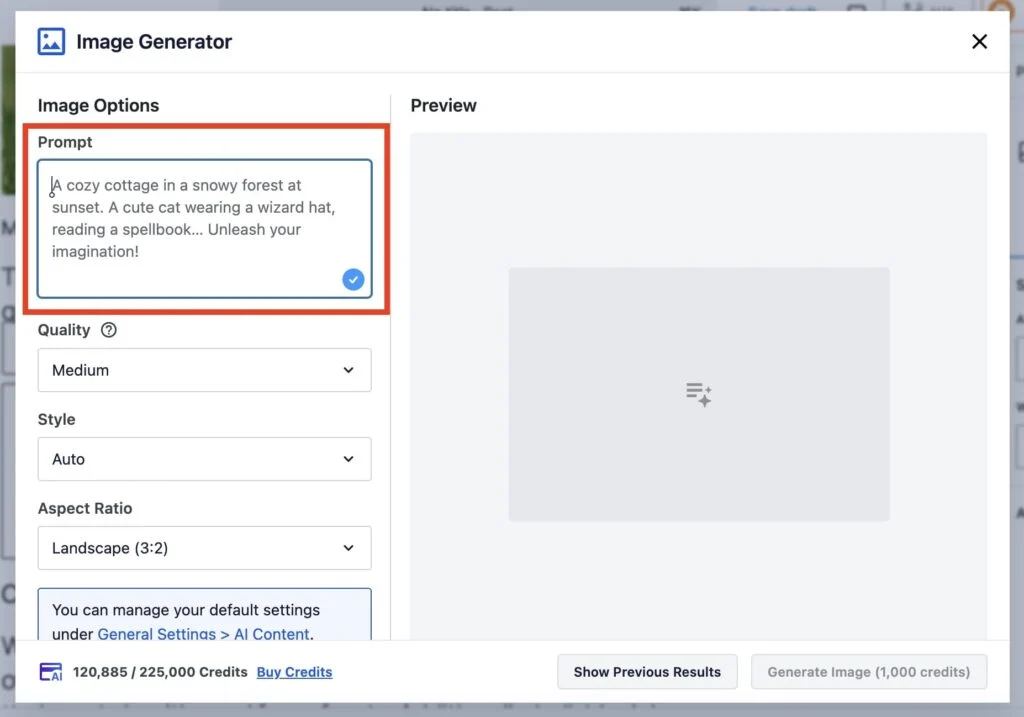
Once everything is set, click Generate Image to create the visual.
Below is an example of the result generated for a dog-related blog post:
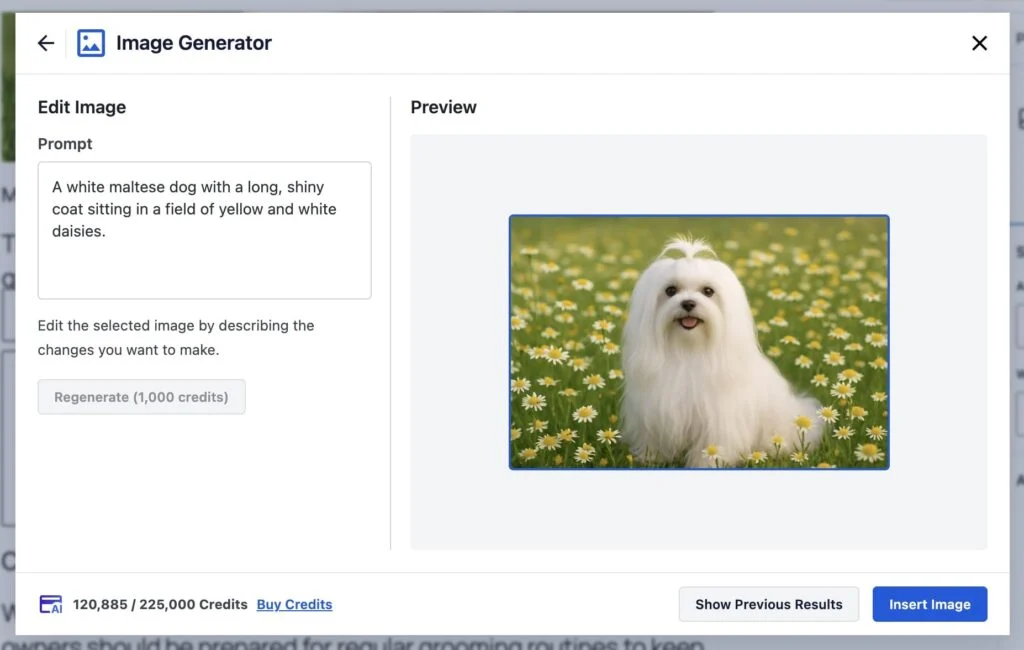
The results are quite impressive, especially considering how quickly they can be generated.
The AI Image Generator has proven to be a versatile tool, suitable for everything from blog post visuals to banners and creative graphics.
Its ease of use makes it a valuable addition, helping enhance the overall appeal and engagement of the content.
Best Practices for Using WordPress AI Plugins
To get the most value from WordPress AI plugins, it’s important to use them strategically rather than relying on them for full automation. Below are the best practices for using AI plugins effectively and safely.
Strategic Implementation
- Define clear objectives: Before adding a plugin, identify specific goals, such as improving customer support with a chatbot, generating product descriptions, or speeding up content drafting.
- Start small and focused: Begin with one area that provides immediate value (for example, meta descriptions or basic code snippets) and master it before expanding to other functions.
- Choose quality plugins: Select well-established plugins that are regularly maintained, offer transparent pricing (many require you to provide your own API key for the AI service), and are compatible with your existing theme and other plugins.
Content Creation & SEO
- Use AI as an assistant, not an author: Use AI for brainstorming ideas, generating outlines, and drafting content, but always have a human editor refine the tone, fact-check, and add unique expertise and brand voice. Search engines prioritize helpful, people-first content.
- Optimize for AI search: Structure content with an answer-first approach, use clear headings, short paragraphs, and implement schema markup so AI systems and search engines can easily understand your content.
- Focus on E-E-A-T signals: Clearly display author information, credentials, and original research to build authority and trustworthiness for both users and search engines.
- Avoid over-automation: Do not automatically publish raw AI-generated content, as this can lead to low-quality content that harms SEO and brand credibility.
Development & Security
- Always test in a staging environment: Never run AI-generated code directly on a live website. Use a staging site to test functionality, security issues, and plugin conflicts before deploying.
- Review and understand AI-generated code: AI can make mistakes or generate outdated solutions. A developer should review and optimize the code for security and performance before using it on a live site.
- Use detailed prompts: The quality of AI output depends on the prompt. Be specific about functionality, security requirements, WordPress coding standards, and limitations.
- Prioritize security and privacy: Many AI services process data on external servers, so make sure tools comply with data privacy regulations, secure API keys properly, and use security plugins such as Wordfence for threat detection.
Performance & Maintenance
- Monitor website performance: AI plugins can be resource-intensive and may slow down your website. Regularly monitor site speed and performance and optimize resource-heavy plugins.
- Keep plugins updated: Always update AI plugins to ensure compatibility with WordPress core updates and to fix security vulnerabilities.
- Maintain the human element: AI should enhance human productivity, not replace it completely. Strategy, creativity, and quality control should still be handled by humans.
Frequently Asked Questions
1. Are WordPress AI plugins free?
Some WordPress AI plugins offer free versions with limited features, but most advanced AI tools require a paid plan or API usage fees. In many cases, you need to pay for AI services such as OpenAI separately, while the plugin itself may be free or freemium.
2. Can AI plugins write full blog posts?
Yes, AI plugins can generate full blog posts, outlines, product descriptions, and website content. However, the content should always be reviewed, edited, and fact-checked by a human before publishing to ensure quality, accuracy, and SEO performance.
3. Do WordPress AI plugins help with SEO?
Yes, many AI plugins help with SEO by generating meta titles, meta descriptions, keyword suggestions, and content optimization recommendations. SEO plugins like Rank Math and All in One SEO include AI features that help improve on-page SEO and content structure.
4. Do I need coding skills to use WordPress AI plugins?
No, most WordPress AI plugins are designed for beginners and non-developers. You can generate content, images, and SEO metadata without coding knowledge. However, basic coding knowledge can be helpful if you want to use AI for generating custom code or advanced website customization.
5. Do AI plugins support multiple languages?
Yes, many WordPress AI plugins support multiple languages and can help translate content, generate multilingual posts, and create content for international websites. This is especially useful for businesses targeting global audiences.
6. Can AI replace human content writers?
No, AI cannot fully replace human content writers. AI is best used as a tool for generating ideas, outlines, and drafts, while humans are still needed for creativity, strategy, editing, and ensuring content quality and brand voice.
Conclusion
Using WordPress AI plugins can significantly improve how you manage and grow your website. From content creation and SEO optimization to chatbot automation and website design, AI plugins help save time, increase productivity, and streamline many website tasks. By choosing the right plugin, following best practices, and using AI as a support tool rather than a full replacement, you can improve your website performance and scale your content and marketing efforts more efficiently.
If you are looking for professional WordPress development or AI integration services, Arestós provides WordPress website development, eCommerce development, ERP integration, and AI-powered website solutions tailored to your business needs. Their team can help you build, customize, and optimize your WordPress website to improve performance, user experience, and business growth.
Contact us today for a consultation and discover how AI can help your website grow faster and work smarter.
Subscribe to our newsletter!
Get updated to
the lastest IT trends
Related Posts
Update the latest technology trends for your business