Back to featured insights
What is WordPress Penetration Testing? (The Complete Guide)
WordPress penetration testing helps identify security vulnerabilities before attackers can exploit them. In this guide, you’ll learn what WordPress penetration testing is, why it’s important, and how to perform the testing process step by step to strengthen your website’s security.

Table of Content
Share
WordPress penetration testing is an important process for identifying security vulnerabilities in a WordPress website before attackers can exploit them. By performing regular security testing, website owners can protect sensitive data, strengthen their website’s defenses, and maintain user trust.
This guide is useful for website owners, developers, and beginners who want to improve the security of their WordPress sites. In this article, we will explain what WordPress penetration testing is, why it matters, and how you can perform it step by step.
What is WordPress Penetration Testing?
WordPress penetration testing is the process of evaluating the security of a WordPress website by simulating real-world cyberattacks. The goal is to identify vulnerabilities in the WordPress core, plugins, themes, or server configuration before malicious attackers can exploit them.
During a penetration test, security professionals use specialized tools and techniques to analyze different parts of the website, such as the login system, database, file uploads, and installed plugins. By mimicking how hackers attempt to break into a website, testers can uncover hidden security weaknesses that may not be detected through regular security scans.
By identifying these vulnerabilities early, website owners can take proactive steps to fix them and strengthen their overall security. This helps protect sensitive data, maintain website stability, and reduce the risk of cyberattacks or unauthorized access.
Why WordPress Penetration Testing Is Important?
Understanding why WordPress penetration testing is important helps website owners recognize the risks of security vulnerabilities and the value of proactively identifying them before attackers do.
- Detect vulnerabilities before hackers do: WordPress penetration testing helps identify security weaknesses in the WordPress core, plugins, themes, or server configuration before attackers can exploit them.
- Protect sensitive data and website integrity: Vulnerabilities such as SQL injection, cross-site scripting (XSS), and weak authentication can lead to data breaches, malware infections, or unauthorized access to important information.
- Prevent website downtime and security incidents: A compromised WordPress website can result in service interruptions, website defacement, or even Google blacklisting, which can significantly affect traffic and business operations.
- Strengthen overall website security: Regular penetration testing allows website owners to discover and fix security issues early, improving the long-term security and reliability of the website.
- Build trust with users and customers: Ensuring that a WordPress website is secure helps protect user data and maintain trust, especially for businesses that rely on online transactions or customer information.
How Often Should You Perform WordPress Penetration Testing?
WordPress penetration testing should be performed regularly to ensure that your website remains protected against evolving security threats. As WordPress websites frequently update plugins, themes, and core files, new vulnerabilities can appear over time. Conducting penetration tests periodically helps detect these risks early and allows website owners to address them before they are exploited.
In general, it is recommended to perform penetration testing at least once or twice a year. However, testing should also be conducted after major changes to the website, such as installing new plugins, redesigning the site, migrating to a new hosting environment, or launching new features. These updates may introduce new security weaknesses that need to be evaluated.
For businesses that handle sensitive data or run e-commerce platforms, more frequent security testing may be necessary. Regular penetration testing helps ensure that security measures remain effective, protecting user data while reducing the risk of costly cyber incidents.
Common WordPress Vulnerabilities Found During Penetration Testing
WordPress penetration testing often reveals several common security vulnerabilities that can expose a website to potential attacks.
Identifying these weaknesses early allows website owners to fix them before they can be exploited by malicious actors.
- Outdated WordPress core: Running an outdated version of WordPress can expose the website to known vulnerabilities that attackers can easily exploit.
- Vulnerable plugins and themes: Third-party plugins and themes may contain security flaws, especially if they are poorly maintained or not regularly updated.
- Weak passwords and authentication issues: Weak admin credentials or the lack of strong authentication mechanisms can make it easier for attackers to gain unauthorized access.
- SQL Injection (SQLi): Attackers may exploit insecure input fields to inject malicious SQL queries and gain access to the website’s database.
- Cross-Site Scripting (XSS): XSS vulnerabilities allow attackers to inject malicious scripts into web pages, potentially affecting site visitors or stealing sensitive data.
- File upload vulnerabilities: Improperly configured upload forms can allow attackers to upload malicious files, which may lead to malware infections or server compromise.
- Misconfigured server settings: Incorrect server configurations, such as improper file permissions or exposed directories, can create additional security risks.
Top 7 Tools Used for WordPress Penetration Testing
Before performing a WordPress penetration test, security professionals usually rely on specialized tools to scan vulnerabilities, analyze network configurations, and simulate cyberattacks.
Below are seven widely used tools that help testers identify security weaknesses in WordPress websites.
- WPScan
- Burp Suite
- OWASP ZAP
- Nmap
- Nikto
- Metasploit
- SQLmap
Here’s a closer look at how each tool works in a WordPress penetration testing process.
WPScan
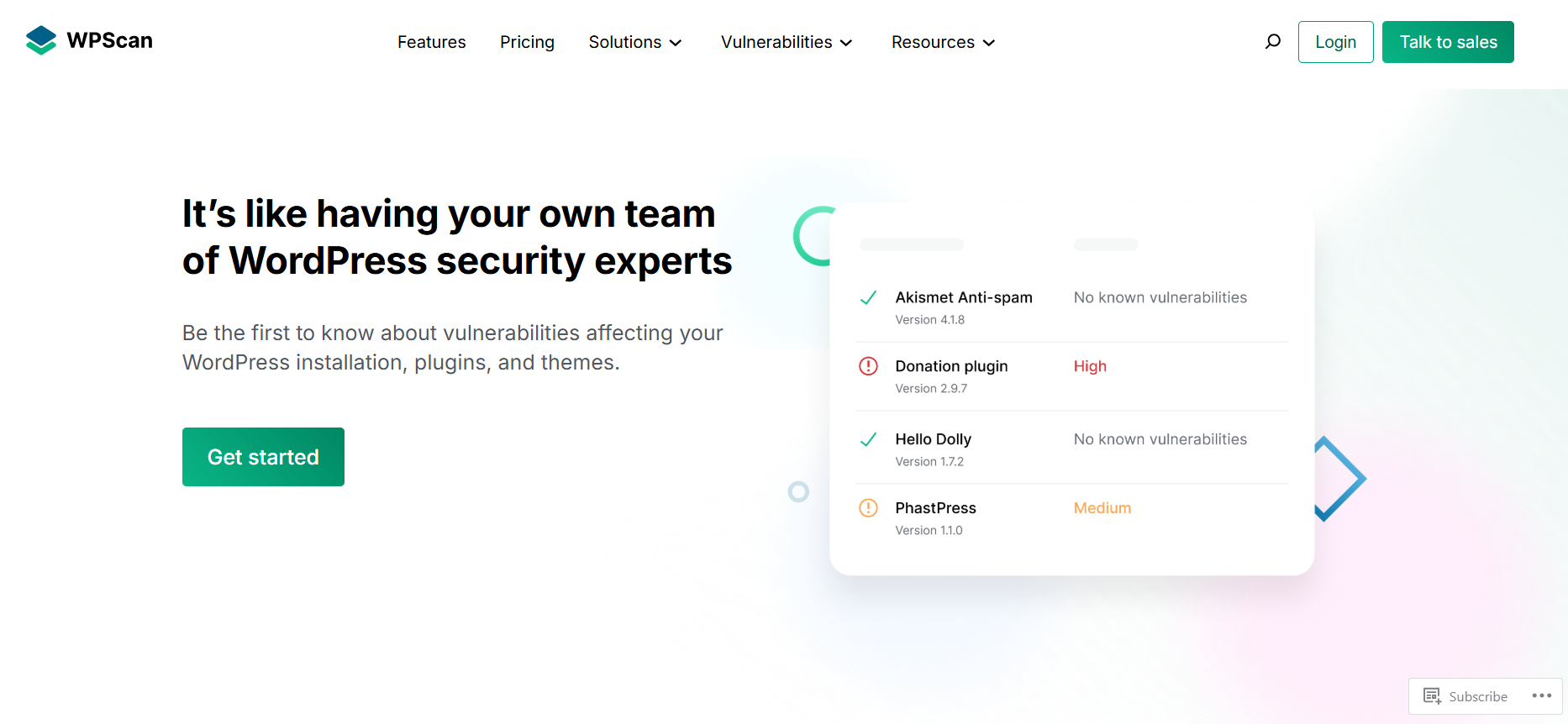
WPScan starts:
- Rating: 4.5/5
- Pricing: Free plan available; paid plans for advanced API access
- Best for: Scanning WordPress websites for known vulnerabilities in core files, plugins, and themes
WPScan is a specialized security scanner designed specifically for WordPress websites. It helps security professionals and website owners identify potential vulnerabilities by scanning the WordPress core, installed plugins, and themes against a constantly updated vulnerability database.
Because it focuses exclusively on WordPress, WPScan is considered one of the most reliable tools for detecting common security weaknesses in WordPress environments.
Key features
- Detects vulnerabilities in WordPress core, plugins, and themes
- Identifies outdated WordPress versions and components
- Performs user enumeration to reveal exposed usernames
- Uses a large and frequently updated vulnerability database
- Supports automated scans via command-line interface (CLI)
- Generates detailed security reports for analysis and remediation
Burp Suite

Burp Suite starts:
- Rating: 4.7/5
- Pricing: Free Community Edition, Professional Edition from $449/user/year
- Best for: Testing web application security, analyzing HTTP requests, and identifying vulnerabilities such as SQL injection and XSS in WordPress websites.
Burp Suite is a powerful web security testing platform widely used by penetration testers and security professionals. It allows testers to intercept and analyze the communication between a browser and a website, making it easier to detect vulnerabilities in web applications, including WordPress sites.
By capturing and modifying HTTP requests, testers can simulate real attack scenarios to uncover security flaws that automated scanners might miss. Because of its advanced testing capabilities and flexibility, Burp Suite is considered one of the most essential tools in professional penetration testing.
Key features
- Intercepts and analyzes HTTP/HTTPS traffic between browser and server
- Detects common vulnerabilities such as SQL injection and XSS
- Provides automated vulnerability scanning tools
- Includes tools for manual penetration testing and request manipulation
- Allows modification and replay of web requests to test security responses
- Generates detailed reports for vulnerability assessment and remediation
OWASP ZAP
OWASP ZAP starts:
- Rating: 4.6/5
- Pricing: Completely free and open-source
- Best for: Automated and manual security testing for web applications, including WordPress websites.
OWASP ZAP (Zed Attack Proxy) is a widely used open-source web application security scanner developed by the OWASP community. It helps security professionals and developers identify vulnerabilities in web applications by scanning websites and analyzing traffic between the browser and the server.
The tool is designed to be beginner-friendly while still offering advanced capabilities for experienced penetration testers. It can automatically scan websites for common vulnerabilities and also allows manual testing for deeper security analysis. Because it is free and regularly updatedby the security community, OWASP ZAP is considered one of the most accessible tools for web security testing.
Key features
- Automated vulnerability scanning for web applications
- Detects common security issues such as XSS and SQL injection
- Intercepts and analyzes HTTP/HTTPS traffic
- Provides tools for manual penetration testing
- Includes spider and active scanning features to discover hidden pages
- Generates detailed security reports for vulnerability analysis
Nmap
Nmap starts:
- Rating: 4.7/5
- Pricing: Free and open-source
- Best for: Network scanning, port discovery, and identifying security weaknesses in servers hosting WordPress websites.
Nmap (Network Mapper) is a powerful open-source network scanning tool widely used by security professionals and system administrators. It helps identify devices on a network, discover open ports, and analyze services running on servers. During WordPress penetration testing, Nmap is often used to detect potential entry points at the network level before testing the website itself.
By scanning servers and network configurations, Nmap can reveal misconfigured services, outdated software, or exposed ports that attackers might exploit. Because of its speed, reliability, and extensive scanning capabilities, Nmap has become one of the most widely used tools in cybersecurity and penetration testing.
Key features
- Discovers open ports and running network services
- Identifies operating systems and server configurations
- Detects potential security vulnerabilities in network services
- Supports multiple scanning techniques for deeper analysis
- Provides detailed network mapping and host discovery
- Works through a command-line interface with powerful scripting capabilities
Nikto
Nikto starts:
- Rating: 4.5/5
- Pricing: Free and open-source
- Best for: Scanning web servers to detect security misconfigurations and known vulnerabilities affecting WordPress websites.
Nikto is an open-source web server scanner designed to identify potential security issues in websites and server configurations. It scans web servers for thousands of known vulnerabilities, outdated software versions, dangerous files, and misconfigured services that could expose a WordPress site to attacks.
During WordPress penetration testing, Nikto is commonly used in the early stages to quickly analyze the target server and identify weaknesses that attackers might exploit. Because it uses an extensive database of known vulnerabilities and performs comprehensive server checks, Nikto is a useful tool for detecting common web security issues.
Key features
- Scans web servers for thousands of known vulnerabilities
- Detects outdated server software and insecure configurations
- Identifies dangerous files and default scripts on web servers
- Performs comprehensive checks on HTTP servers
- Supports SSL scanning and multiple server testing options
- Generates detailed reports for security analysis
Metasploit
Metasploit starts:
- Rating: 4.7/5
- Pricing: Free Metasploit Framework; Metasploit Pro from about $15,000/year
- Best for: Exploitation testing and simulating real-world cyberattacks to verify vulnerabilities in WordPress environments.
Metasploit is one of the most powerful penetration testing frameworks used by cybersecurity professionals worldwide. It allows testers to simulate real cyberattacks by exploiting known vulnerabilities in systems, applications, and networks, including WordPress websites.
During WordPress penetration testing, Metasploit is often used after vulnerabilities have been identified. Security testers use it to verify whether a vulnerability can actually be exploited and to understand the potential impact of a successful attack. Because of its large database of exploits and flexible modules, Metasploit is considered a core tool in professional penetration testing.
Key features
- Large database of exploits and vulnerability modules
- Allows simulation of real-world cyberattacks
- Supports automated and manual penetration testing
- Integrates with other security tools and scanners
- Provides payload generation for testing security defenses
- Helps verify the severity and impact of discovered vulnerabilities
SQLmap
SQLmap starts:
- Rating: 4.6/5
- Pricing: Free and open-source
- Best for: Detecting and exploiting SQL injection vulnerabilities in web applications, including WordPress websites.
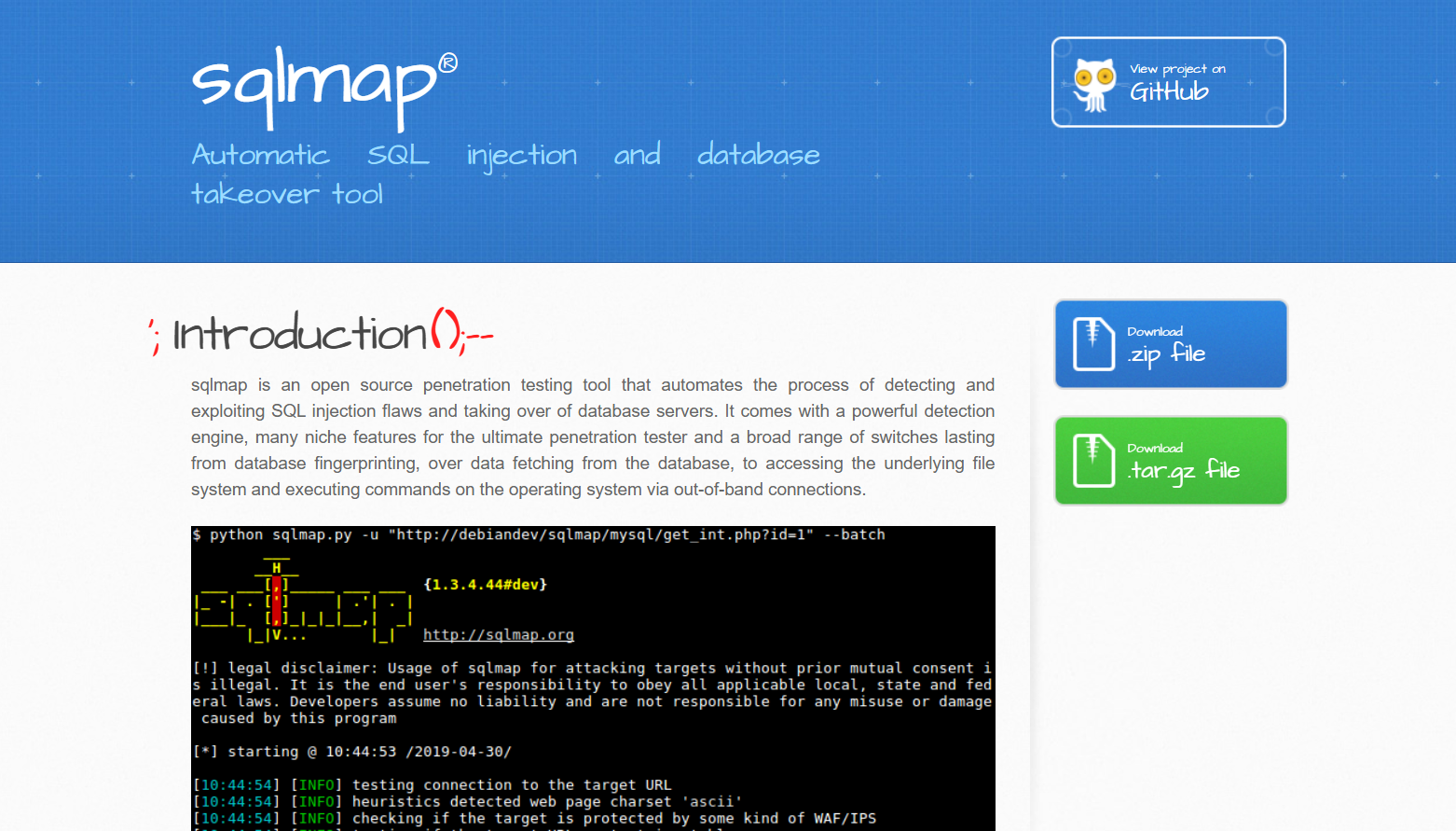
SQLmap is an open-source penetration testing tool specifically designed to detect and exploit SQL injection vulnerabilities. It automates the process of identifying vulnerable database queries and allows security testers to analyze how attackers might gain unauthorized access to a website’s database.
During WordPress penetration testing, SQLmap is commonly used to test input fields such as login forms, search boxes, and URL parameters. If a vulnerability exists, the tool can demonstrate how attackers might extract sensitive information from the database. Because of its automation capabilities and powerful testing features, SQLmap is considered one of the most effective tools for SQL injection testing.
Key features
- Automatically detects SQL injection vulnerabilities
- Supports multiple database systems such as MySQL, PostgreSQL, and Oracle
- Extracts database information such as tables and data when vulnerabilities exist
- Automates complex SQL injection testing processes
- Supports multiple injection techniques and attack methods
- Works through a powerful command-line interface
How to Perform WordPress Penetration Testing
Below is a simple step-by-step overview of the key stages typically followed during a WordPress penetration testing process.
- Step 1: Testing for Vulnerabilities in WordPress Core, Plugins and Themes
- Step 2: Enumerating WordPress Usernames
- Step 3: Gaining Access Through Brute-Force Login Attacks
- Step 4: Testing for Access to Sensitive Files
- Step 5: Identify Technology Fingerprinting Markers
Let’s take a closer look at each step involved in performing WordPress penetration testing.
Step 1: Testing for Vulnerabilities in WordPress Core, Plugins and Themes
WPScan is widely used to collect security-related information from a WordPress website. It can enumerate various components such as installed plugins, active themes, backup files, and even exposed usernames. This information helps penetration testers identify potential attack surfaces before conducting deeper security analysis.
A basic scan can be executed with a simple command: wpscan –url <URL>
For a more comprehensive scan, additional options can be included to enumerate plugins, themes, database exports, configuration backups, and user accounts. An example of a more advanced command is: wpscan -e ap,at,tt,cb,dbe,u1-20 –plugins-detection mixed –url <URL> –api-token <API Token>
Using these options allows WPScan to perform a deeper analysis of the WordPress installation and detect more potential vulnerabilities.
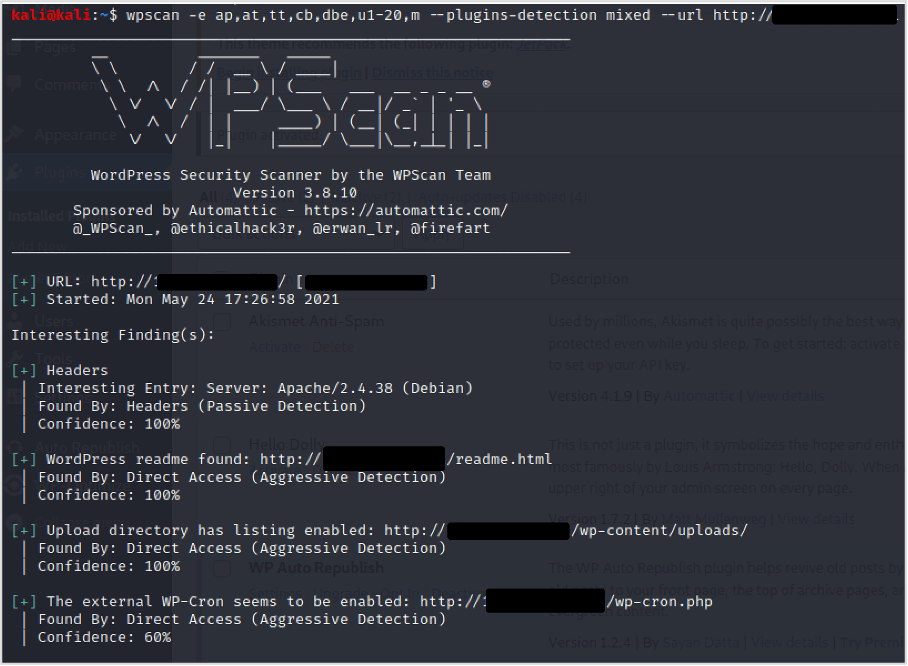
After the scan is complete, review the results carefully to identify any useful findings. Pay close attention to the detected WordPress core version, as well as the installed plugins and themes and their respective versions, since outdated components may indicate potential security vulnerabilities.
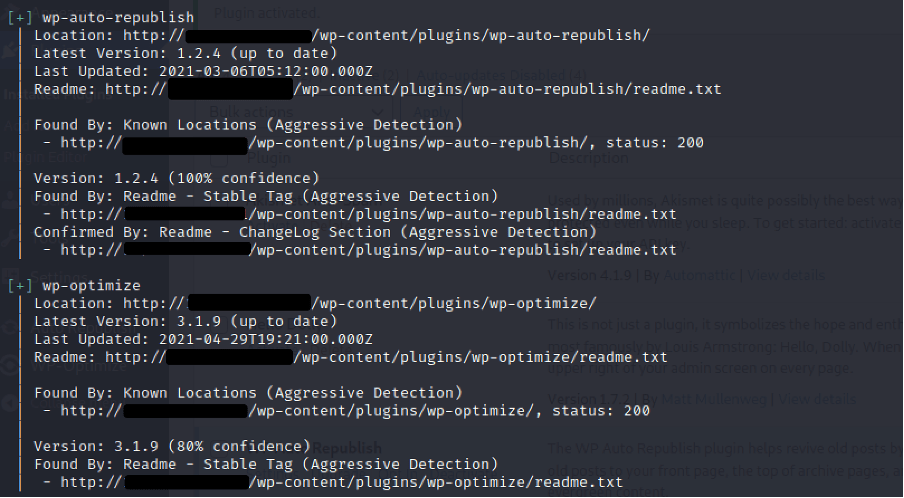
With this information, you can investigate whether any of the identified WordPress components contain publicly reported security vulnerabilities. Tools such as SearchSploit can help you search exploit databases, and you can also check online sources to find related CVE (Common Vulnerabilities and Exposures) records.
During the analysis, pay attention to any less common or custom plugins discovered in the scan. Well-known plugins are usually monitored closely by the WordPress community, meaning vulnerabilities are often identified and patched quickly. However, custom-built or rarely used plugins may contain undiscovered security flaws that could be exploited. If possible, reviewing the functionality of these plugins may reveal potential weaknesses.
Recommendations:
- Keep WordPress core, plugins, and themes updated regularly. This ensures that all components include the latest security patches and fixes.
- Review installed plugins and remove unnecessary ones. Reducing the number of plugins helps minimize the potential attack surface of the website.
Step 2: Enumerating WordPress Usernames
WordPress usernames are often easy to discover because several enumeration techniques are available. Identifying valid usernames can give attackers an advantage when attempting brute-force attacks against login endpoints such as XML-RPC or wp-login.php. For this reason, username enumeration is commonly included in WordPress penetration testing.
In this section, we will explore several techniques used to identify WordPress usernames. Some of these methods can be automated using tools like WPScan, making the process faster and more efficient during security testing.
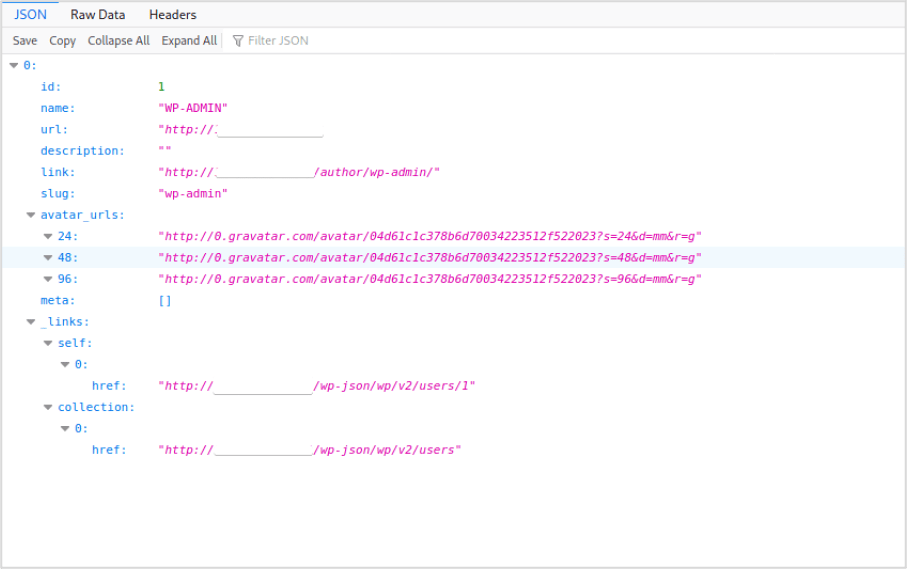
In some cases, if it is enabled, WordPress may expose usernames through its REST API. Testers can sometimes retrieve a list of users by accessing the following endpoint: https://<Target WordPress Site>/wp-json/wp/v2/users
If the API is publicly accessible, it may reveal usernames associated with the website.
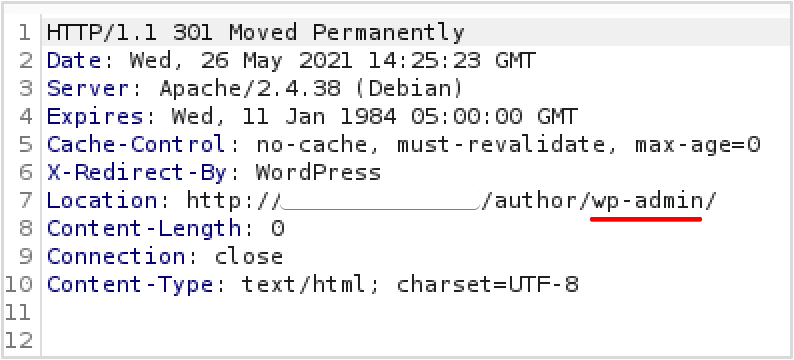
Another common method to discover WordPress usernames is by using the author ID enumeration technique. This involves sending a request to the website while adding the author parameter with a numeric ID value. The request can be performed directly in a browser or automated using security tools.
For example, you can start with the following URL: https://<Target WordPress Site>/?author=1
By gradually increasing the ID number (e.g., 1, 2, 3, and so on), you may be able to identify multiple authors associated with the website.
If this feature is not restricted, the request typically redirects to the author’s archive page. During this redirect, the username is often revealed in the Location header of the HTTP response. This information can be captured using an HTTP proxy such as Burp Suite, or by inspecting the Network tab in your browser’s developer tools. In many cases, the username will also appear directly in the URL displayed in the browser.
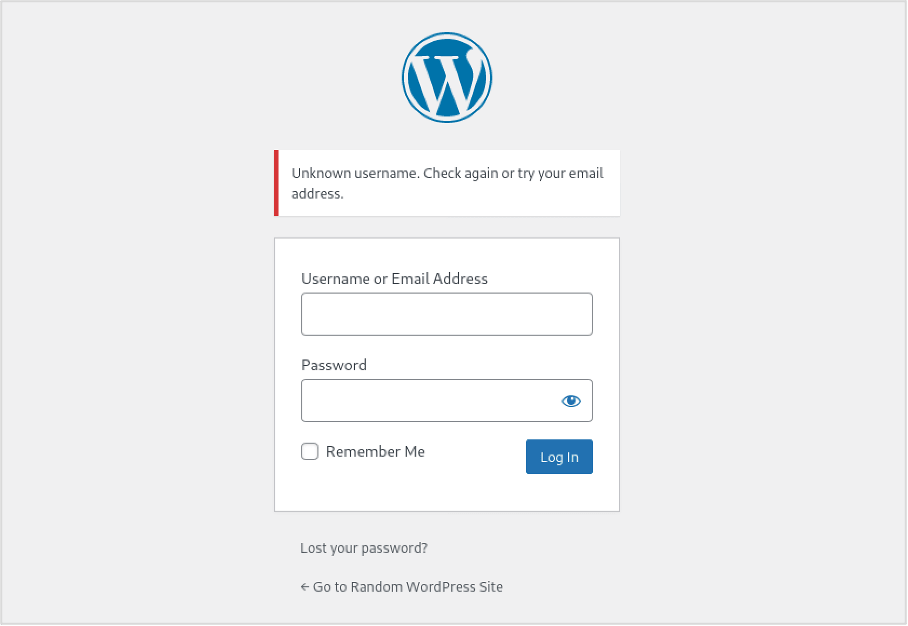
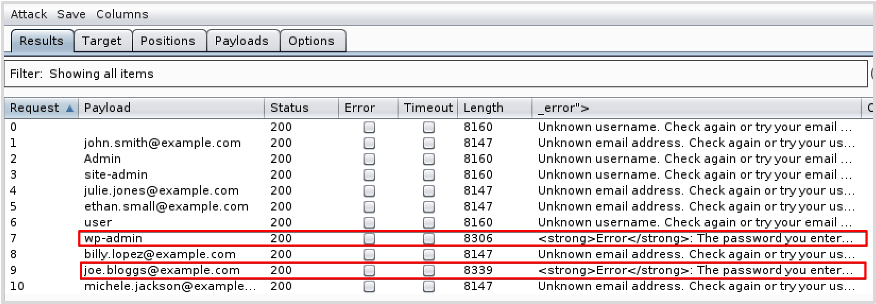
WordPress’s default login error messages can also make username enumeration possible. By attempting to log in with different usernames, testers can observe how the system responds and determine whether a username exists.
For example, when an incorrect username and password are entered, WordPress may display a specific error message indicating that the username is not recognized. By comparing the responses returned by the login page, it becomes possible to verify whether a username is valid.
This behavior is different when a valid username is entered but the password is incorrect. In this case, WordPress typically returns an error message indicating that the password is wrong, rather than stating that the username does not exist.
By comparing these different responses, testers can determine whether a username is valid, which makes it possible to confirm previously discovered usernames.
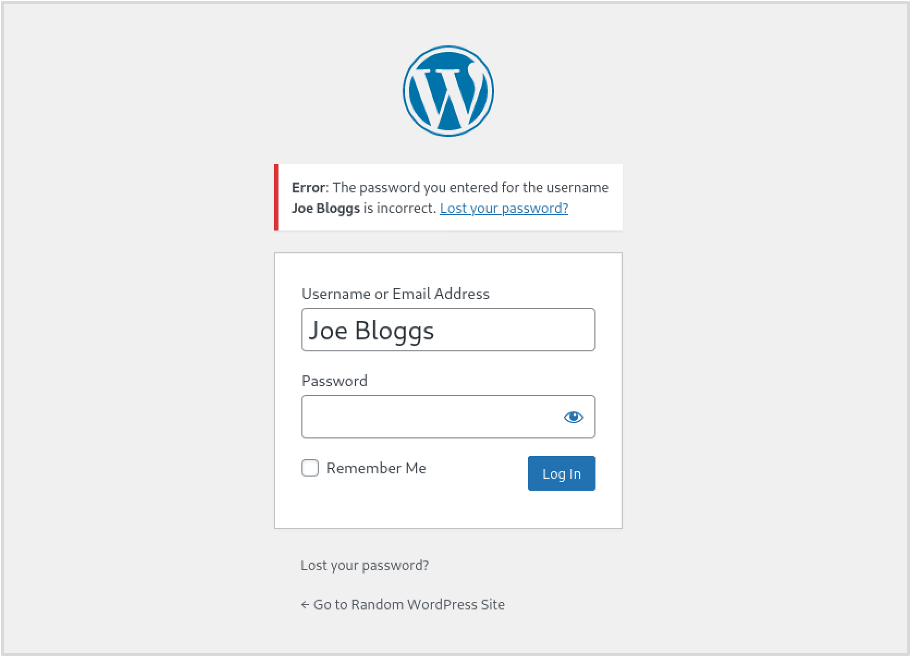
This type of error message suggests that the username is valid, even though the password is incorrect. If the website does not implement rate limiting or login protection, attackers could potentially generate a list of common or likely usernames and attempt a brute-force attack to verify which ones exist. Tools such as Burp Suite’s Intruder can automate this process by sending multiple login attempts and analyzing the responses.
Additionally, WordPress allows users to log in using either a username or an email address. For example, if a user’s email is [email protected]
, that email can often be used in place of the username during login. This can be particularly useful during security testing because penetration testers may already have collected email addresses through open-source intelligence (OSINT) techniques.
These collected email addresses can then be tested against the WordPress login page to determine whether they are associated with valid accounts.
Below is an example demonstrating how Burp Suite’s Intruder can be used to enumerate valid usernames or email addresses.
Recommendations:
- Restrict access to the wp-json API for unauthenticated users to prevent user enumeration.
- Block author ID enumeration at the server level (e.g., return a 403 when author=<ID> appears in requests).
- Use identical login error messages for all failed wp-login attempts to avoid revealing valid usernames.
Step 3: Gaining Access Through Brute-Force Login Attacks
At this stage, you may already have a list of valid usernames and possibly some potential passwords gathered from publicly available breached credential databases.
When testing WordPress security, brute-force login attempts are commonly performed through two main entry points: /wp-login.php and /xmlrpc.php. Similar to automated scans with WPScan, these attacks can generate significant activity in the server logs.
The XML-RPC feature in WordPress allows external applications and services to interact with the site, for example by publishing posts remotely. However, if this functionality is not properly restricted, it can be abused to perform brute-force login attacks.
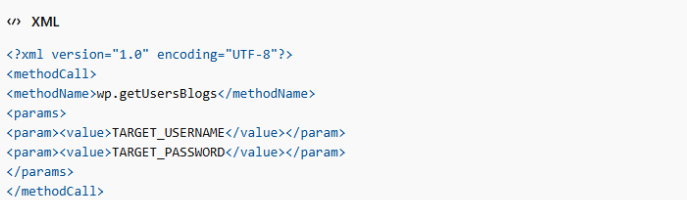
Attackers typically send a POST request to the xmlrpc.php endpoint using the wp.getUsersBlogs method to test username and password combinations.
Example request structure:
Below is an example of a login request using invalid credentials, demonstrating the type of response returned by the server. This request was sent using Burp Suite.
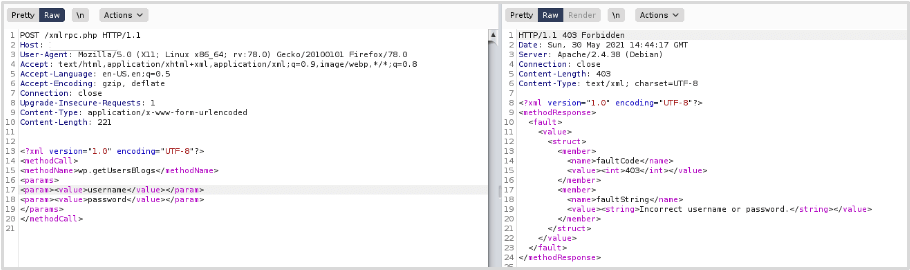
Although the server returns a 403 response code, the XML content in the response indicates that a login attempt was processed but the credentials were incorrect. This confirms that the XML-RPC endpoint is accessible and that authentication requests can still be made.
Since authentication through XML-RPC is possible, attackers or security testers may attempt a brute-force attack using automated tools. For example, tools such as Burp Suite’s Intruder can be configured to automatically send multiple login requests with different username and password combinations.
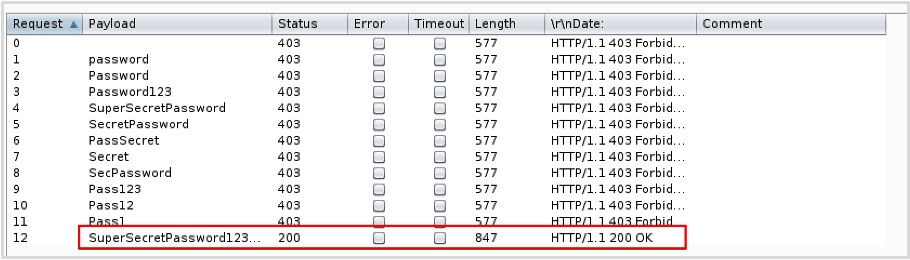
The brute-force attack is considered successful when the correct credentials are used. In this example, authentication succeeded with the username “wp-admin” and the password “SuperSecretPassword123#”.
By examining the server’s response to the request, we can confirm that the authentication process was successful and that access was granted for the user “wp-admin.” With these valid credentials, it would then be possible to log in to the WordPress admin panel (wp-admin), provided that it is accessible.
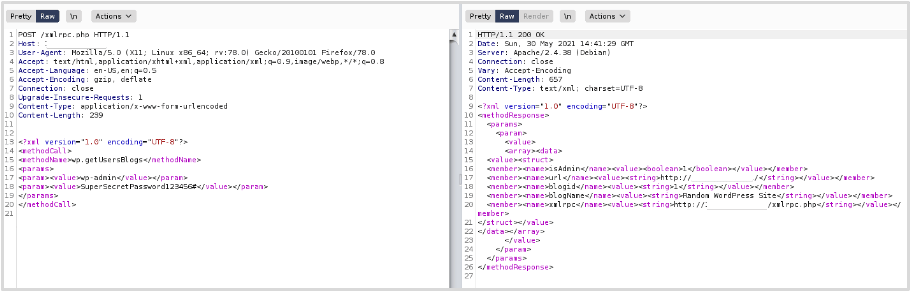
Access to XML-RPC should be restricted to reduce the risk of exploitation. Besides brute-force login attempts, XML-RPC also includes a method called pingback.ping, which can potentially be abused to launch Distributed Denial of Service (DDoS) attacks.
Another common target for brute-force attacks is the WordPress login form, typically located at /wp-login.php or accessible through the /wp-admin login page. If security controls such as rate limiting or account lockout policies are weak or not implemented, attackers may attempt to guess passwords using a list of known or discovered usernames.
Below is an example of a POST request sent to /wp-login.php, which can be used during testing to attempt multiple password combinations in a brute-force attack.
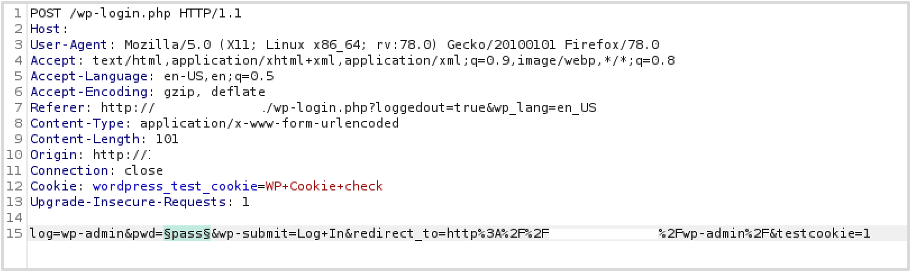
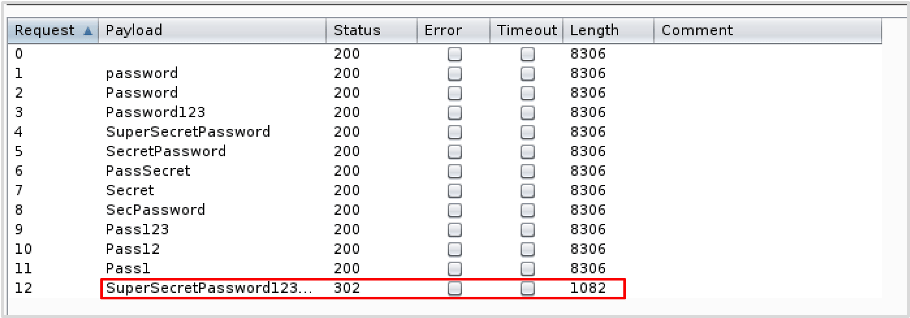
Similar to the XML-RPC example, a list of common passwords was used during this test. In real-world brute-force attacks, the password wordlists are typically much larger and more comprehensive than the simplified list used in this demonstration.
When authentication is successful, the server response usually returns an HTTP 301 redirect to the WordPress admin dashboard. From the results of the attack, we can see that login was successful using the username “wp-admin” and the password “SuperSecretPassword123#”.
In this demonstration, Burp Suite’s Intruder was used to automate the brute-force requests.
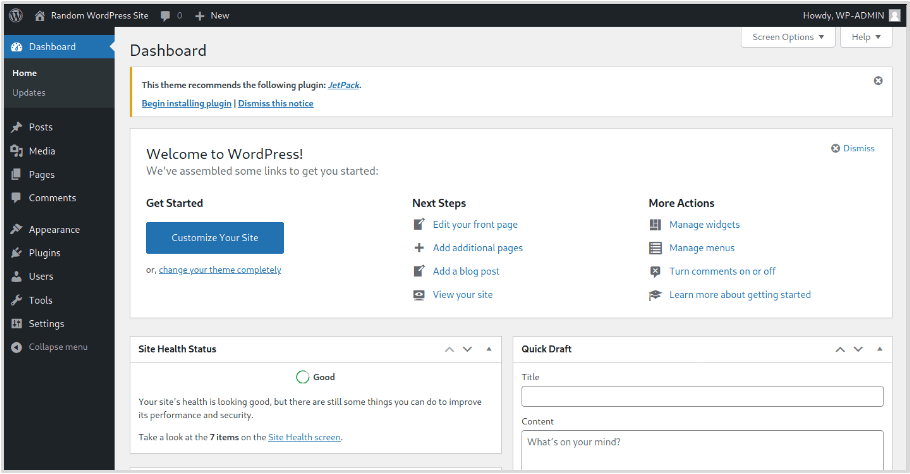
If the response is opened in a browser, it shows that access to the WordPress admin dashboard has been successfully obtained. With administrative access, an attacker or tester may potentially take further actions that could compromise the web server, depending on the permissions and configuration of the system.
Recommendations:
- Disable or restrict access to XML-RPC, especially for unauthenticated users.
- Protect the wp-login page with rate limiting, using tools such as a web application firewall, Fail2Ban, or security plugins.
- Remove unused user accounts to reduce security risks.
- Require strong passwords for all WordPress users.
Step 4: Testing for Access to Sensitive Files
The file structure of WordPress Core is widely known, so using directory brute-force tools such as Dirb or GoBuster to discover hidden folders is often unnecessary. However, it is still important to check for backup files that may have been accidentally left on the server.
For example, before making configuration changes, administrators may create backups of the wp-config.php file. This file contains sensitive information, including database credentials and other important configuration details.
Sometimes these backups remain on the server with simple names such as wp-config.php.bak. If such a file is accessible, an attacker could download it and read the contents of the configuration file, potentially exposing critical information that could be used in further attacks.
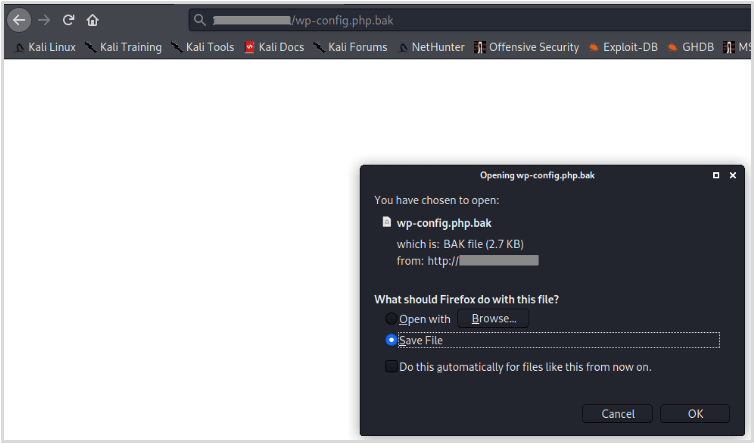
Some of the most important WordPress core files include the configuration file and installation files. These files should not be accessible to regular users.
A common belief is that files such as wp-config.php do not need additional protection because their contents cannot normally be viewed through a browser. While it is true that the PHP code is not displayed during a normal request, this protection can fail under certain conditions.
For example, if the PHP interpreter stops working or if a vulnerability such as directory traversal exists in WordPress or one of its components, an attacker may be able to access the file’s contents.
Installation files can also create security risks. In some cases, vulnerabilities have allowed attackers to exploit these files when they are exposed on the server.
Although such incidents are relatively rare, it is considered best practice to move the wp-config.php file one directory above the web root and restrict access to installation-related files to reduce potential security risks.
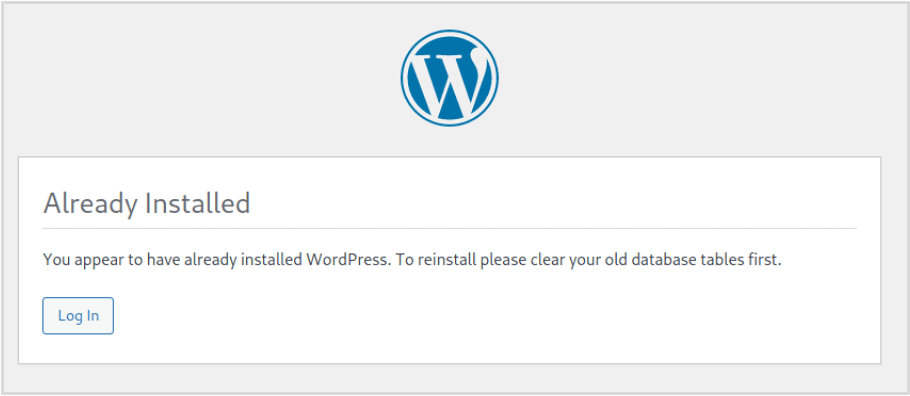
Recommendations:
- Remove any backup files from publicly accessible web directories. Simply renaming backup files is not a secure solution.
- Consider moving wp-config.php outside the web root and restrict access to installation files (e.g., using .htaccess on Apache) or delete them if they are no longer needed.
Step 5: Identify Technology Fingerprinting Markers
Many automated bots continuously scan web applications in search of common vulnerabilities. These bots are programmed to detect specific indicators within a website’s structure or HTML code to determine whether the application may be exploitable. Such identifiers can reveal which components are running and their versions.
While it is difficult to completely hide that a website is built on WordPress, it is often possible to obscure the WordPress version as well as the versions of installed themes and plugins.
Although this can be challenging, reducing the amount of information exposed by the web application can make it harder for attackers and automated bots to identify vulnerabilities.
Limiting these fingerprinting indicators can also discourage opportunistic attackers who typically target easier systems. Tools like WPScan rely heavily on these markers when enumerating WordPress installations.
The versions of WordPress plugins and themes can often be identified by checking files stored within their directories, and in some cases this information may also appear in the website’s HTML source code.
For example, in the tested WordPress site there is a plugin called “WP-Optimize.” If we navigate to the plugin’s folder and open the readme.txt file, the plugin version can be clearly identified. In this case, the file reveals that the plugin version is 3.1.9.
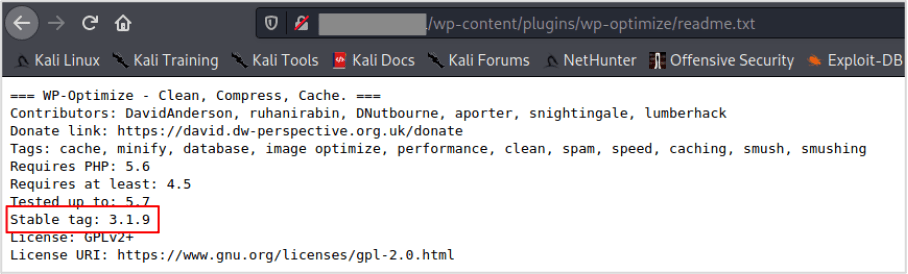
Identifiers like the example above can be removed by deleting the file from the plugin directory. For themes, version information is often found not only in readme.txt but also in the style.css file, which commonly contains the theme’s version details.
However, when a plugin or theme is updated, these files may reappear automatically. To manage this, it can be helpful to create a script that periodically checks plugin and theme directories and removes these files if they are detected.
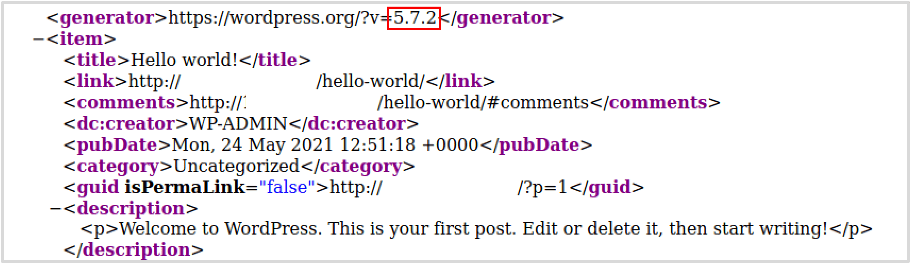
The WordPress Core version can be found in several places on a website. One common location is in the HTML source code of the homepage (/) and the /wp-admin page, where it may appear within meta tags or be appended to JavaScript and CSS files loaded by WordPress.\
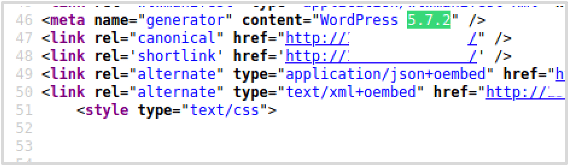
The RSS feed which can be obtained by browsing to /feed.
The /readme.html file in some older versions of WordPress.
Recommendations: Remove or hide version markers for web application components, especially WordPress Core, plugins, and themes, to reduce information disclosure.
Frequently Asked Questions
1. Is WordPress penetration testing necessary for small websites?
Yes. Even small WordPress sites can become targets for automated attacks and bots scanning for vulnerabilities. Regular penetration testing helps identify security weaknesses before they can be exploited.
2. How long does WordPress penetration testing take?
The duration depends on the size and complexity of the website. A basic test for a small site may take a few hours, while a more comprehensive assessment for larger websites can take several days.
3. Can security plugins replace penetration testing?
No. Security plugins help protect a website by adding monitoring and basic defenses, but they cannot fully replace penetration testing. Penetration testing actively identifies vulnerabilities that automated protections might miss.
4. How much does WordPress penetration testing cost?
The cost varies based on the scope and depth of the assessment. Simple automated scans may be free or low-cost, while professional penetration testing services can range from a few hundred to several thousand dollars.
5. Can beginners perform WordPress penetration testing?
Yes, beginners can start with basic tools such as vulnerability scanners and security plugins. However, advanced penetration testing usually requires deeper knowledge of web security and testing methodologies.
Conclusion
WordPress penetration testing is an essential practice for identifying vulnerabilities before attackers can exploit them. By regularly testing your website, checking for common weaknesses, and using the right security tools, you can significantly improve the overall protection of your WordPress site.
If you want a more secure and reliable WordPress website, Arestós offers professional WordPress services, including development, optimization, migration, and security improvements. Our team helps businesses build and maintain high-performance WordPress websites with strong security foundations.
Contact us today and let our experts help you build a safer, more reliable website.
Subscribe to our newsletter!
Get updated to
the lastest IT trends
Related Posts
Update the latest technology trends for your business