Back to featured insights
8 Factors That Determine Your Website WordPress Price
One of the most popular questions we receive from our clients is that what website WordPress price is. In fact, there are many factors can affect the cost of your WordPress website. In this article, we will go through six main factors that usually influence WordPress website pricing.
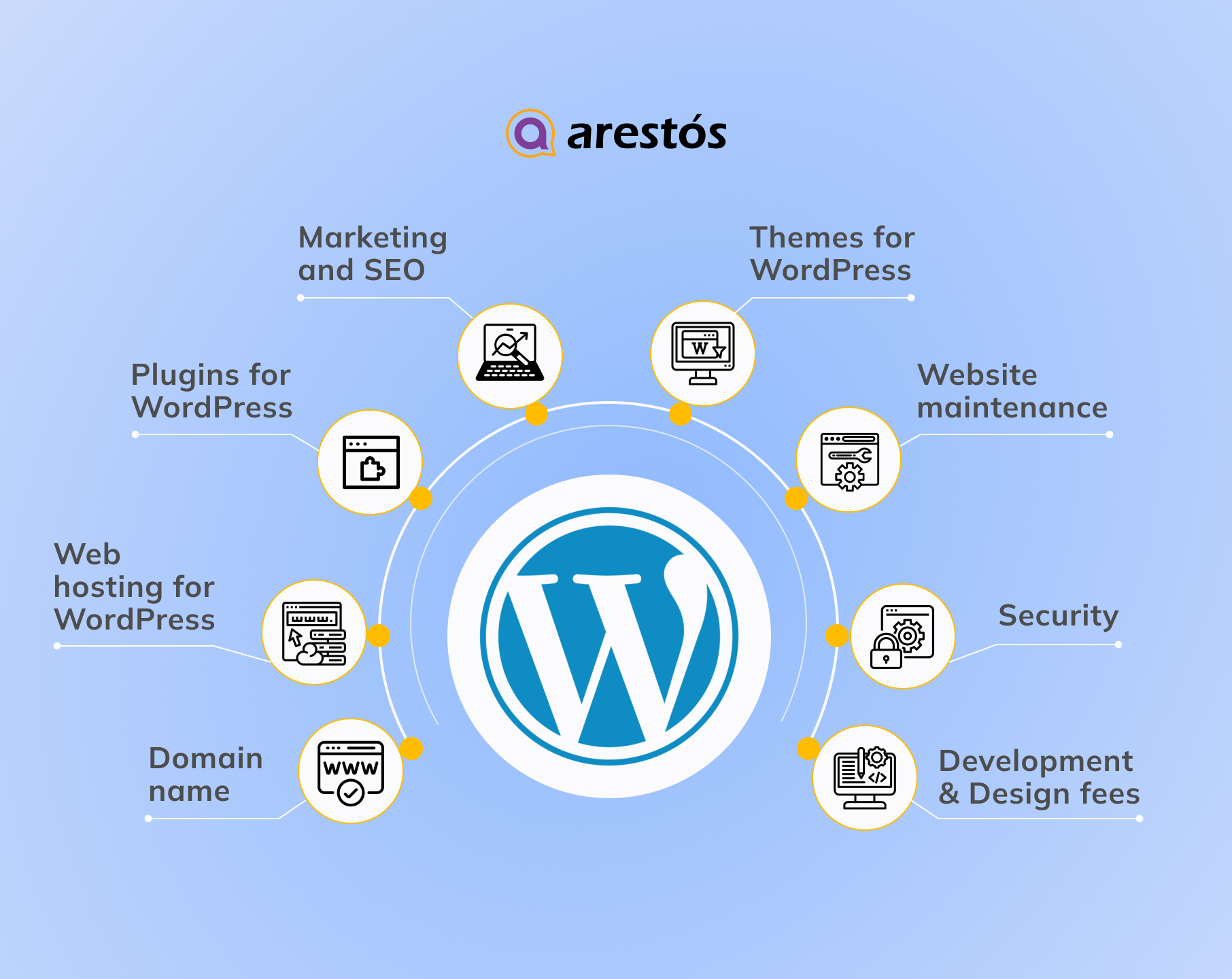

Table of Content
Share
If you’re planning to build a website for your business, understanding the website WordPress price is essential. WordPress is a powerful and flexible platform that can fit businesses of all sizes, from small startups to large enterprises.
However, costs can vary widely depending on your business goals, desired features, and customization needs. In this guide, we’ll break down the main factors that influence WordPress website costs, helping you plan your budget effectively and avoid unexpected expenses.
Why should you invest in WordPress development?
Investing in WordPress development is one of the smartest choices for building a professional, scalable, and cost-effective website. Here are the key reasons why businesses and individuals choose WordPress:
- Flexible and Scalable: WordPress allows your website to grow with your business. You can start small and expand features as needed without rebuilding your site.
- Cost-Effective Solution: Compared to custom-built platforms, WordPress development is more affordable while still offering professional results.
- Large Community and Support: With millions of users worldwide, WordPress has a strong community, offering free resources, tutorials, and plugins.
- Extensive Plugin Ecosystem: Access thousands of plugins to add functionality like e-commerce, SEO, security, and analytics without coding from scratch.
- SEO-Friendly Platform: WordPress is optimized for search engines with clean code, SEO plugins, and a responsive design to improve your website’s visibility.
- Customizable Design Options: Themes and page builders allow you to create a unique, professional design tailored to your brand identity.
- Reliable Security Features: Regular updates and security plugins protect your website from potential threats, ensuring your online presence is safe.
- Easy Content Management: User-friendly dashboard allows team members to update content, manage pages, and publish posts without technical expertise.
WordPress platform to use. If you already have hosting, you can host the site there. If not, you can choose between WordPress.com or WordPress.org.
WordPress.org vs. WordPress.com
Although WordPress.com and WordPress.org share the WordPress name, they differ significantly in terms of functionality and usage. The primary distinction lies in who handles website hosting.
With WordPress.org (self-hosted WordPress), you are responsible for hosting your website through a third-party provider. This means purchasing a domain and hosting plan, installing WordPress, and managing your website independently.
On the other hand, WordPress.com is a fully hosted platform that provides website hosting and content management services on WordPress servers, similar to a software-as-a-service (SaaS) solution. Users can build and manage websites without installing software or handling server maintenance. The main differences between the two versions are outlined below:
WordPress.org is ideal if you want full control over your website. You will need to purchase a domain and hosting, install themes and plugins, and take care of your website’s security. While the WordPress.org software itself is free, these additional services come at a cost.
On the other hand, WordPress.com provides a complete, all-in-one solution. You don’t need to manage servers, pay for hosting separately, or register domains on your own. Depending on the plan you choose—free or paid—you can customize your website according to your needs.
WordPress.com offers different plans with varying features and levels of flexibility.
WordPress plan (only for WordPress.com)
If you plan to use WordPress.org, you can skip this step and proceed. For WordPress.com, you need to select one of its available plans:
- Free
- Starter: $4/month or $48/year
- Explorer: $8/month or $96/year
- Creator: $25/month or $300/year
- Entrepreneur: $45/month or $540/year
- Cloud: $65/month or $649.99/year
- Enterprise: starting at $25,000/year

For more details on each WordPress.com plan, check the official website. If you want a professional website with your own custom domain, themes, and plugins, you will need at least the Creator plan, which costs $25 per month.
However, if you do not need custom themes or plugins, the Starter plan is sufficient. It still allows you to use your own domain name and remove WordPress.com ads.
The key factors affecting a WordPress website price
To help you balance your goals with your budget, we’ve outlined the key factors that influence the cost of designing a WordPress website. Let’s take a closer look at each factor to plan your WordPress site more effectively.
Domain name
Average cost: $10-$25/year.
A domain name is your website’s address (e.g., yourwebsite.com) that users type in a browser to visit your site. WordPress requires you to register your own domain, which should reflect your brand, be unique, and easy to remember.
The cost of a WordPress domain depends on several factors, including the domain extension:
- Top-Level Domains (TLDs): Appear after the dot, e.g., .com, .org, .net
- Generic TLDs (gTLDs): Versatile extensions like .info, .biz, .app
- Country Code TLDs (ccTLDs): Country-specific, e.g., .us (USA), .ca (Canada)
- Sponsored TLDs (sTLDs): For specific purposes, e.g., .edu or .gov
Other factors affecting domain pricing include:
- Domain registrar/provider (GoDaddy, Name.com, BlueHost, Hostinger)
- Domain length, uniqueness, and age
- Renewal and contract period
- Premium domain options
- Domain transfer fees
- SEO-friendliness
- Additional services (privacy, SSL certificates)
Choosing a reputable registrar is crucial to avoid scams and hidden fees. Domain registration typically lasts one year, and renewal fees are often higher. Some registrars offer discounts for multi-year renewals.
Examples:
- Name.com: $11.99 for registration, $21.99/year renewal, domain transfer and expiration protection
- Hostinger: $4.99 for the first year, $15.99/year renewal, web hosting, AI automation, free WHOIS privacy
On average, domain costs range from $10 to $20 per year, but prices may vary depending on your preferences. Explore registrars to find the best options for your business needs.
Web hosting for WordPress
Average cost: from $20 – $300/month and it depends on a web hosting provider, type of hosting, and subscription length.
Every website needs a designated space, usually a server, to store all content—HTML files, images, videos, CSS, and more—and make it accessible online. When a user types your domain into a browser, they are directed to the web hosting server where your website resides.
Choosing a reliable hosting provider is crucial because it affects your website’s performance, scalability, security, and speed. First, you need to decide which type of hosting suits your needs:
- Shared Hosting: Multiple websites share resources on the same server. Cost-effective but may limit performance and customization.
- Dedicated Hosting: A full server dedicated to your website, offering maximum performance, control, and customization, but at a higher cost.
- Managed WordPress Hosting: The provider handles server maintenance, security, backups, and updates. Offers excellent performance and support, letting you focus on content creation.
- VPS Hosting (Virtual Private Server): Provides dedicated resources in a shared environment, offering more control and scalability.
- Cloud Hosting: Uses multiple interconnected servers to host your site. Scalable, reliable, and agile—ideal for growing websites.
For smaller websites or limited budgets, shared hosting is sufficient. As traffic increases, consider dedicated or managed hosting for better performance. Remember: the more exclusive the server, the higher the cost.
After choosing the type of hosting (for WordPress.org), select a provider and plan based on business needs, budget, storage, bandwidth, performance, security, support, and additional services. Hosting costs vary depending on the subscription period—shorter periods typically cost more overall.
WordPress.com includes hosting, so you don’t need a separate provider. Popular hosting providers and their price ranges include:
- Hostinger: Managed hosting $2.99–$3.99/month, VPS $4.99–$19.99, Cloud $9.99–$29.99, Dedicated $80–$300, WordPress hosting $2.99–$9.99/month
- Other providers: SiteGround, Bluehost, InMotion Hosting, Scalahosting
Tip: As your website grows, you may need more resources like storage or bandwidth. Consider upgrading your hosting plan when necessary.
If you want to explore the best hosting options tailored for your websites, check out our Top 10 WordPress Hosting Providers for Hong Kong webs to find the right provider for your needs.
Themes for WordPress
Average cost: from $0 – $200/year or one-time cost.
When estimating the cost of your WordPress site, themes play a key role. A theme is a set of templates, code files, and stylesheets that define the look of your website. A carefully chosen theme enhances visual appeal, strengthens brand identity, improves SEO, and delivers a better user experience. Overusing themes or choosing poorly can have the opposite effect, so balance aesthetics with functionality.
You can choose between:
- Pre-made themes: Quick to set up and cost-effective, ranging from free to around $59 (or more). They may lack uniqueness and advanced features.
- Custom (premium) themes: Tailored to your brand for a professional look. They usually include drag-and-drop editors, free plugins, demo templates, and dedicated support.
Cost estimation:
- Premium themes: $20–$1,000
- Custom themes for personal or small business sites: $1,500–$5,000
- Custom themes with extra features/plugins: $6,000–$10,000
- Enterprise-level custom themes: $30,000+
Tip: Using a page builder to create a custom theme can reduce costs and remove the need for hiring freelancers or agencies. Explore the WordPress theme repository to find suitable options.
To get the most out of your WordPress theme, follow our WordPress Themes: a complete guide for detailed instructions on setup and customization.
Plugins for WordPress
Average cost: $0- over $300/month, year or one-time cost.
Plugins are essential for enhancing a website’s functionality. WordPress offers a vast selection of plugins, allowing you to customize your site without coding skills.
There are over 60,000 plugins in the official WordPress directory, classified as free, freemium, or premium:
- Free plugins: Provide basic functionality.
- Premium plugins: Offer advanced features, priced between $15 and $200, either as a one-time payment or an annual subscription.
Most websites require around 15–18 plugins to cover essential business needs, so plugin costs can range from $0 to $1,000, depending on the number and type you choose. Plugins can also be obtained from trusted third-party sources, but always ensure reliability to avoid security risks.
Before selecting your plugins, you can also explore our detailed guide WordPress Plugins: Top 10 must-have plugins for your site to better understand which options deliver the most value for your business.
Must-have plugin categories include:
- Security plugins: Protect against malware and unauthorized access (e.g., Wordfence)
- SEO plugins: Improve search engine visibility (e.g., Ahrefs, Semrush)
- Caching plugins: Speed up website performance (e.g., WP Rocket, LiteSpeed Cache)
- Backup plugins: Safeguard website data (e.g., UpdraftPlus)
- Form builders: Create contact and lead forms (e.g., WPForms)
- Image optimization plugins: Compress images for faster loading (e.g., EWWW Image Optimizer)
- Page builders: Design custom layouts without coding (e.g., Divi Builder, Spectra)
- Analytics plugins: Track traffic and user behavior (e.g., MonsterInsights)
- Social media plugins: Add share buttons, social feeds, etc. (e.g., Blog2Social, Social Post Feed)
Marketing and SEO
Average cost: $250- 1000/month.
Initially, marketing and SEO may not be essential for building a WordPress website. However, if you want your site to rank high on search engines, generate leads, and drive sales, investing in marketing and SEO is crucial.
You can either handle marketing and SEO yourself or hire professionals. Hiring digital marketers and SEO experts usually costs more but often yields better results. Costs depend on factors such as your industry, competitiveness, service scope, number of pages, project complexity, and agency location.
Estimated costs:
- Freelance SEO services: $250–$1,000/month
- SEO agencies: $500–$5,000+/month or project-based fees
- Digital marketing freelancers: $25+ per hour or $700+/month
- Marketing agencies: Up to $500/hour or $1,000–$20,000/month for small to medium businesses
A budget-friendly alternative is a DIY approach, using WordPress SEO plugins and marketing tools. Costs may include:
- SEO tools: Ahrefs ($99+/month), Semrush ($119.95+/month), Screaming Frog ($259/year)
- SEO plugins: Yoast SEO, All in One SEO; caching plugin like WP Rocket to improve speed and SEO
- Email marketing: Mailchimp for WordPress, MailPoet, Newsletter plugins
- Social media: Plugins like Blog2Social to share content on Facebook, Twitter, Instagram, LinkedIn
- PPC ads: Google Ads, Facebook Ads; average cost per click $2.69–$3.77
- Content creation & marketing: Hire creators or agencies, plan blog topics, develop content strategies
- Link building: Guest posting, outreach, and backlink strategies to improve authority
- Analytics tools: Google Analytics, Google Search Console
Website maintenance
Average cost: from $0 – $500/month.
When calculating the cost of a WordPress website, don’t forget maintenance. Regular maintenance is essential for performance, security, and user experience. Plugins and themes are constantly updated to fix bugs and enhance functionality, so keeping them up to date is crucial.
Maintenance costs vary based on website type (personal, ecommerce), size, complexity, customization, hosting, and additional requirements. Common approaches include:
- DIY Maintenance: Most affordable. Covers basic tasks like theme updates, plugin installations, core upgrades, and backups. Cost: $0–$100/month.
- Freelancers: Handle more complex tasks, security optimization, bug fixes, or custom features. Cost: $200–$500/month.
- Managed WordPress Hosting: Hosting provider manages updates, backups, security scans, performance monitoring, and support. Cost: $30–$200/month.
- Maintenance Agencies: Full-service agencies offer updates, security audits, content management, performance optimization, and ongoing support. Cost: $500–$1,000+/month depending on scope and customization.
Choosing the right maintenance approach ensures your website remains secure, fast, and reliable while minimizing potential downtime and technical issues.
Security
Average cost: $70 – $1000 / month or year.
Ensuring website security is a top priority for WordPress site owners. There are two main approaches: obtaining an SSL certificate and using security plugins.
SSL (Secure Sockets Layer): SSL encrypts data transferred between a user’s browser and your website, protecting sensitive information like payment details and login credentials. SSL also increases user trust and is favored by Google for higher search rankings.
Ways to get SSL:
- Through hosting, domain registrar, or website builder: Some providers include SSL certificates in their plans. Average cost: $70–$80/year, but can go up to $1,000/year depending on the plan and security level.
- Purchase from a Certificate Authority (CA): Trusted CAs include Comodo (Sectigo), GeoTrust, Let’s Encrypt, DigiCert, GlobalSign, etc., offering different SSL types, features, and pricing.
Security plugins: Plugins provide an extra layer of protection beyond SSL, including malware scanning, web application firewalls (WAF), and real-time monitoring. Free plugins may suffice for small businesses, while premium plugins offer advanced security features.
Examples of premium plugins:
- Sucuri: $199.99–$499.99/year
- Wordfence: $99–$950/year
Development and design
Average cost: from $15 to $50\hour for a developer and $30 for a designer\hour.
If you want a highly customizable website with advanced features and a unique design, hiring a WordPress developer and designer is essential. Custom WordPress websites cost more than standard business sites due to their complexity.
A WordPress developer is a full-stack professional skilled in creating and customizing themes, plugins, and modules, optimizing performance and SEO, and managing code. They are proficient in PHP, HTML, CSS, JavaScript, databases, cybersecurity, and tools like Git.
Developer rates vary by location and experience:
- Junior: $20–$50/hour
- Mid-level: $50–$150/hour
- Senior: $150–$250/hour
A designer improves your website’s aesthetics, usability, and brand consistency. While DIY or pre-made themes offer basic solutions, professional design ensures intuitive navigation, responsive layouts, and a polished user experience.
Design costs also vary: freelance designers average $30/hour, while agencies may charge $5,000+ per project. Typical website design ranges from $500 to $15,000, increasing for ecommerce or complex functionality.
To take your WordPress website to the next level, follow our WordPress Tutorial: A Complete Step-by-Step Guide for practical tips on setup, optimization, and customization.
Frequently Asked Questions
1. Is WordPress really free?
Yes, the WordPress software is free. However, building a website involves costs like domain registration, hosting, SSL, premium themes/plugins, custom development, and maintenance.
2. How much does WordPress maintenance cost?
Maintenance costs vary from $0–$100/month for DIY, $200–$500/month for freelancers, $30–$200/month with managed hosting, and $500–$1,000+/month for agencies providing full services.
3. Do I need a developer for a WordPress website?
Not always. Small websites can use pre-made themes and DIY setup. For advanced features, custom design, or complex functionality, hiring a developer and designer is recommended.
4. Can I reduce WordPress website costs?
Yes, you can lower costs by using free themes and plugins, DIY maintenance, and selecting affordable hosting. However, investing in premium features or professional services ensures better performance, branding, and scalability.
Conclusion
Building a WordPress website involves several factors that influence its price, including domain, hosting, theme and design, plugins, marketing/SEO, and maintenance/security. By understanding these elements, you can plan your budget wisely and ensure your website meets your business goals without unexpected costs.
At Arestós, we specialize in creating professional, fully customized WordPress websites tailored to your business needs. From responsive design to advanced features, SEO optimization, and ongoing support, our team ensures your website delivers both performance and impact.
Contact us today to get a personalized quote and take the first step toward a high-performing, professional website.
Subscribe to our newsletter!
Get updated to
the lastest IT trends
Related Posts
Update the latest technology trends for your business