Back to featured insights
How to Generate a WordPress Theme with Telex
Discover how to generate a WordPress theme with Telex using a simple prompt-based workflow. Turn your ideas into professional designs faster, streamline development, and create flexible, customizable themes with ease.
Table of Content
Share
Generating a WordPress theme with Telex is becoming an increasingly popular way to build websites faster and more efficiently. It allows you to turn ideas into fully functional themes with minimal coding, saving time and effort in the development process.
This approach is ideal for developers, designers, agencies, and even beginners who want to create professional WordPress websites. In this guide, you’ll learn how to generate a WordPress theme with Telex step by step, from writing prompts to customizing and deploying your theme.
What is Telex by WordPress?
Telex is an AI-powered tool designed to simplify and accelerate the process of building WordPress themes and blocks. It allows users to generate website components by simply describing their ideas in natural language, reducing the need for manual coding.
Built to work seamlessly with WordPress, Telex focuses on automating repetitive development tasks such as creating theme structures, generating code, and configuring design elements. This makes it especially useful for developers, agencies, and beginners who want to build WordPress websites more efficiently.
Unlike traditional development methods, Telex emphasizes speed, flexibility, and accessibility. Whether you are creating a simple blog or a complex website, Telex helps turn ideas into functional WordPress themes in a much shorter time.
Benefits of Generating a WordPress Theme with Telex
Using Telex to generate WordPress themes offers several advantages for developers, designers, and businesses.
From faster prototyping to improved workflow and better customization control, Telex helps streamline the entire theme development process and reduce the time required to build a WordPress website.
Rapid Prototyping and Lower Entry Barriers
- No-Code Development: You can build custom WordPress block themes and individual Gutenberg blocks simply by describing them in plain English, eliminating the need to master PHP or React. This makes theme development more accessible for beginners and non-developers.
- Instant Iteration: Use the Enhance feature to refine designs or upload reference images to guide the visual direction in real time. This allows faster design adjustments and improves the overall development workflow.
- Immediate Preview: It runs within the WordPress Playground, allowing you to test functionality in a browser-based environment without a live server or local setup. This makes testing and prototyping much faster and more convenient.
Streamlined Workflow for Professionals
- Reduces Boilerplate: Telex handles the basic theme scaffolding, including file structures and configuration files, saving developers hours typically spent on repetitive setup tasks.
- Native Compatibility: Unlike generic AI coding tools, Telex is specialized for WordPress. It generates installable ZIP files that follow standard platform conventions, making them easy to integrate into existing themes and development pipelines.
- Theme-Aware Styling: Generated components can inherit your current theme’s typography, colors, and spacing to maintain visual consistency across the entire website.
Collaboration and Learning
- Easy Sharing: Every generated project can be shared via a unique link, allowing agencies to prototype live with clients or teams to collaborate on specific website elements and layouts.
- Educational Tool: Beginners can study the generated code to understand how prompts are translated into functional WordPress structures, making Telex a useful learning tool for WordPress block development.
Customization and Control
- Ownership: Because the output is a standard WordPress theme or plugin ZIP file, you fully own the code and can host it anywhere, avoiding platform lock-in from website builders.
- Granular Control: You can switch to Code view at any time to manually tweak CSS, animations, or specific logic that the AI might not generate perfectly, giving developers full control over customization.
How to Generate a WordPress Theme with Telex (Step-by-Step)
To help you get started quickly, here is a simple step-by-step guide to generating a WordPress theme using Telex.
- Step 1: Ask Telex to create a theme
- Step 2: Click “Enhance Prompt” before generating
- Step 3: Alternatively, upload a reference image
- Step 4: Choose from the four variations Telex generates
- Step 5: Build out the remaining templates
- Step 6: Refine your theme until it fits your vision
- Step 7: Download the ZIP and install it
Let’s break down each step in detail to see how Telex generates a WordPress theme.
Step 1: Ask Telex to create a theme
Begin by entering a prompt that describes your website idea. The more specific your description is, the more accurate the generated result will be.
Below is an example of a prompt for a recruitment consultant landing page.
“Create a professional business theme for a recruitment consultant. Clean layout, confident typography, muted color palette with one strong accent color, clear calls to action for job seekers and hiring managers, and a services section above the fold.”
It’s important to describe the visual style, layout structure, and overall purpose of the website when writing your prompt. For instance, a recruitment landing page should convey trust and professionalism right away, which creates a very different first impression compared to a portfolio or personal blog.
The more context you provide, the more accurate the generated result will be and the fewer changes you’ll need to make later.
Step 2: Click “Enhance Prompt” before generating
Before generating your theme, you can click the Enhance Prompt button to improve your input. Telex will automatically refine your description into a more detailed design brief, adding elements like layout structure, typography, spacing, and visual style that you might have missed.

For a recruitment website, this means Telex may automatically include design suggestions such as trust signals, proper use of whitespace, and clear visual hierarchy — even if you didn’t specifically mention them in your prompt.
As a result, the enhanced prompt will contain additional design details like:
“Use a clean and minimal layout with strong sans-serif typography and a neutral color palette complemented by one bold accent color for call-to-action elements. The homepage should feature a hero section above the fold that includes a headline, supporting text, and two clear CTA buttons — one targeting job seekers and the other for hiring managers.
Below the hero section, include a services section with icon-based blocks that highlight key services such as talent sourcing, executive search, and contract staffing. The theme should also include templates for a single job listing page, an about page, and a contact page.
From a frontend perspective, the website should load quickly, be fully responsive, include a sticky header with the logo and navigation menu, and a footer containing contact information and social media links.”
This gives you a much stronger foundation.
Step 3: Alternatively, upload a reference image
If you have a competitor website you like, a brand mockup, or even a simple layout sketch, you can upload it to Telex to help define the visual direction of your theme. Telex will analyze the visual reference and use it as a foundation when generating the design.
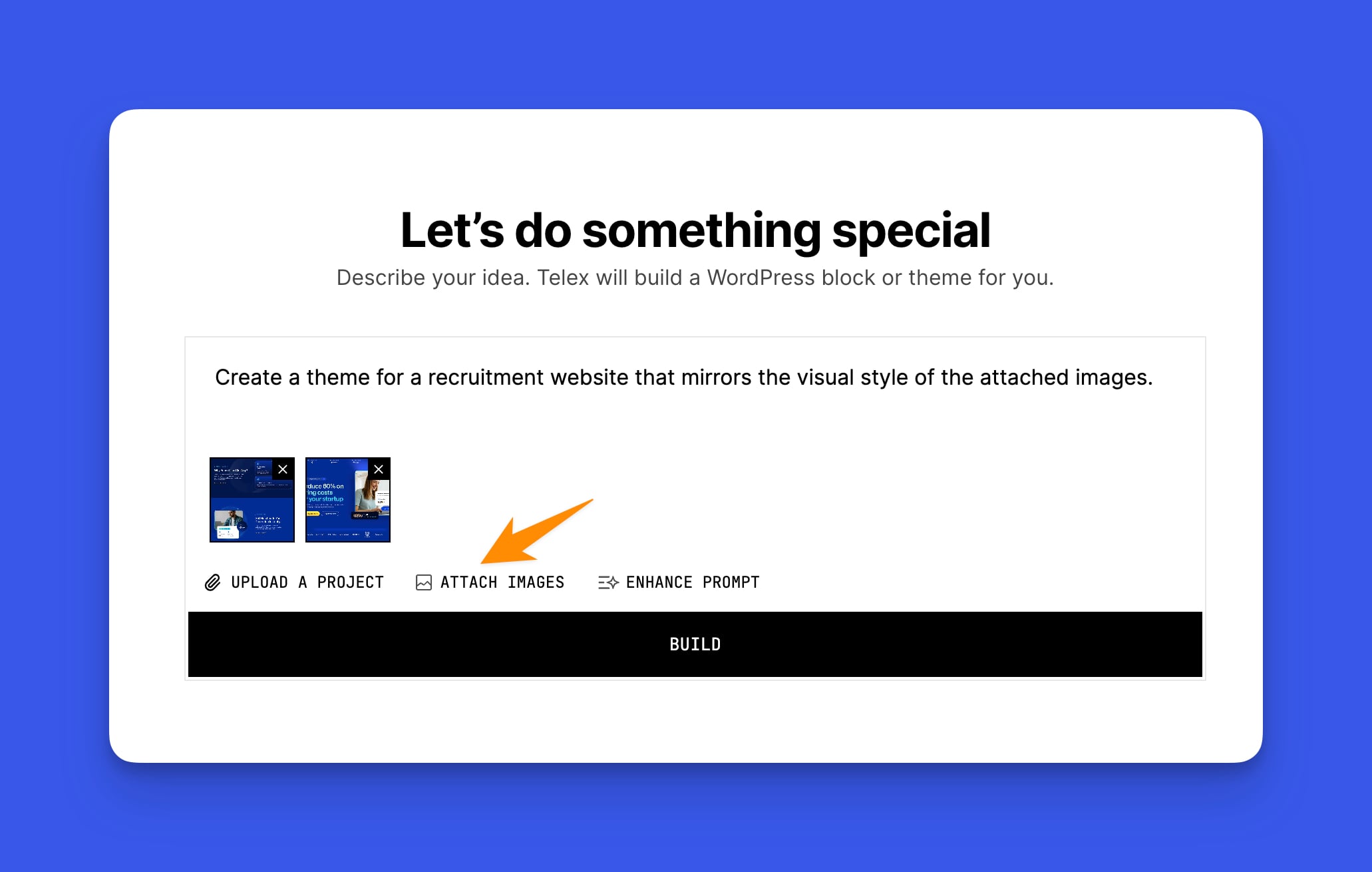
For users who already have a clear brand direction, this is usually the quickest way to generate a result that matches their original vision.
Step 4: Choose from the four variations Telex generates
After this step, Telex will generate four different design variations for you to review. Each version will interpret your prompt slightly differently, resulting in variations in typography, spacing, layout, and overall visual style.
Choose the version that best matches your brand identity, target audience, and the impression you want your website to convey. Keep in mind that this is just the starting point, and you can continue refining the design afterward.
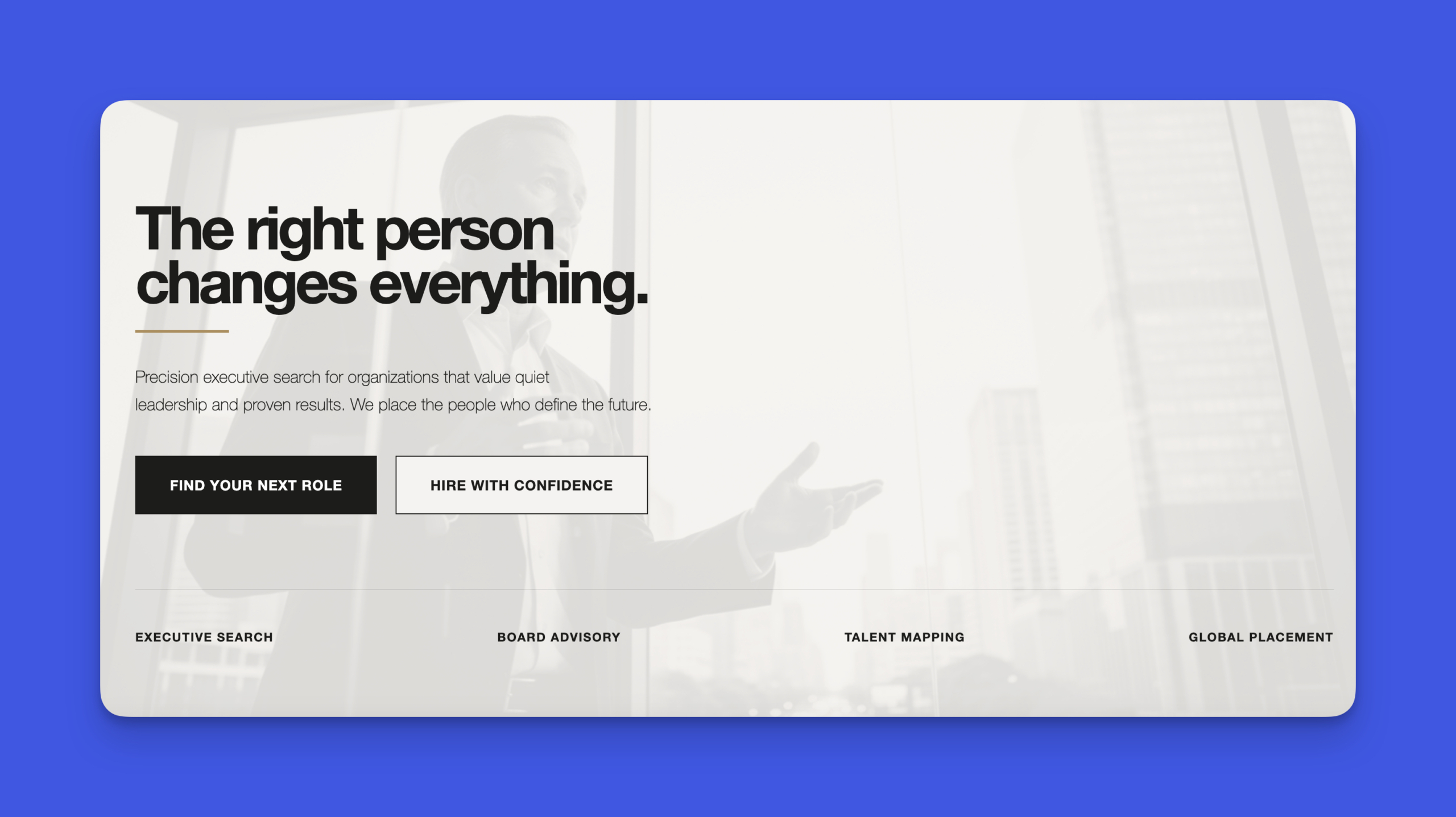
For a business landing page, it’s important to evaluate how each variation handles visual hierarchy and readability. Start with the version that communicates the value proposition most clearly and naturally directs attention toward the call-to-action.
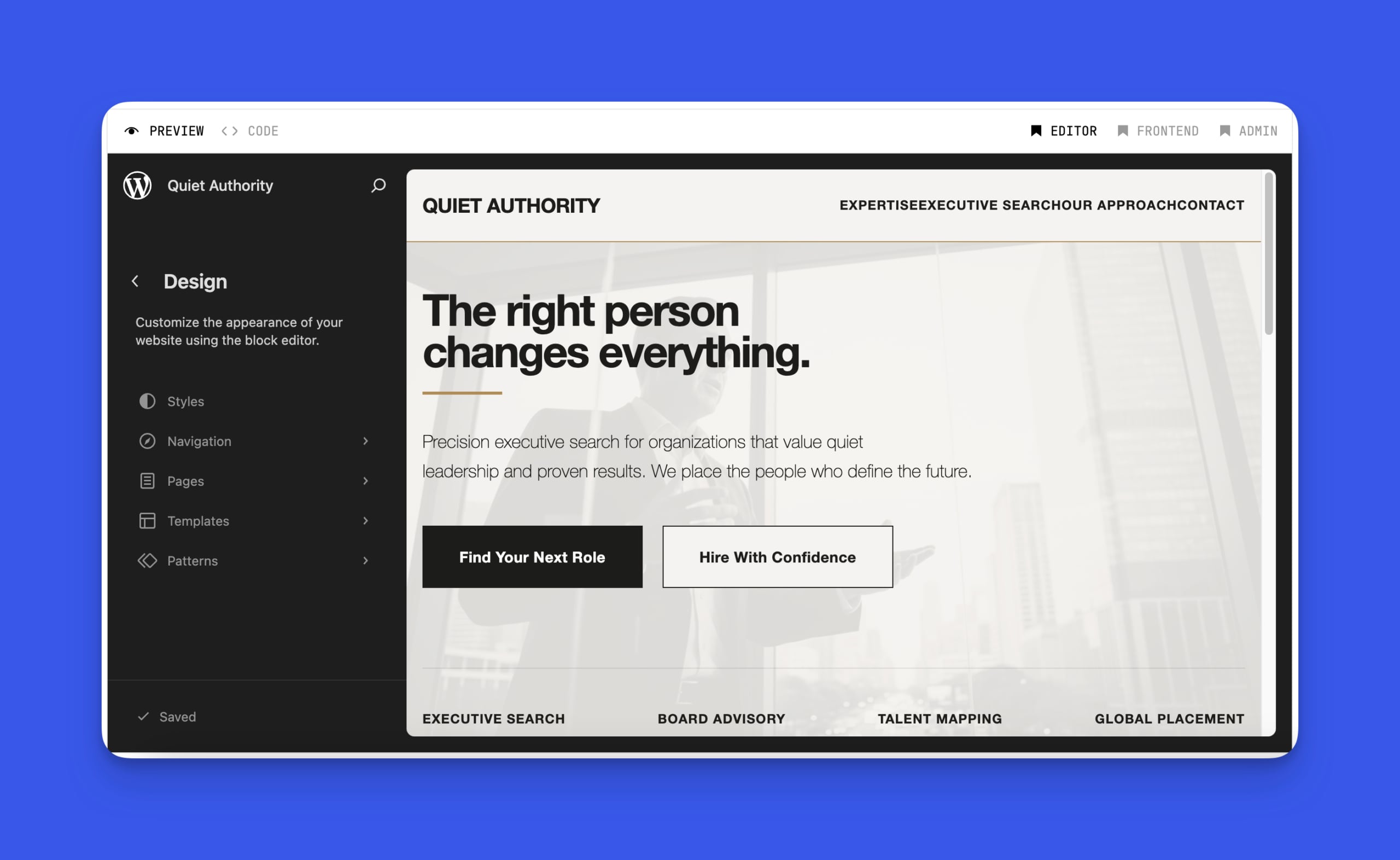
For our recruitment website example, we selected this theme:
Step 5: Build out the remaining templates
From this point, you can ask Telex to generate additional templates for different page types. By default, Telex starts with a single template that WordPress applies to all pages, but a fully functional theme requires separate layouts for different types of content.
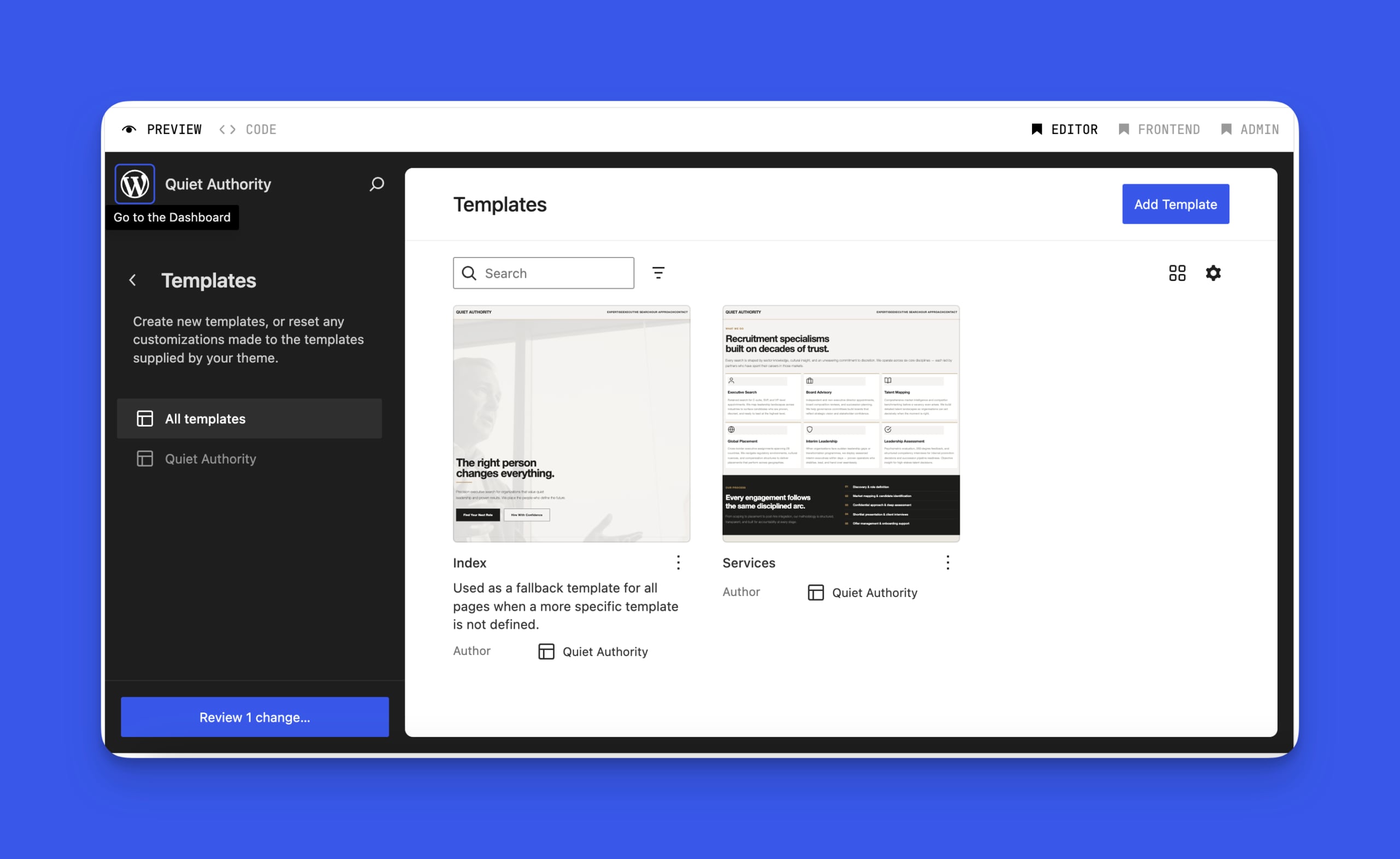
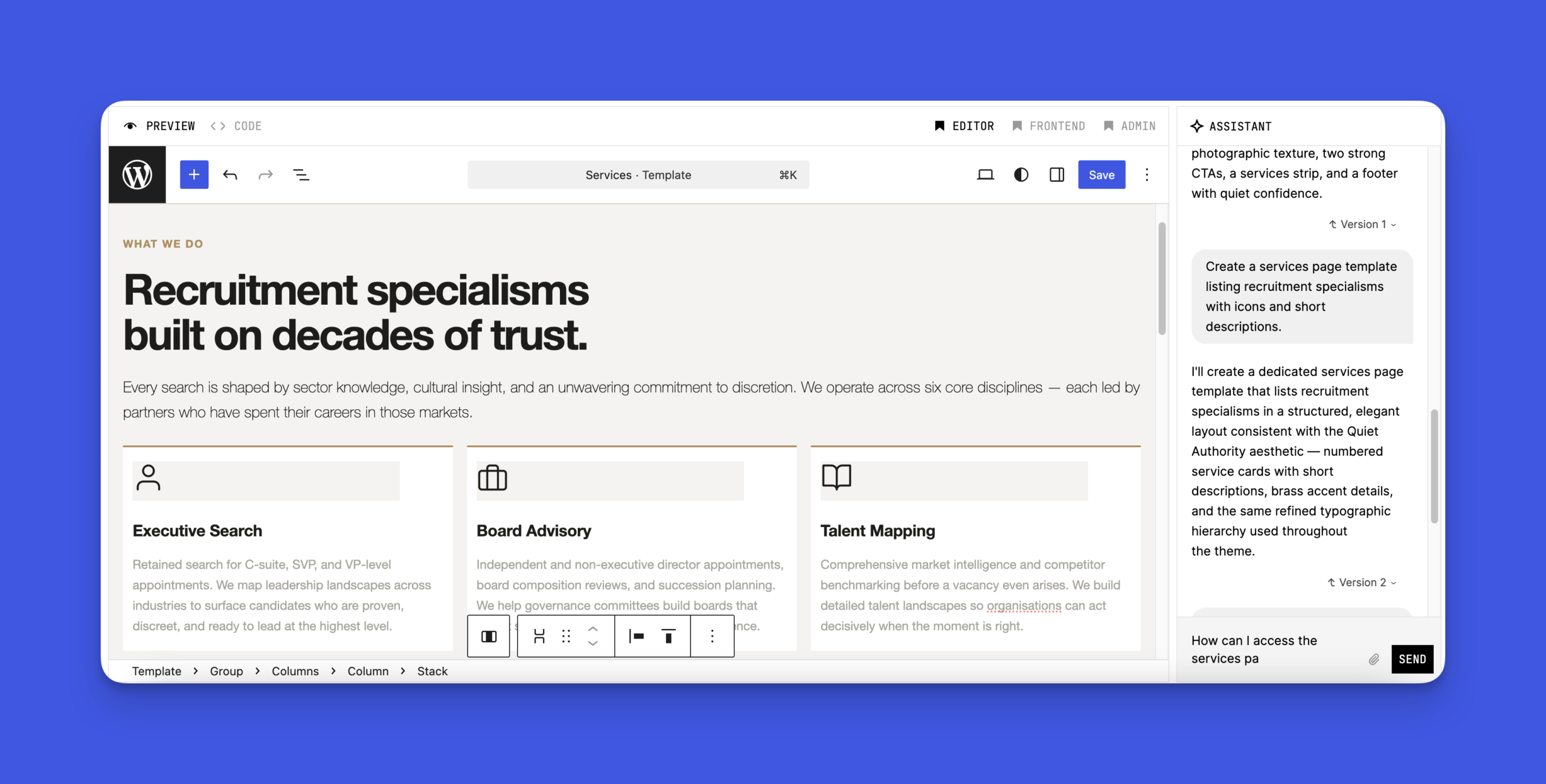
For a recruitment consultancy website, you can ask Telex to generate specific templates for each key page type, such as:
- Services Page Template: Create a layout that uses icons and concise descriptions to present each service clearly and professionally.
- About Page Template: Include sections for company background, team bio, images, and trust indicators like years of experience or client success metrics.
- Contact Page Template: Design a page with a lead capture form and clear next steps to guide visitors toward getting in touch.
- Job Listings Archive Template: Display available roles with key details such as location, salary range, and an easy-to-find apply button.
Each new template helps expand your theme while maintaining the visual consistency and design direction established from the beginning.
Step 6: Refine your theme until it fits your vision
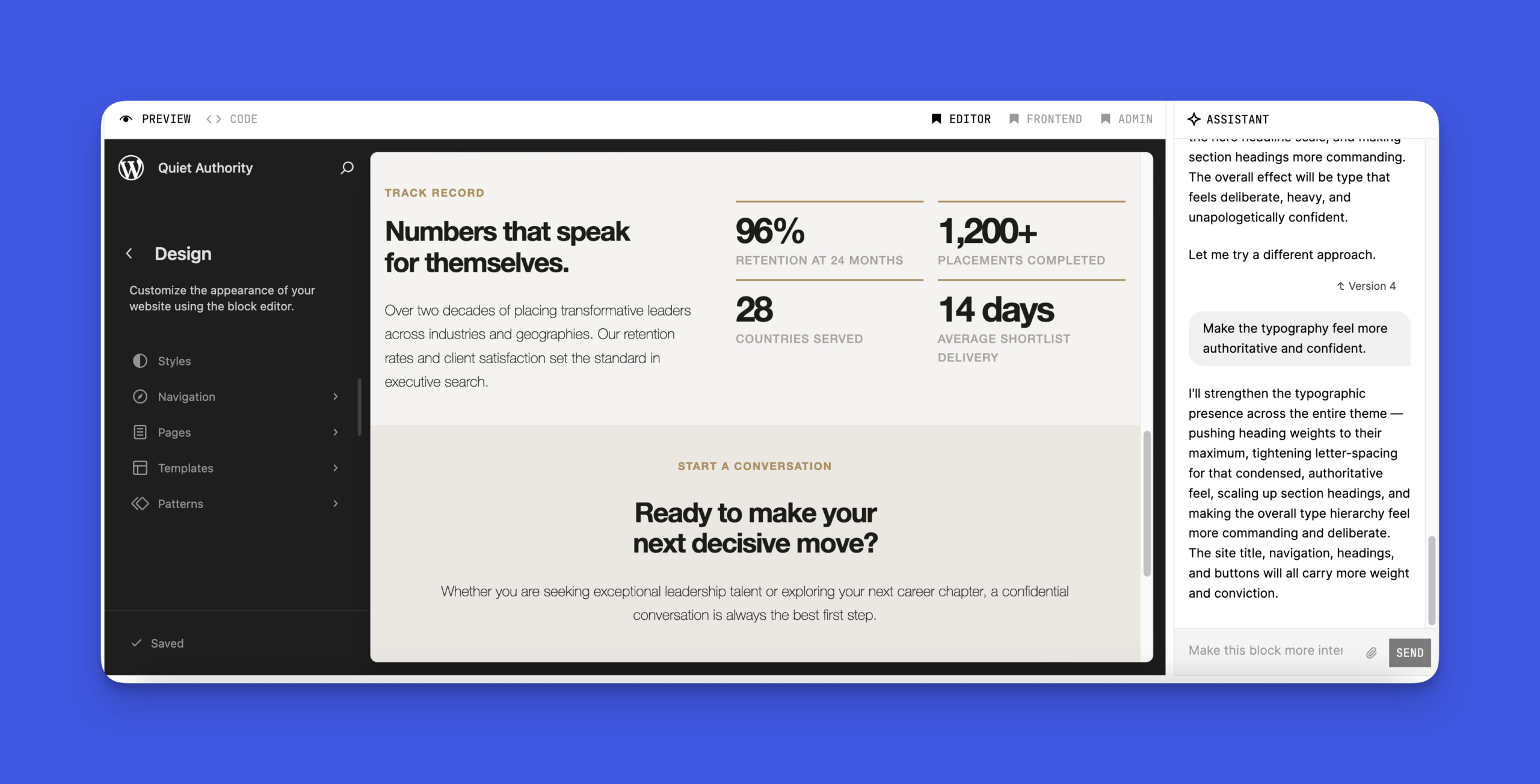
Once the overall theme structure is ready, the next step is to refine the details such as typography, color palette, spacing, mobile layout, dark mode, and other visual elements. This stage is about improving the design so it better matches your brand and user experience goals.
For a recruitment website, for instance, you may want typography that feels more professional and authoritative, or you might need to optimize the mobile layout since many visitors are likely to browse job listings on their phones.
Step 7: Download the ZIP and install it
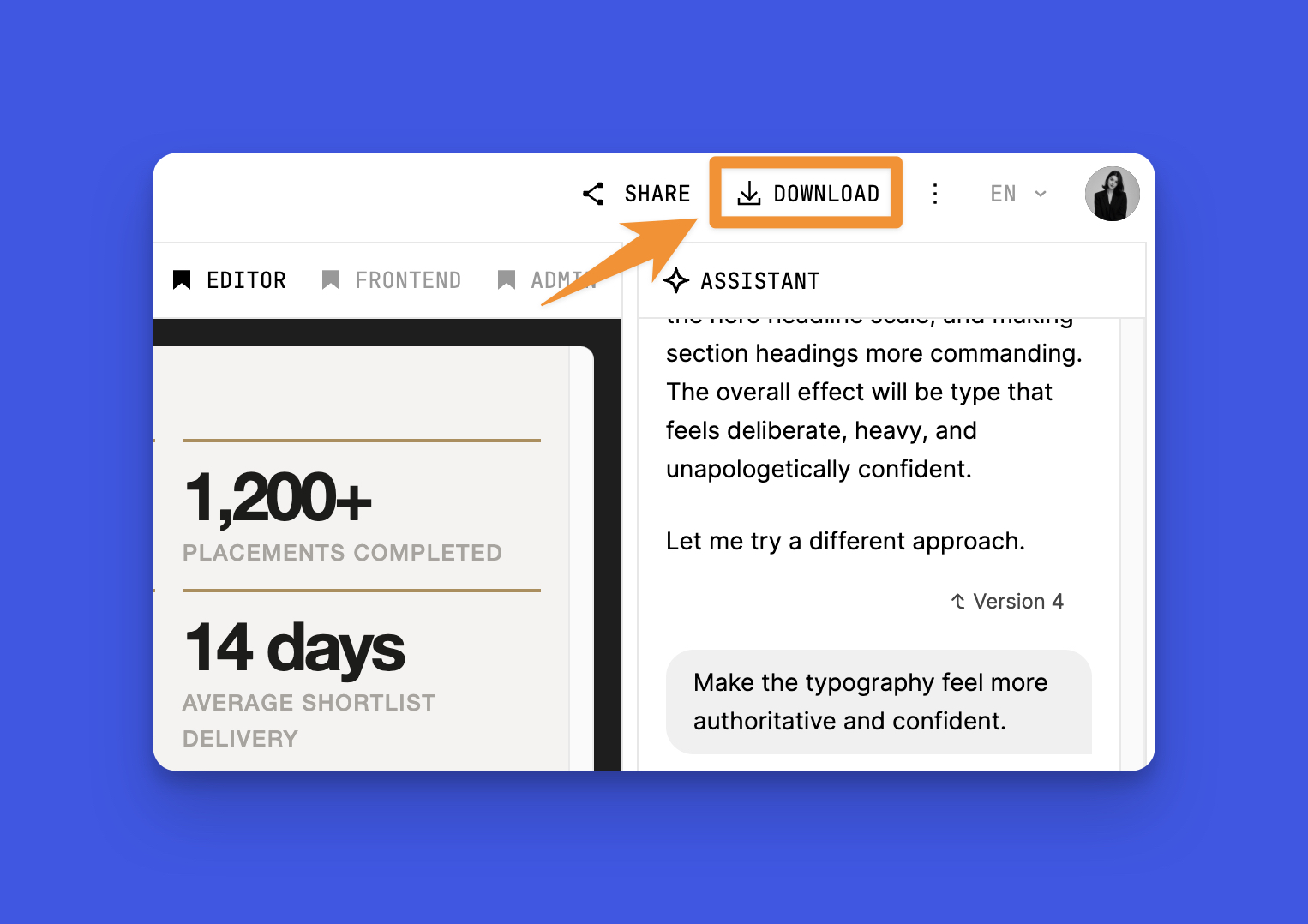
Finally, click the Download button and Telex will package your theme into a ZIP file that includes all templates, styles, the theme.json file, and layout configurations.
After downloading the ZIP file, go to your WordPress dashboard and navigate to Appearance → Themes → Add New → Upload Theme. Then select the ZIP file, install it, and activate the theme.
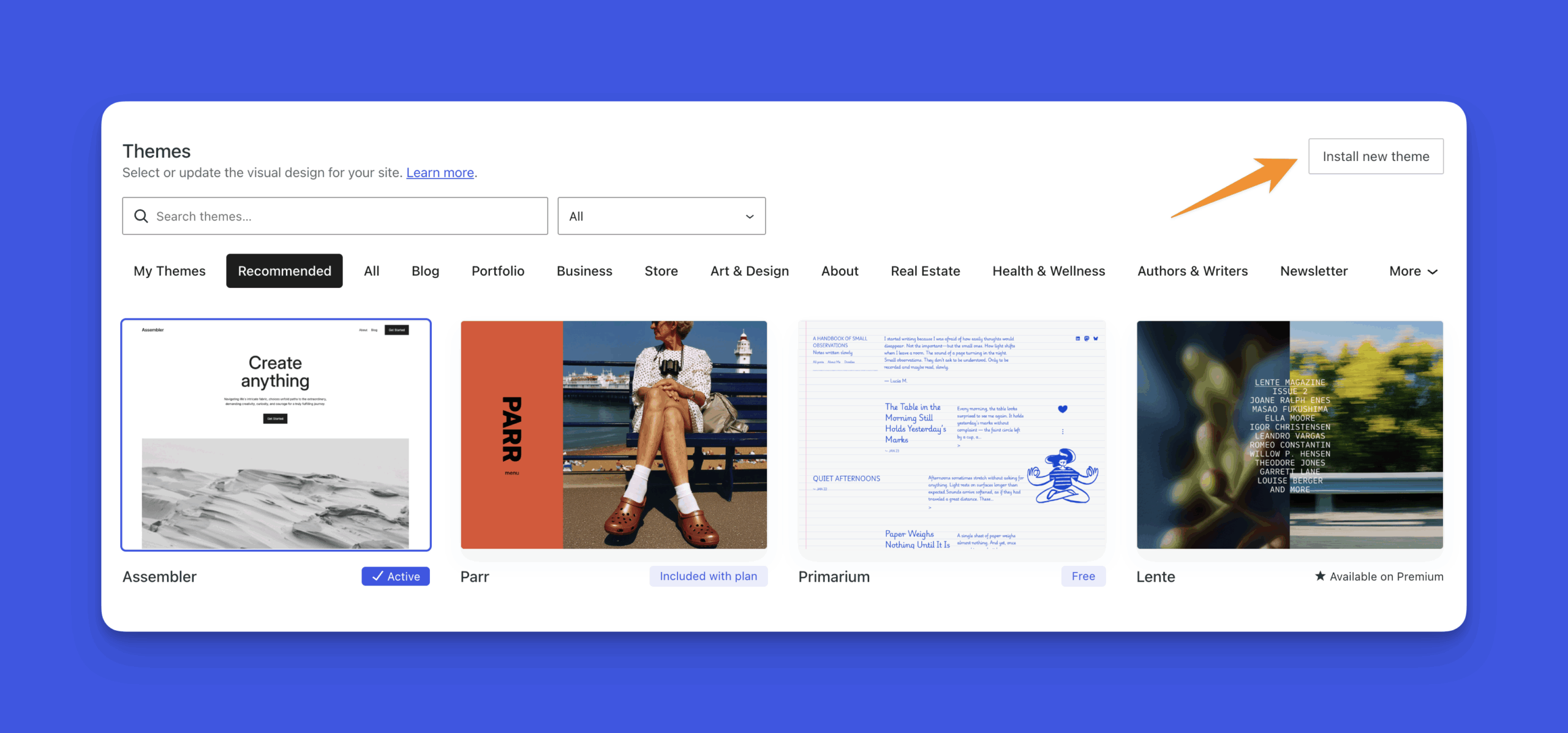
As soon as you activate the theme, WordPress automatically applies the new design to your existing pages and content. If you already have pages like Services, About, or job listings, they will be displayed using the new layout without requiring any manual adjustments.
Bonus step: Test your theme on a staging site first
Before activating a new theme on a live website, it’s best to test it in a safe environment first. For example, WordPress Playground allows you to test your theme directly in the browser without installing WordPress locally or setting up a server.
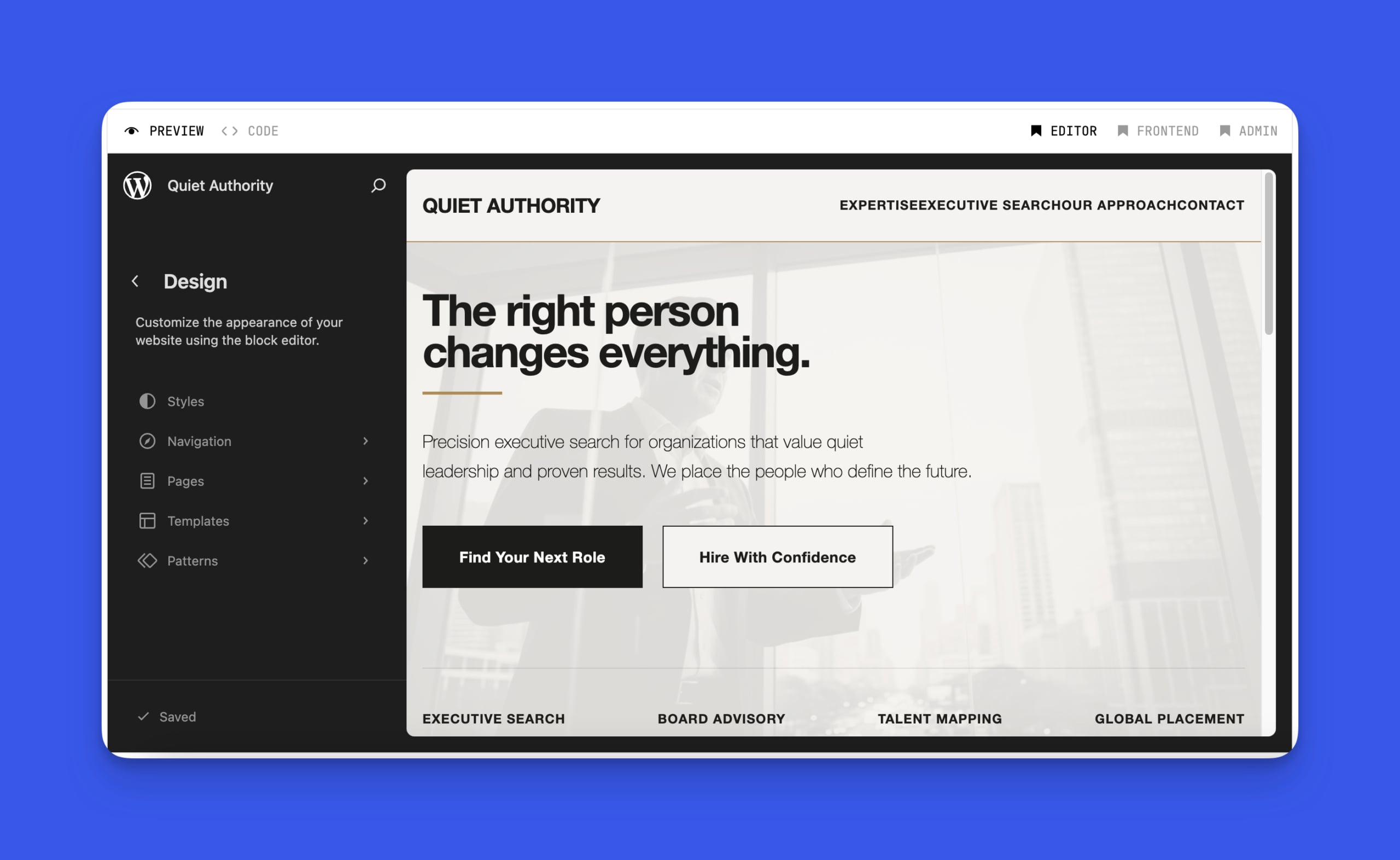
You can also try WordPress Studio, a free desktop tool that allows you to run a full local WordPress environment on your computer without setting up a server manually.
If you’re looking for design inspiration before generating your WordPress theme with Telex, explore our guide to the Top 10 WordPress E-Commerce Templates for Electronics & Gadgets to discover practical design ideas and features for your online store.
Frequently Asked Questions for Generate a WordPress Theme with Telex
1. Do I need coding skills to use Telex?
No, you don’t need advanced coding skills to use Telex. The tool supports no-code and low-code workflows, allowing you to create WordPress themes using simple prompts in natural language.
2. Can I customize the generated WordPress theme?
Yes, the generated theme can be fully customized. You can modify layouts, colors, typography, and even edit the code if needed to match your specific requirements.
3. Can beginners use Telex?
Yes, Telex is designed to be beginner-friendly. Its intuitive interface and prompt-based approach make it easy for users with little to no technical experience to build WordPress themes.
4. Is Telex better than traditional theme development?
Telex is faster and more efficient for prototyping and basic theme development. However, for highly complex projects, traditional development may still be necessary for advanced customization and optimization.
5. How long does it take to generate a WordPress theme with Telex?
With Telex, a basic WordPress theme can be generated in just a few minutes, depending on the level of detail in your prompt and the complexity of the design.
Conclusion
Generating a WordPress theme with Telex makes it possible to turn ideas into functional website designs much faster than traditional development. From writing prompts and generating layouts to creating templates and exporting the final theme, the entire process can be completed in a structured and efficient workflow. This approach is especially useful for rapid prototyping, building custom themes, and experimenting with new website designs.
If you’re looking for professional WordPress development, customization, or website design services, Arestós provides WordPress solutions tailored to your business needs, from theme development and performance optimization to full website design and maintenance.
Contact us today to build a faster, smarter, and more scalable WordPress website for your business.
Subscribe to our newsletter!
Get updated to
the lastest IT trends
Related Posts
Update the latest technology trends for your business