Back to featured insights
10 Types of WordPress Sites to build with AI
Types of WordPress Sites to build with AI are expanding rapidly, making it easier than ever to turn ideas into real websites. With just a few prompts, you can create, refine, and launch a site in minutes instead of weeks, and this guide shows you how.
Table of Content
Share
Types of WordPress sites to build with AI are more diverse than ever, allowing you to turn almost any idea into a functional website. By combining WordPress with AI, you can significantly speed up development, reduce costs, and simplify the entire process.
This approach is ideal for beginners, creators, marketers, and businesses looking to launch websites quickly without heavy technical skills. In this guide, you’ll discover 10 types of WordPress sites you can build with AI, along with examples, prompts, and key features for each.
Key Benefits of Building WordPress Sites with AI
Building WordPress websites with AI shifts a traditionally time-consuming process into a streamlined workflow that can produce a functional site in a matter of minutes.
By combining WordPress flexibility with intelligent automation, it becomes possible to improve speed, reduce costs, and deliver more personalized user experiences.
Faster Development and Workflow Efficiency
- Instant site generation: AI-powered builders can create complete website structures, including multiple pages and initial content, within seconds.
- Automation of repetitive tasks: Coding assistants help handle routine development work such as setting up templates, reducing manual effort.
- Rapid prototyping: Early versions of websites can be generated quickly, making it easier to test ideas and gather feedback before full development.
Integrated Content and Media Creation
- AI-assisted copywriting: Content such as blog posts, product descriptions, and landing page text can be generated directly inside the editor.
- Visual generation: Images, banners, and basic design assets can be created using prompts, minimizing the need for external resources.
- Multilingual capabilities: AI tools can translate and localize content efficiently while maintaining tone and structure.
Smarter SEO and Performance Optimization
- Real-time SEO suggestions: AI tools analyze content and recommend keywords, meta tags, and improvements to boost search visibility.
- Automated performance improvements: Optimization processes such as image compression and caching can be handled intelligently to enhance site speed.
Improved Security and Maintenance
- Advanced threat detection: AI systems can identify unusual activity patterns and respond proactively to potential security risks.
- Reduced maintenance workload: Issues like broken links or performance bottlenecks can be detected and resolved with minimal manual intervention.
Enhanced and Personalized User Experience
- Dynamic personalization: Content and layout can adapt based on user behavior, preferences, or location.
- 24/7 automated support: AI chatbots can respond to user inquiries instantly, improving engagement and lead generation.
Key criteria for picking the right AI website builder for WordPress
Choosing the right AI website builder plays a crucial role in ensuring your WordPress site is efficient, scalable, and easy to manage.
- Ease of use: Should offer an intuitive interface with minimal learning curve for beginners.
- AI capabilities: Must support content generation, layout creation, and design suggestions.
- Customization flexibility: Allow easy adjustments to layouts, styles, and functionalities.
- Compatibility with WordPress: Should integrate smoothly with themes, plugins, and the WordPress editor.
- Performance optimization: Able to generate fast-loading pages with clean code structure.
- SEO support: Provide built-in tools or suggestions for on-page SEO improvements.
- Scalability: Suitable for both small websites and larger, more complex projects.
- Integration options: Support third-party tools such as CRM, analytics, or marketing platforms.
- Pricing and value: Offer a good balance between cost and available features.
- Support and updates: Regular updates and reliable customer support are essential.
You can also consider using a WordPress AI Assistant—a built-in feature within WordPress that helps streamline the entire website creation process and improve overall efficiency.
10 Types of WordPress Sites You Can Build with AI
No longer limited to blogging, WordPress has evolved into a flexible platform capable of powering nearly any type of website—from personal brands and portfolios to membership platforms, news portals, and full-scale business sites.
With the rise of AI-powered website builders, the creation process has become significantly more efficient. A few simple text prompts can now transform ideas into fully functional websites tailored to different purposes.
To explore this potential, 15 different types of websites were built using this AI-driven approach.
Portfolio website
Designed to showcase creative work, a portfolio website can highlight writing, photography, design, video production, or other skills.
Useful for sharing with clients, it helps demonstrate expertise and present selected work samples in a professional way.
Below is the prompt you can use with an AI website builder to create a portfolio site:
“Build a portfolio website named ‘Rochi’s Portfolio’ to showcase long-form writing services tailored for tech companies. Include five main sections: Introduction, Work Samples, Testimonials, Process, and Contact. Apply a clean, minimal layout with warm color tones and maintain a friendly, approachable style throughout the site.”
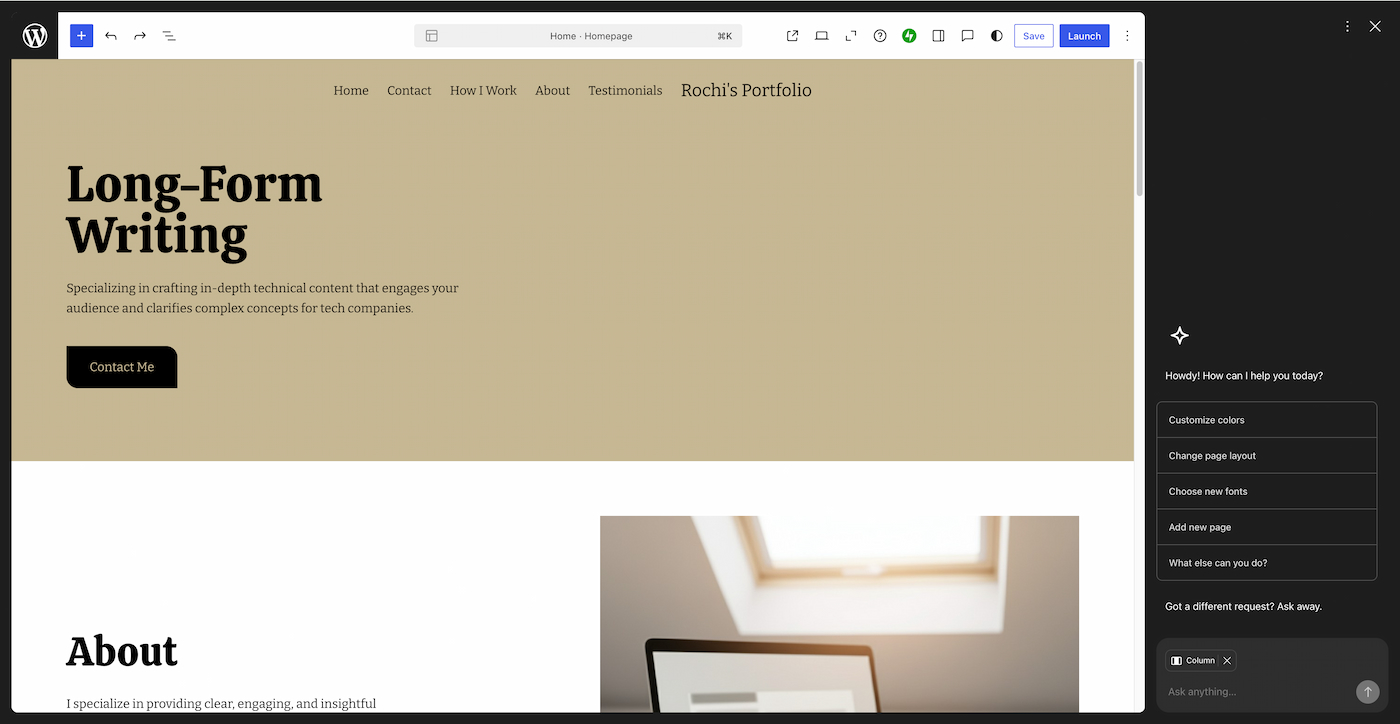
Within just a few minutes, a clean and functional portfolio website can be generated and further refined through AI chat by adding content, examples, and custom elements.
Key pages and features of a portfolio website
- Work samples: Include a dedicated page to present completed projects, or highlight selected pieces within a section on a one-page layout to showcase the best work.
- Service details: Add a section or page outlining available services, including timelines, workflow, and pricing (if appropriate). This helps potential clients understand what to expect when working together.
- Contact methods: Provide clear ways for visitors to get in touch. This can include an email address or, more effectively, a contact form that allows users to submit inquiries directly without leaving the site.
Resume/CV website
A resume website acts as a digital version of your CV, presenting your experience in a more engaging and interactive format. It also gives you greater flexibility to creatively highlight your skills and achievements.
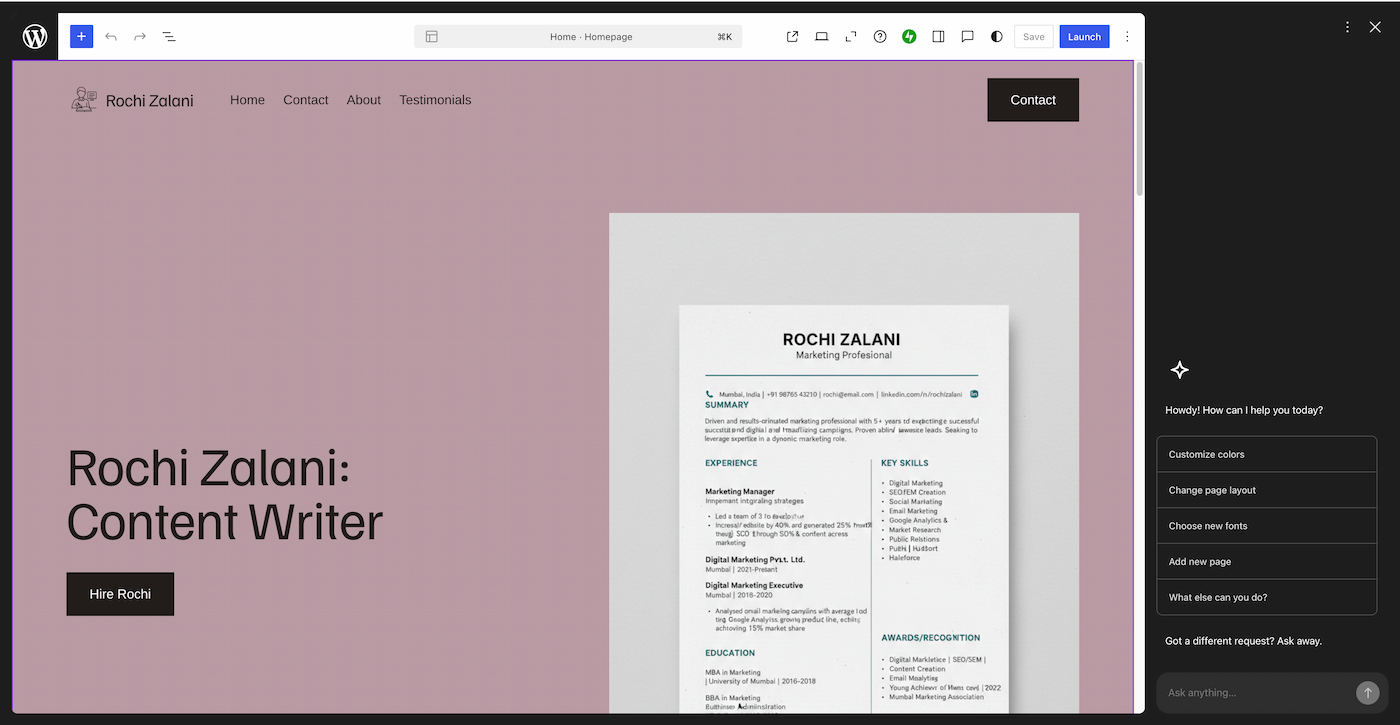
Below is the prompt used in the WordPress.com AI website builder to create a resume site:
“Create a resume website for Rochi Zalani to highlight my skills as a content writer. Use a clean, professional, and easy-to-navigate design. The site should include four main pages: Home, About, Testimonials, and Contact.”
Key pages and features of a resume/CV website
- About page: Acts as an extension of your resume while giving more space to showcase personality beyond work experience. A simple approach works best—share your interests, background, and professional journey without overcomplicating it.
- Testimonials and endorsements: Include short recommendations from previous employers or clients to highlight your strengths. These can be placed on a dedicated page or integrated into the homepage to build credibility and trust.
- Contact methods: Make it easy for potential employers to get in touch by adding a contact form or displaying an email address directly on the homepage.
Personal website
A personal website can take many forms—from a hobby blog and creative space to a journal or a hub for side projects. It serves as your own space online, making it easier to share ideas and connect with like-minded people.
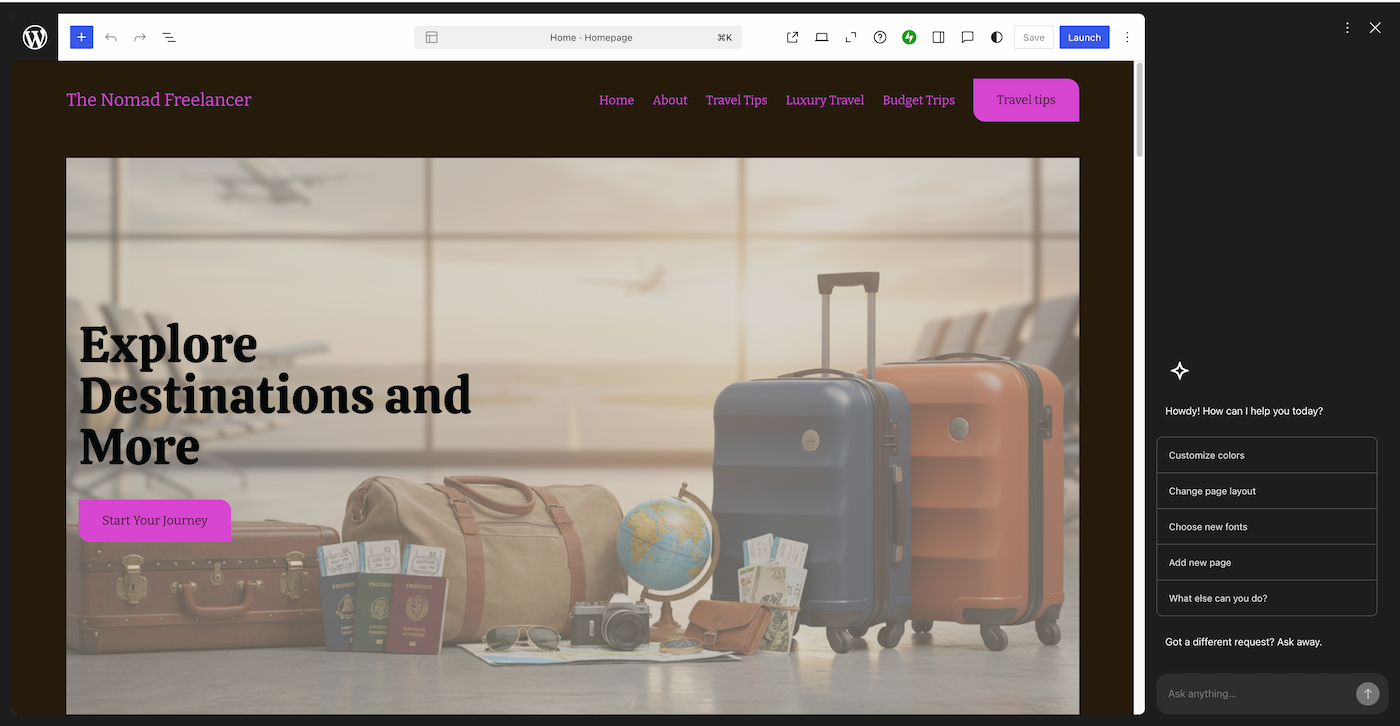
For this example, the goal was to build a personal website focused on documenting travel experiences and sharing recommendations.
Below is the prompt used to create the site:
“Build a personal website called ‘The Nomad Freelancer’ to share travel experiences and recommendations. Include five main pages: Home, About, Budget Trips, Luxury Travel, and Travel Tips. Use a bright and vibrant design style.”
Key pages and features of a personal website
- About page: Provides context about who you are and what your website is about, helping visitors understand what to expect. A personal touch—such as your motivation or story behind the site—can make the content more engaging.
- Social links: Encourage visitors to stay connected beyond the website by linking to your social media profiles. Integrating social icons makes it easy to access and follow your updates across platforms.
Blogging website
A blogging website can either support a broader business or serve as a standalone personal project.
It can revolve around personal interests—similar to a personal site—or focus on a specific niche to grow an audience and generate income through ads, sponsored posts, affiliate marketing, and more.
For this example, the goal was to build a blog centered on influencer marketing.
Below is the prompt used to create the site:
“Create a website called ‘Influencing Right’ designed for influencer marketers who want expert tips to improve their creator marketing strategies. Include five key pages: Home, Research Reports, Sponsored Campaigns, Free Strategy Template, and About. Use a warm and approachable tone throughout the site.”
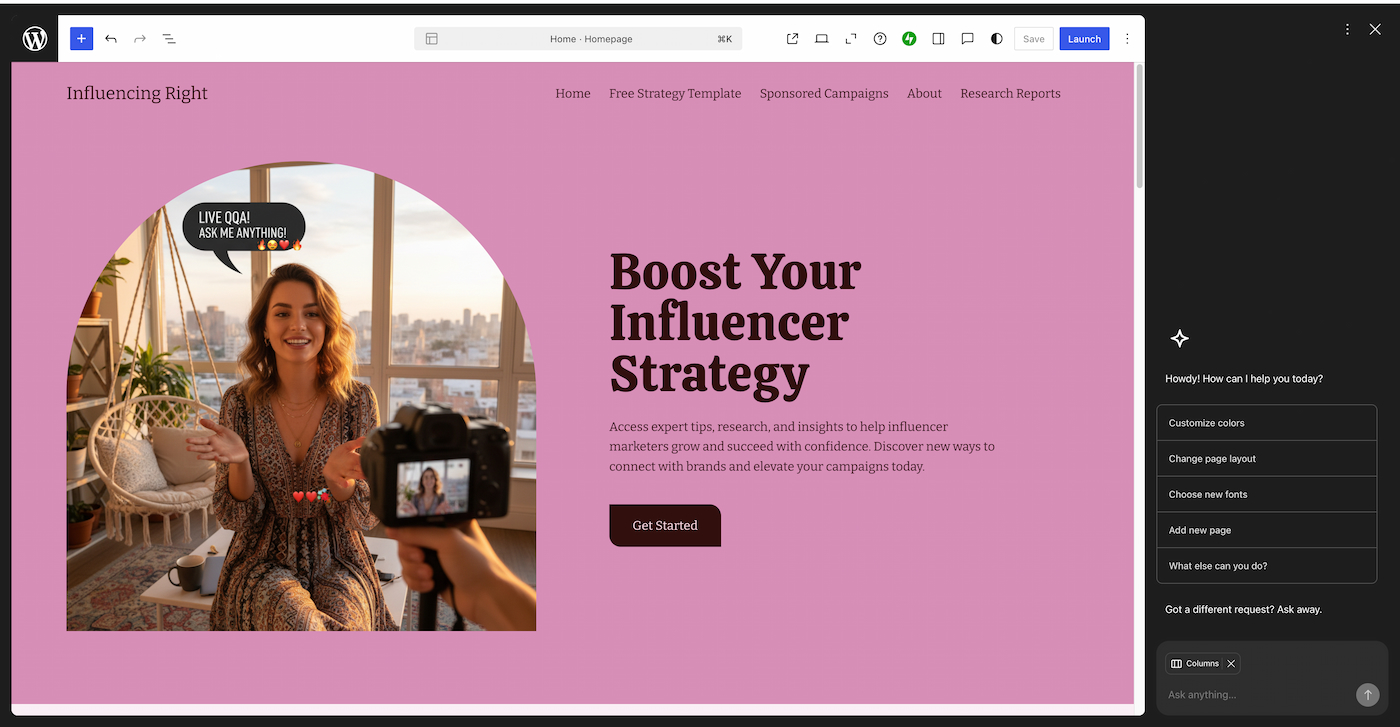
Key pages and features of a blogging website
- Category pages: Organize content into clear topics to make navigation easier. For example, a productivity blog can group posts into areas like time management, tools, or organization tips, helping readers quickly find relevant content.
- Lead magnet page: Offer a free resource to encourage visitors to share their email addresses. This helps build an audience and maintain ongoing engagement with readers.
- About page: Provide context about the purpose of the blog and highlight relevant experience or expertise. This builds credibility and strengthens trust with your audience.
Business website
A business website can be used to sell a wide range of offerings, including digital products, physical goods, or services.
Having a website allows potential customers to learn more about your business, what you offer, and how you operate. It also helps build credibility and strengthen your brand presence online.
For this example, the goal was to create a website for a cleaning service business.
Below is the prompt used to build the site:
“Build a multi-page website for a cleaning service business. Include the following pages: Home, About, Services, Pricing, Testimonials, and Contact. Use a clean, modern design with blue tones and keep the content simple, professional, and approachable.”

Key pages and features of a business website
- Appointment booking: Allow customers to schedule services directly through the website by integrating a booking system. This makes it easier to manage availability and streamline the booking process.
- FAQ section: Include a dedicated area to address common customer questions. This helps clarify policies, reduce confusion, and improve overall user experience.
- Business details: Provide essential information about products or services based on the business model. For physical locations, include details such as business hours and map location to help customers find and visit easily.
Landing page
A landing page is a single, focused page built to drive one specific action—such as capturing emails, promoting a product, booking a call, launching a new offer, or supporting paid campaigns.
This type of page works best with a clean, distraction-free layout that guides visitors directly toward a single call-to-action.
For this example, the goal was to create a high-converting landing page.
Below is the prompt used to build it:
“Build a high-converting landing page for a digital product called ‘Influencer Briefs,’ designed as ready-to-use templates for marketers. The page should feature a compelling hero section with a centered headline and a single CTA (‘Download the template’), followed by sections for problem/solution, included features, testimonials, and FAQs. Use a clean, modern layout with bold accents and minimal distractions to keep the focus on conversion.”
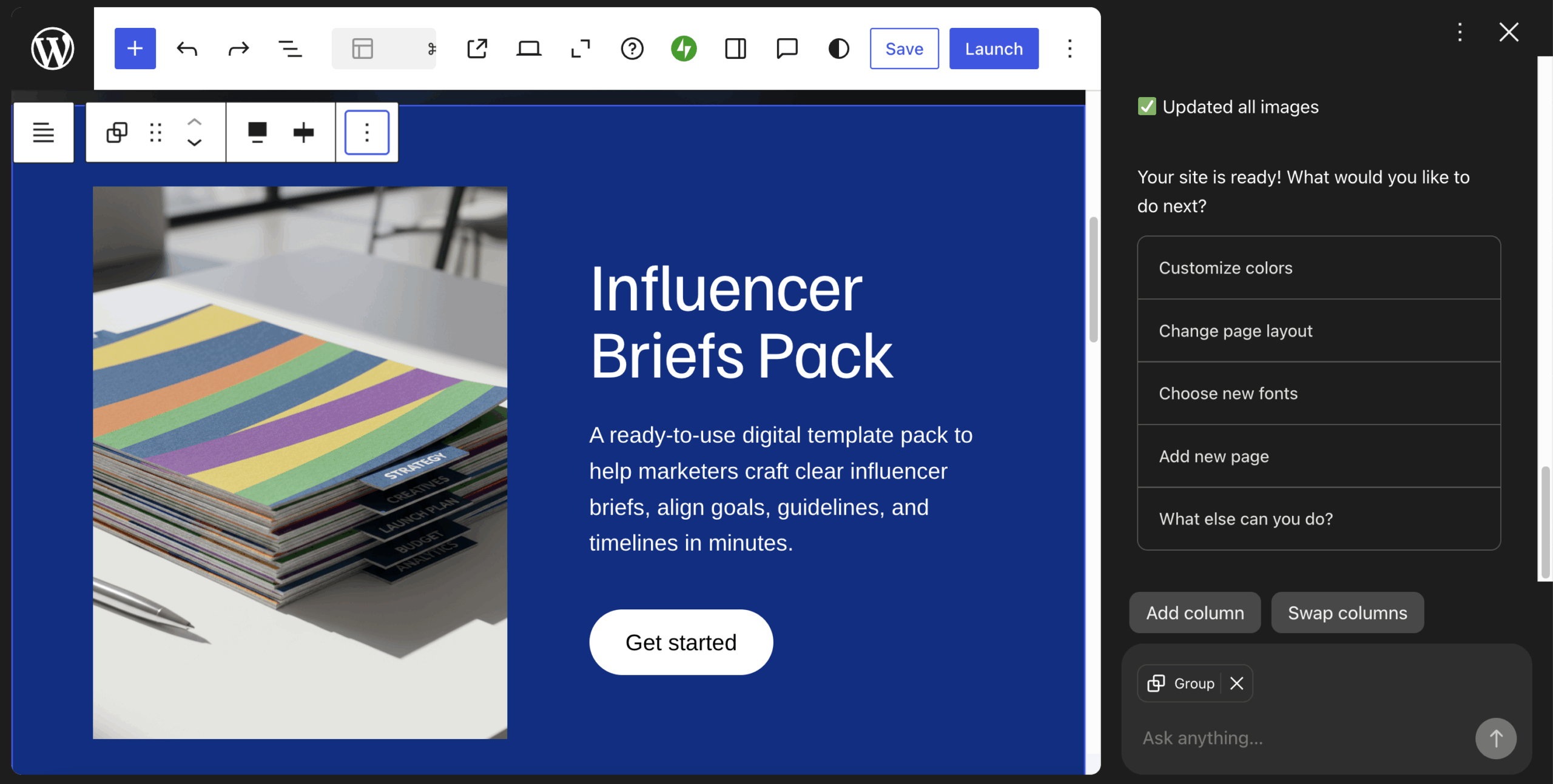
Key pages and features of a landing page
- Hero section: Focus on a clear, centered headline paired with a single, strong CTA. A short value statement should immediately communicate what the visitor will gain.
- Offer overview + social proof: Present the core offer in a concise way by combining the problem, solution, and key benefits. Reinforce credibility with testimonials, reviews, or recognizable logos.
- Conversion elements: Reinforce the main action with a simple form or repeated CTA near the bottom. Add a short FAQ section to address common concerns and reduce hesitation.
Nonprofit website
A nonprofit website supports organizations in showcasing their mission, raising funds, recruiting volunteers, and sharing their story.
Having a dedicated site also makes it easier to manage events and stay connected with the community.
For this example, the goal was to build a nonprofit website for an educational organization.
Below is the prompt used to create the site:
“Build a modern and uplifting website for an educational NGO named ‘Education for All.’ The design should feel optimistic, community-oriented, and trustworthy, using bright colors and warm imagery. Include key pages such as a homepage with a strong ‘Get involved’ CTA, along with Mission Statement, Programs, and Impact pages. The overall experience should emphasize credibility, community, and a clear sense of purpose.”
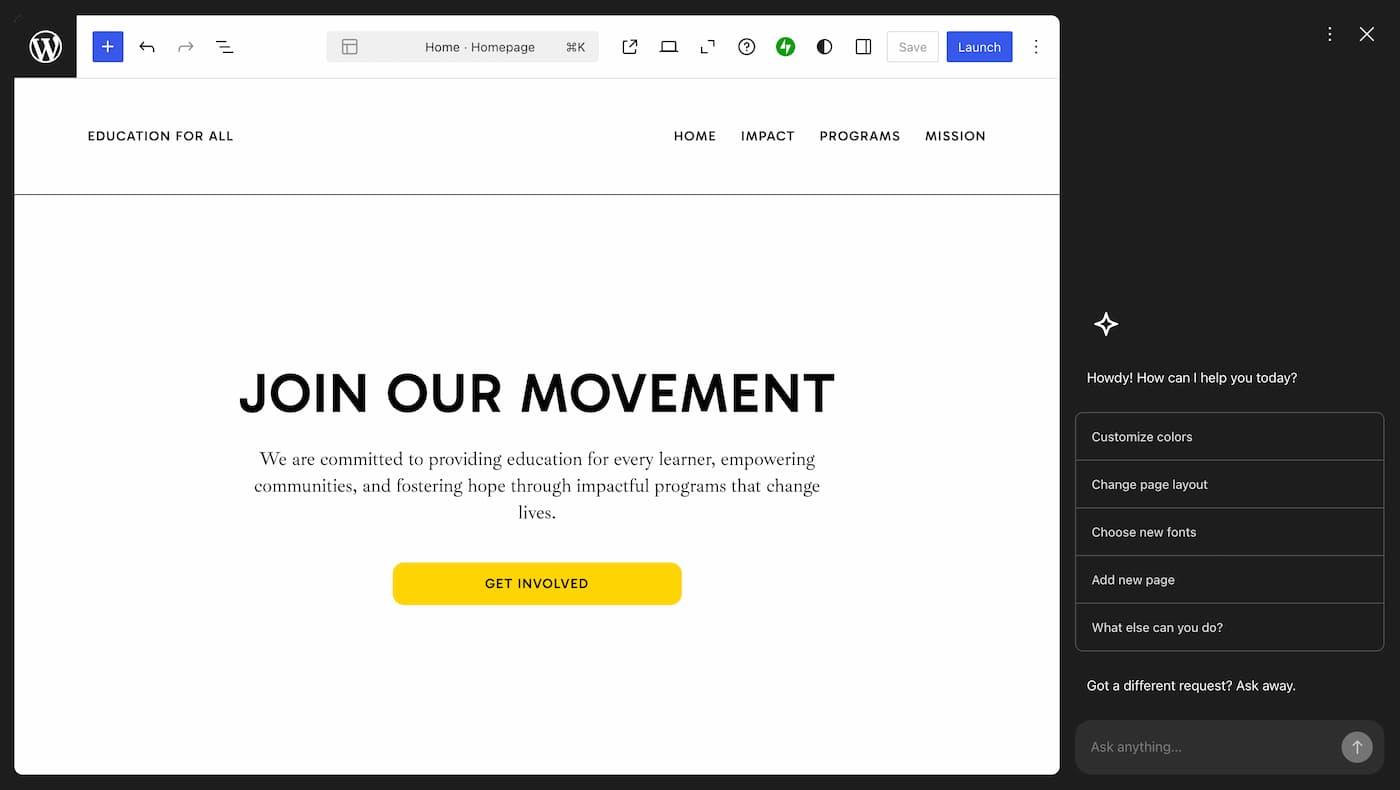
Key pages and features of a nonprofit website
- Programs and impact pages: Highlight ongoing initiatives and showcase the results of past campaigns. Clear visibility into impact can help build trust and encourage more support from donors and volunteers.
- Mission page: Explain the organization’s purpose, values, and background. Including information about the founders and team helps create a stronger emotional connection with visitors.
- Donate and volunteer page: Make it easy for visitors to contribute or get involved by providing simple options for donations and volunteer sign-ups directly on the site.
Membership or subscription website
A membership website is essential for managing subscriptions and delivering gated content to members.
It helps improve the overall user experience, simplifies content distribution, and encourages stronger community engagement.
For this example, the goal was to build a membership site for content marketers.
Below is the AI prompt used to create the site:
“Create a modern and professional membership website called ‘Content Marketer Collective,’ tailored for content marketers seeking ongoing training, ready-to-use templates, and community support. Include key pages such as Home, Membership Benefits, Pricing, Content Library, About, Support, and Login. The homepage should clearly highlight the core value—weekly resources, practical templates, live sessions, and expert feedback. Use a clean, editorial-style design with a strong focus on clarity and conversions.”
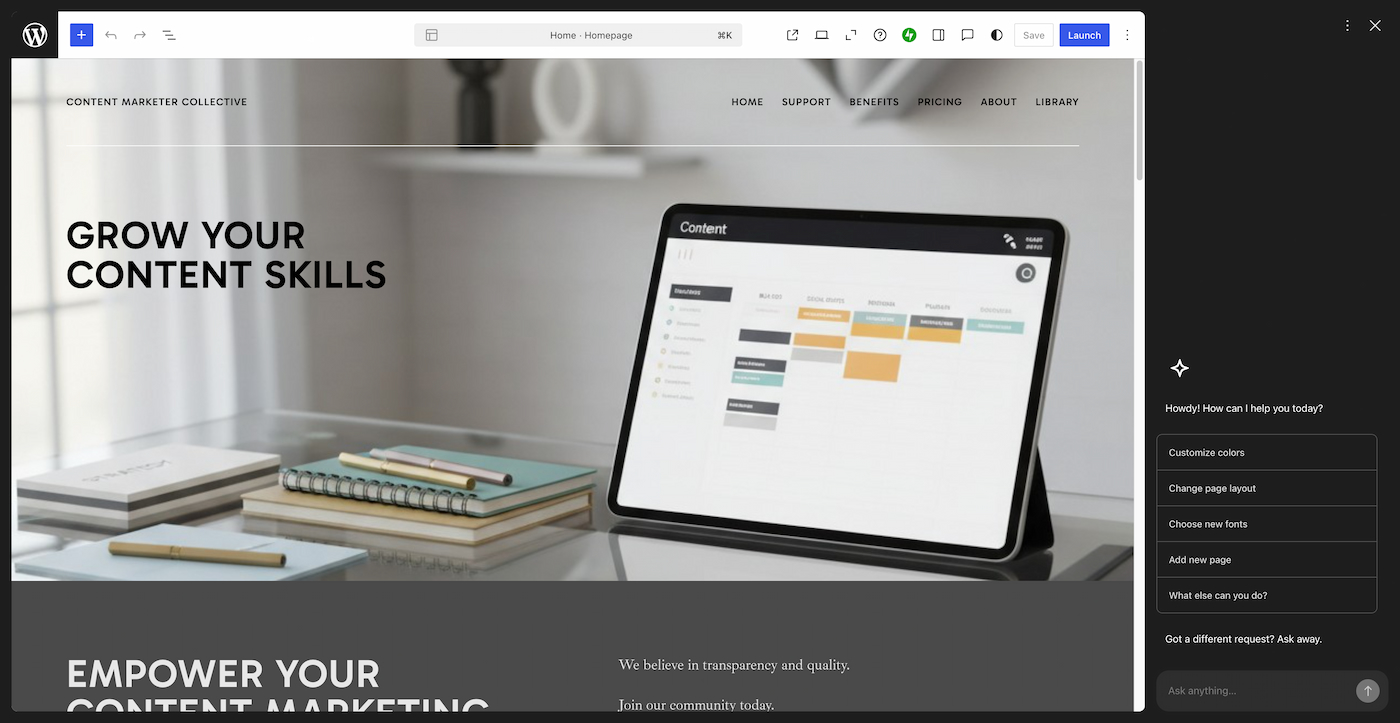
Key pages and features of a membership website
- “Who is it for” section: Clearly define the ideal audience to help visitors quickly understand if the membership is right for them. This also improves conversion by attracting more qualified users.
- Membership overview: Outline the core benefits and value members will receive. Including testimonials or feedback can strengthen trust and highlight real outcomes.
- Exclusive features and gated content: Provide premium content accessible only to members, such as resources, newsletters, or training materials. Structured access—like tiers, dashboards, and user accounts—can enhance the overall experience and perceived value.
Community forum website
A community forum website brings together people with shared interests in one place.
It enables discussions, knowledge sharing, updates, and collaboration among members.
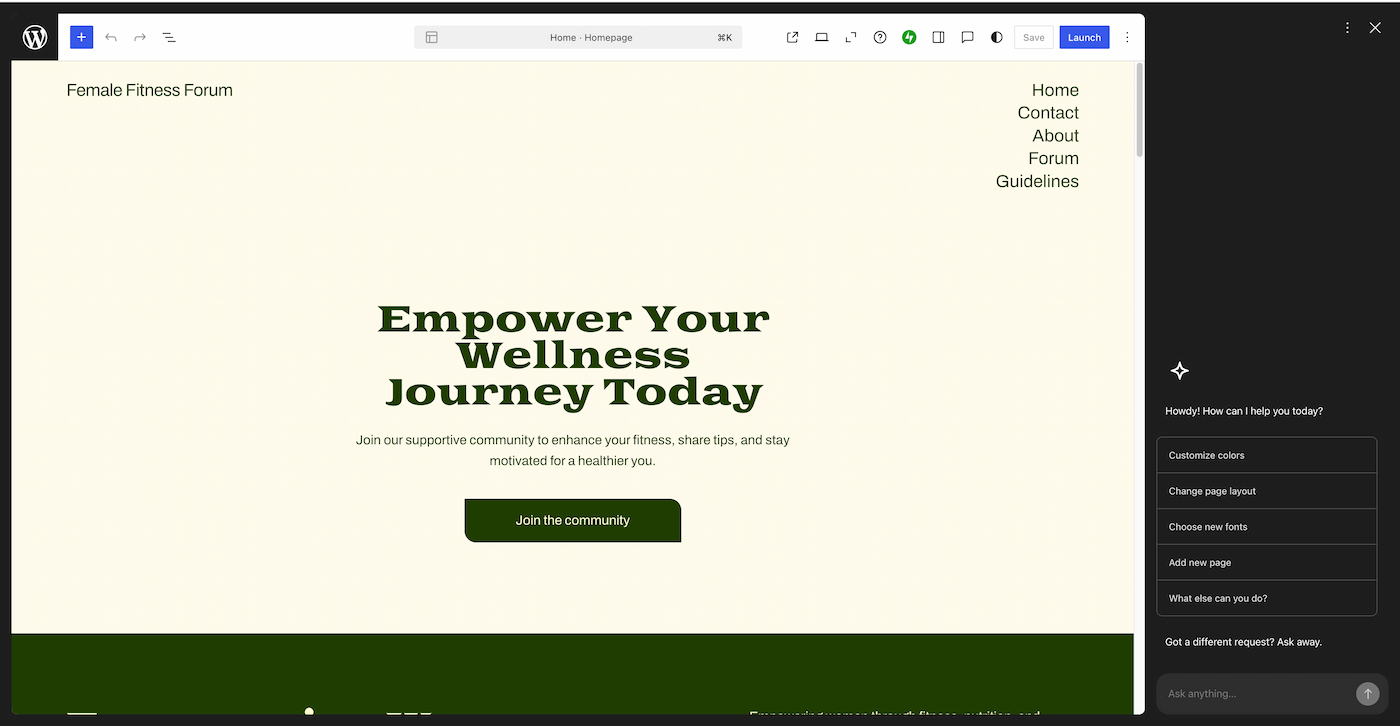
For this example, the goal was to build a community forum focused on fitness.
Below is the AI prompt used to create the site:
“Build a community forum website called ‘Female Fitness Forum,’ designed for women to share and discuss topics like workouts, nutrition, weight loss, strength training, and overall wellness. Include key pages such as Home, Forum, Guidelines, Contact, and About. The homepage should feature a clear CTA like ‘Join the Community.’ Use a clean, energetic design with intuitive navigation, mobile responsiveness, and essential features such as search, tags, upvotes, and notifications.”
Key pages and features of a community forum
- Community guidelines: Set clear rules and expectations for members to follow when joining and participating. Well-defined guidelines help maintain a respectful and positive environment.
- Interactive features: Encourage engagement through actions like liking, commenting, and sharing. Additional elements such as polls or upvotes can further boost participation and interaction.
- Discussion boards: Organize conversations into topic-based boards so members can easily find and join discussions that match their interests. This structure helps keep the community active and organized.
Author/book website
A well-crafted author website helps establish credibility with agents, media, and publishers. It also provides a direct way to connect with readers without depending on third-party platforms.
It can be used to promote events, share updates, and publish additional writing such as blog posts or short stories.
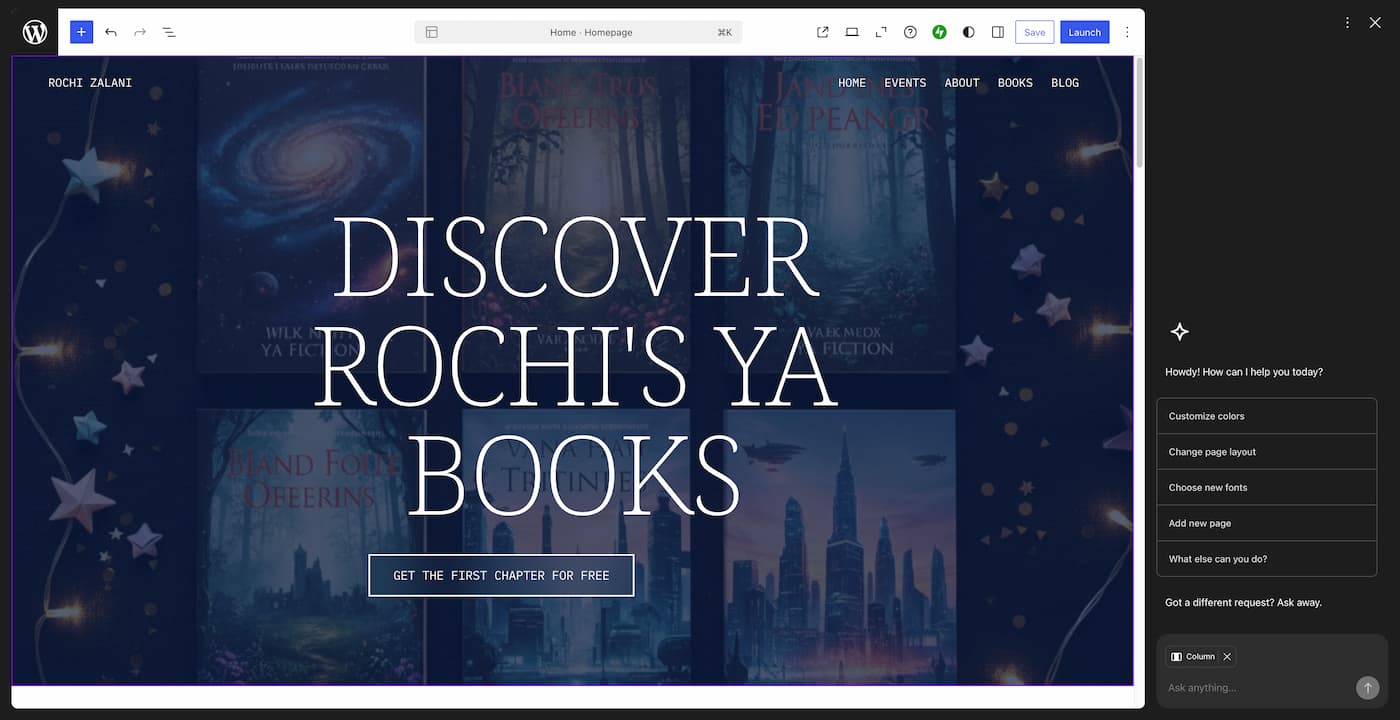
For this example, the goal was to build a website for a young adult (YA) fiction writer.
Below is the AI prompt used to create the site:
“Build a bold, character-focused author website for Rochi Zalani, a YA fiction writer. Include key pages such as Home, Books, About, Events, and Blog. The homepage should feature a clear CTA—‘Get the first chapter for free.’ Use an atmospheric, youthful design with striking typography to reflect the genre.”
Key pages and features of an author website
- Freebies: Offer incentives such as a free chapter, sneak peek, or exclusive content to attract readers. This can help grow an email list and create a direct connection with your audience.
- Books page(s): Showcase each book with its own dedicated space, including a brief synopsis, purchase options, and selected reviews to build interest and credibility.
- Events page: Keep readers updated on upcoming events such as book signings or speaking engagements. Sharing highlights or recordings from past events can also help create anticipation and engagement.
To get started, follow our step-by-step guide in How to Use a WordPress AI Plugin.
Best AI Tools for Building WordPress Sites
Choosing the right mix of AI tools can greatly enhance the speed and efficiency of building and managing a WordPress website.
- WordPress AI Builder: Quickly generates complete pages, including layout, content, and visuals from simple prompts.
- 10Web AI Builder: Builds fully structured websites with automated design and performance optimization.
- Elementor AI: Supports layout creation, content writing, and real-time editing within the page builder.
- Divi AI: Delivers AI-driven design, text generation, and visual creation inside the Divi framework.
- AI Engine: Provides content generation, chatbot functionality, and image creation directly within WordPress.
- Bertha AI: Helps create blog content, product descriptions, and marketing copy inside the editor.
- WPWriter: Streamlines large-scale content creation and publishing workflows.
- Rank Math AI: Suggests keywords, evaluates SEO performance, and improves on-page optimization.
- AIOSEO: Enhances metadata, schema markup, and overall search engine visibility.
- AI coding assistants: Assist with debugging and advanced customization in WordPress projects.
Looking for real-world tools to get started? Check out our curated list of Top 7 WordPress AI Plugins for Hong Kong Websites.
Frequently Asked Questions about Types of WordPress Sites to build with AI
1. Do I need coding skills to build a WordPress site with AI?
No, most AI tools are designed for beginners and allow you to create websites using simple prompts and visual editors.
2. Are AI-generated websites good for SEO?
Yes, AI can assist with keyword optimization, content structure, and readability. However, manual review is still important to ensure quality and originality.
3. How much does it cost to build a WordPress site with AI?
Costs vary depending on the tools and features used, but AI can reduce overall expenses by automating design, content, and development tasks.
4. Can I customize an AI-generated WordPress website?
Yes, AI-generated websites are fully customizable. You can edit layouts, content, and functionality just like any other WordPress site.
5. Can AI replace web developers completely?
No, AI helps speed up workflows and automate tasks, but developers are still needed for advanced customization, strategy, and quality control.
Conclusion
AI is reshaping how WordPress websites are built, and the range of types of WordPress sites to build with AI continues to grow, from blogs and portfolios to business platforms and online communities. With the right tools and approach, turning almost any idea into a functional website has become faster and more efficient than ever.
To take your website further, Arestós offers professional WordPress services powered by AI, helping you design, develop, and optimize high-performing websites tailored to your business goals. From strategy and UI/UX to performance and SEO, Arestós ensures your site is built to scale and convert.
Contact us today and start building a website that delivers real results.
Related Posts
Update the latest technology trends for your business