Back to featured insights
What Are Headless WordPress Development Benefits?
Explore how Headless WordPress empowers you to build faster, more flexible, and scalable websites by separating frontend and backend. With modern frameworks and API-driven content delivery, businesses can create seamless digital experiences across multiple platforms.
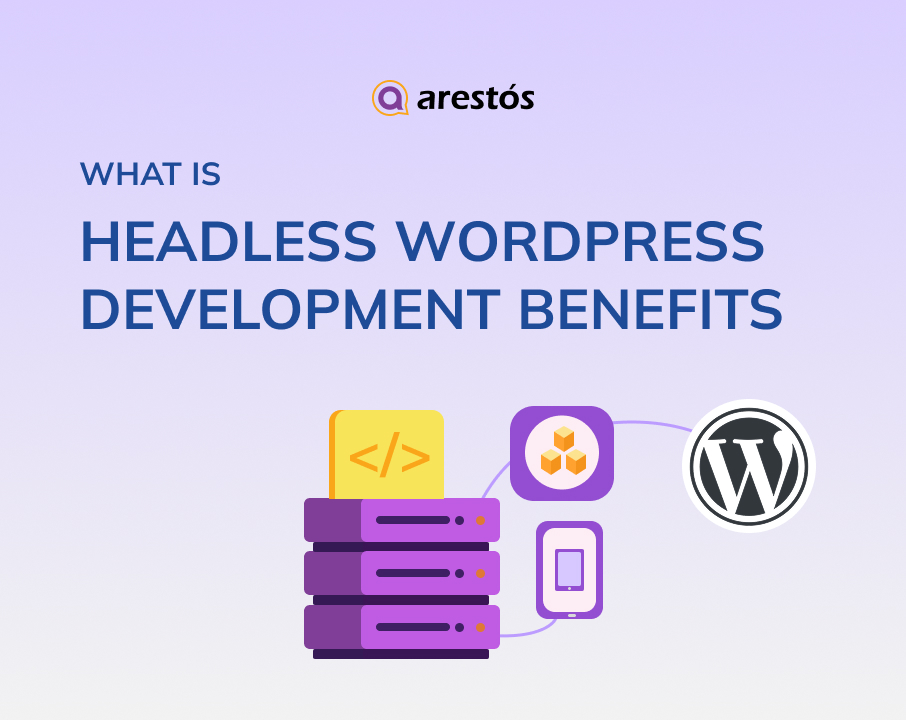

Table of Content
Share
What are Headless WordPress Development Benefits, and why are more businesses adopting this modern approach? From improved performance and flexibility to better scalability and security, headless WordPress offers significant advantages for building high-performing digital experiences.
Whether you’re a developer, business owner, or digital marketer, understanding these benefits can help you make better technology decisions. In this guide, we’ll explore the key advantages of headless WordPress and how you can implement it effectively.
What Is Headless WordPress?
Headless WordPress is an approach where WordPress is used only as a backend content management system, while the frontend is built separately using modern frameworks like React or Vue. Instead of using WordPress themes, content is delivered via APIs (such as REST API or GraphQL) to any platform, including websites, mobile apps, or other digital channels.
This separation gives developers more flexibility and allows businesses to create faster, more scalable user experiences while still using WordPress to manage content.
For a deeper understanding of the concept, you can read our guide on What is Headless Web Development?.
The Key Benefits of Headless WordPress for Businesses
Headless WordPress offers a range of powerful advantages that help businesses build faster, more flexible, and scalable digital experiences.
Below are the key benefits that make this approach increasingly popular.
- Multichannel Content Distribution
- Seamless API Integration
- Optimized Performance
- Higher Core Web Vitals Scores
- Front-End Flexibility
- Bullet-Proof Security
Here are the key benefits of Headless WordPress for businesses:
Multichannel Content Distribution
Headless WordPress enables businesses to distribute content seamlessly across multiple platforms from a single source. Instead of duplicating efforts, content is created once and delivered via APIs to different channels, ensuring consistency and efficiency.
Key advantages include:
- Publish content across websites, mobile apps, and other platforms simultaneously
- Maintain consistent messaging and branding on all channels
- Reduce time and effort in content management
- Easily scale to new platforms or devices as your business grows
Seamless API Integration
Headless WordPress is built around APIs, making it easy to integrate with third-party services and modern applications. This allows businesses to connect their website with various tools and systems, creating a more flexible and powerful digital ecosystem.
Key advantages include:
- Easily connect with CRM, ERP, and marketing automation tools
- Integrate payment gateways, analytics, and external services
- Enable real-time data exchange between systems
- Build custom features without being limited by WordPress plugins
Optimized Performance
Headless WordPress improves website performance by separating the frontend from the backend, allowing developers to use modern frameworks and optimized delivery methods. This results in faster load times and a smoother user experience.
Key advantages include:
- Faster page loading with lightweight frontend frameworks
- Improved Core Web Vitals and SEO performance
- Efficient content delivery via APIs and CDNs
- Better handling of high traffic and scalability
Higher Core Web Vitals Scores
Headless WordPress can significantly improve Core Web Vitals by allowing developers to optimize how content is delivered and rendered on the frontend. With modern frameworks and better control over performance, websites can achieve faster load times and smoother interactions.
Key advantages include:
- Faster Largest Contentful Paint (LCP) with optimized content delivery
- Improved First Input Delay (FID) through efficient frontend rendering
- Better Cumulative Layout Shift (CLS) with stable UI design
- Enhanced SEO rankings and user experience
Front-End Flexibility
Headless WordPress gives developers full freedom to build the frontend using any technology they prefer, instead of being limited by WordPress themes. This flexibility enables more creative, dynamic, and high-performance user experiences.
Key advantages include:
- Use modern frameworks like React, Next.js, or Vue
- Design fully custom user interfaces without theme constraints
- Optimize performance with tailored frontend architecture
- Easily adapt and update the UI without affecting the backend
Bullet-Proof Security
Headless WordPress enhances security by separating the frontend from the backend, reducing direct exposure to common WordPress vulnerabilities. With no direct connection between the user interface and the CMS, it becomes much harder for attackers to exploit the system.
Key advantages include:
- Reduced attack surface by decoupling frontend and backend
- No direct access to the WordPress admin or database from the frontend
- Better protection against common threats like DDoS and brute-force attacks
- Ability to use secure hosting and authentication layers
Tools for Headless WordPress
Building a Headless WordPress setup requires a combination of technologies across different layers to ensure performance, flexibility, and scalability. Below are the essential tools in a clear format:
- Frontend Frameworks/Libraries: React, Next.js, Vue for building fast, dynamic, and highly interactive user interfaces
- APIs: WordPress REST API, GraphQL (WPGraphQL) for efficiently fetching and delivering content to different platforms
- Hosting Platforms: Vercel, Netlify, AWS for reliable deployment, global scalability, and high availability
- CDN (Content Delivery Network): Cloudflare, Fastly for caching and delivering content quickly to users worldwide
- Authentication & Security: JWT, OAuth for securing API access and protecting sensitive data
- Version Control & CI/CD: Git, GitHub, GitLab for team collaboration, version tracking, and automated deployment workflows
- State Management & Data Fetching: Redux, React Query, Apollo Client for managing application state and handling API data efficiently
How to create a Headless WordPress website?
In this section, we’ll guide you through how to set up a Headless WordPress website with ReactJS—one of the most popular and effective approaches for building modern frontends.
Step 1: Choose the Hosting Provider
The first step in building a Headless WordPress website is choosing a reliable hosting provider for both the WordPress backend and the ReactJS frontend. Since the system is decoupled, each part can be hosted separately, allowing you to optimize performance and scalability for each layer.
A well-chosen hosting setup not only improves loading speed and uptime but also ensures your website can handle traffic growth and future expansion smoothly.
Step 2: Enable WordPress Rest API
The next step is to enable the WordPress REST API, which allows your frontend to communicate with the WordPress backend. This API acts as a bridge, letting you fetch posts, pages, and other content in a structured format. By enabling and configuring the REST API properly, you ensure smooth data exchange between WordPress and your ReactJS application.
Steps to enable:
- Download the ZIP file of the WP REST API plugin from Git
- Upload the ZIP file to your WordPress plugins directory
- Activate the plugin to enable the WordPress REST API
Step 3: Fetch Post Data
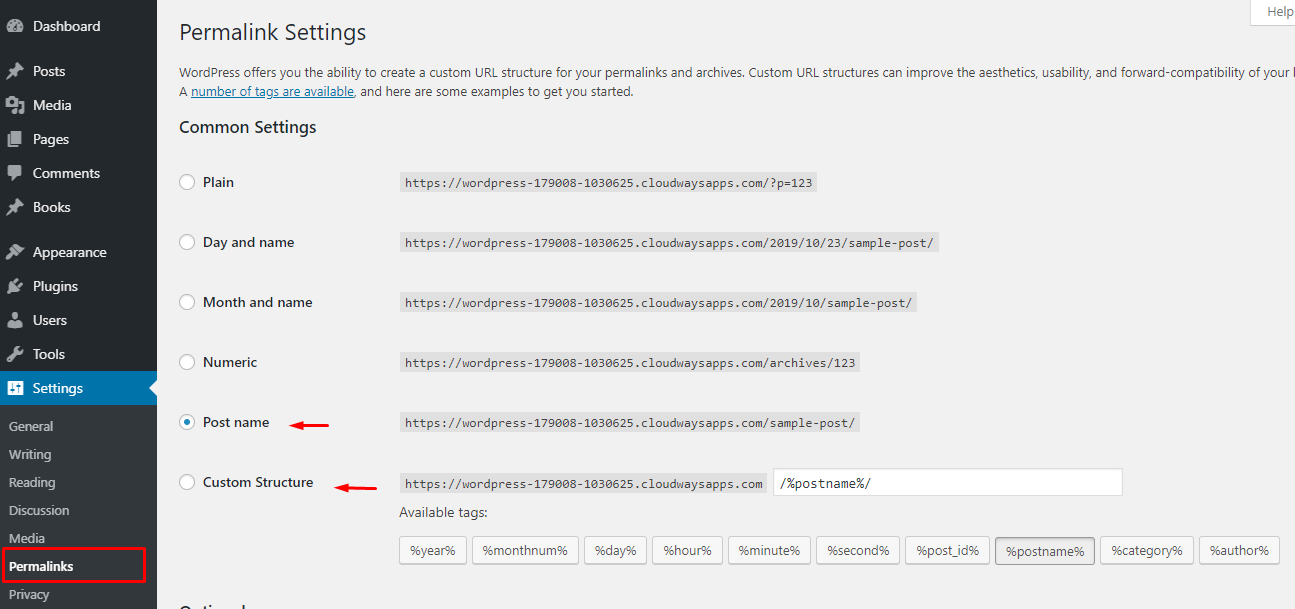
To retrieve post data properly, make sure your permalink structure is configured correctly.
- Navigate to Settings → Permalinks and choose either Post name or a Custom Structure to ensure clean and accessible API endpoints.
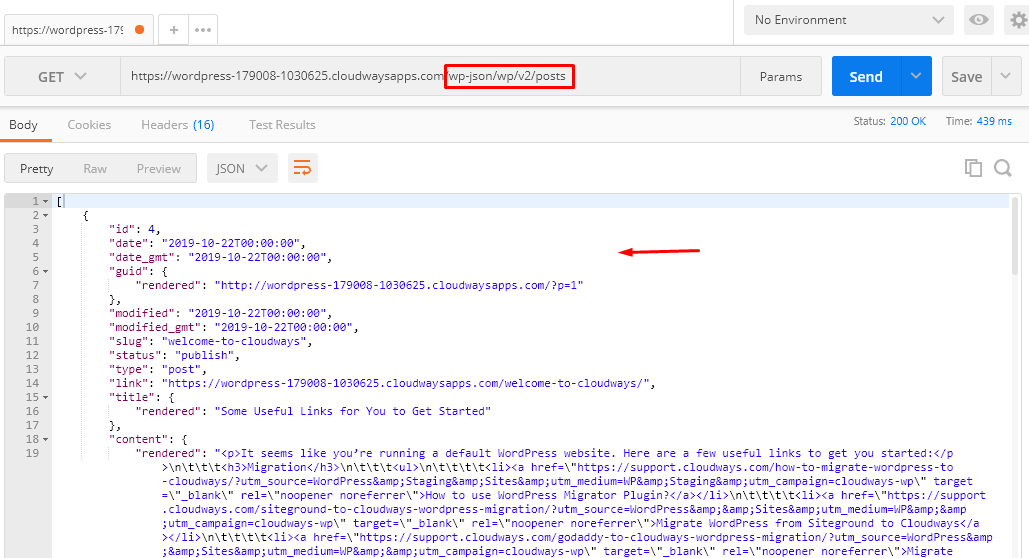
- Use a tool like the Postman Chrome extension to test API requests
- Enter the API endpoint in this format: https://example.com/wp-json/wp/v2/posts
- This request will return post data from your WordPress site in JSON format
Step 4: Create Custom Post Types
To create custom post types:
Download and install the Custom Post Type UI plugin to create custom post types
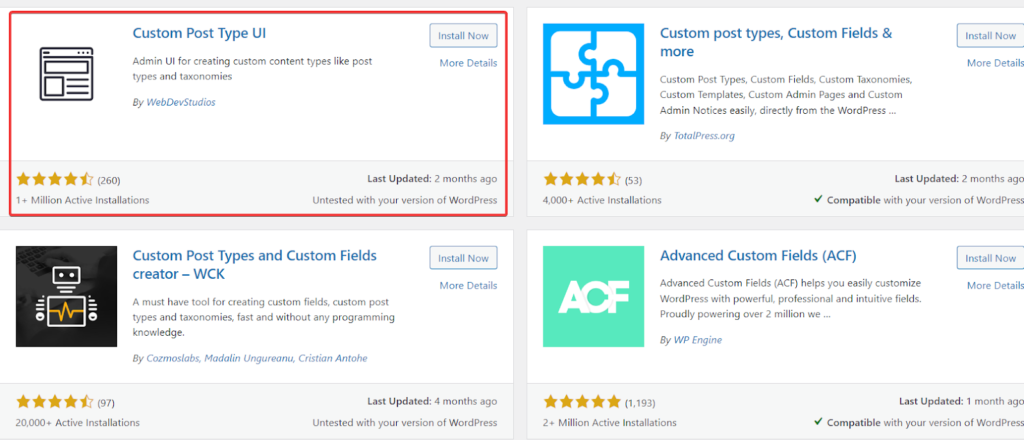
- Install and activate the plugin, then create a new custom post type
- For this tutorial, we’ll use a “Books” post type as an example
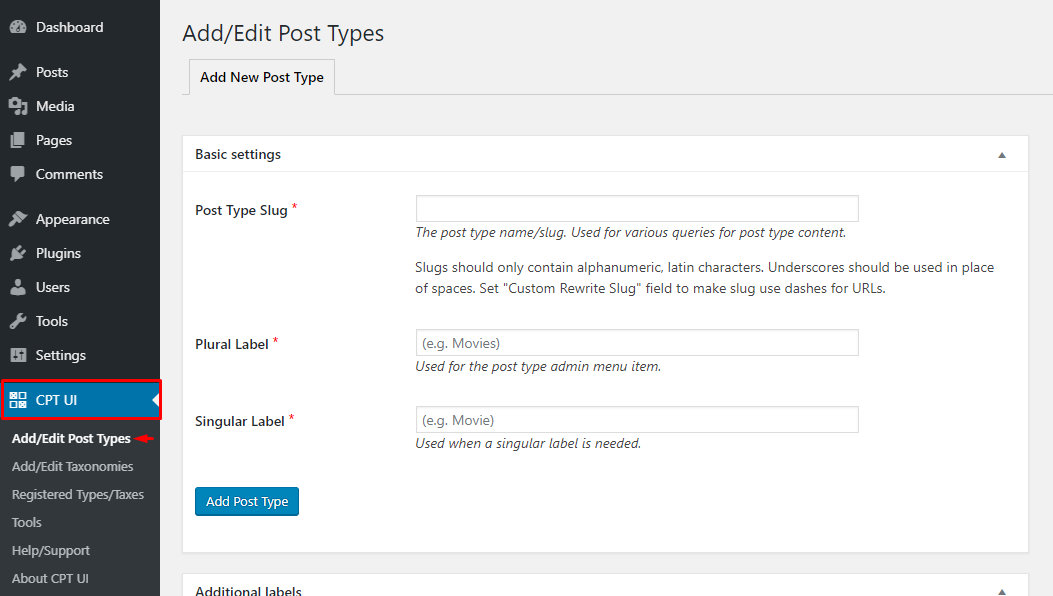
- In the Post Type Slug field, enter the name of your custom post type

- Make sure the “Show in REST API” option is enabled and the REST API base slug is properly set, as this is required for using WordPress as a headless CMS
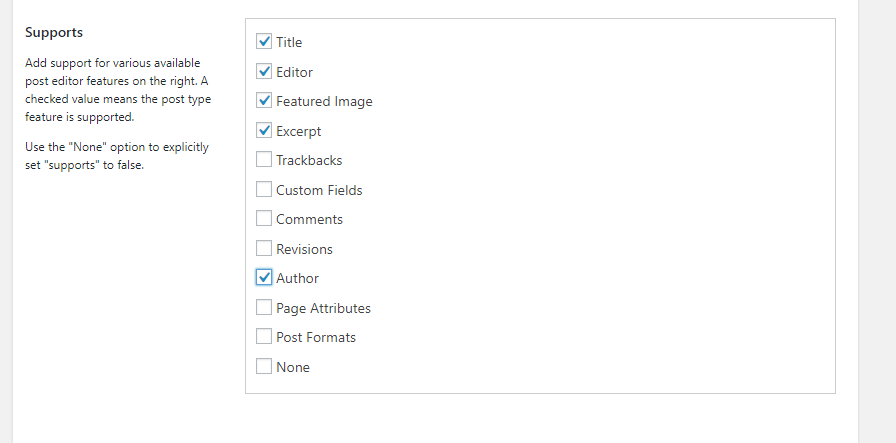
- Select all the relevant fields you want to retrieve from the REST API
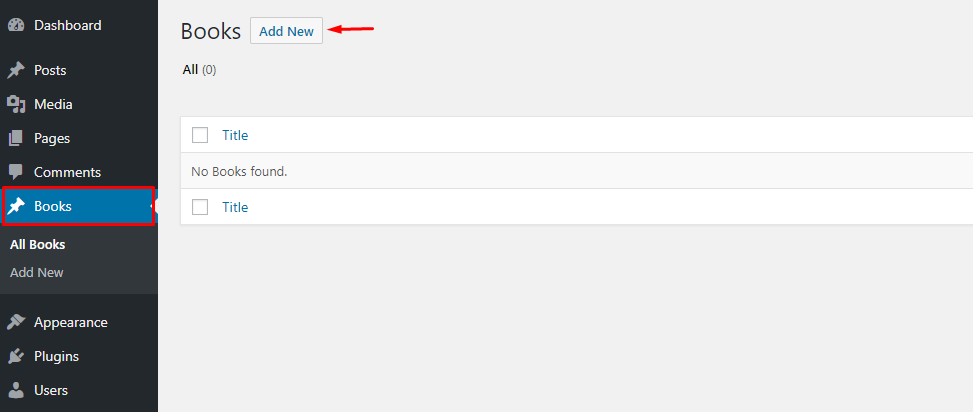
- After saving your changes, a new menu item will appear in the sidebar—click it to add a new “Book” entry to your custom post type
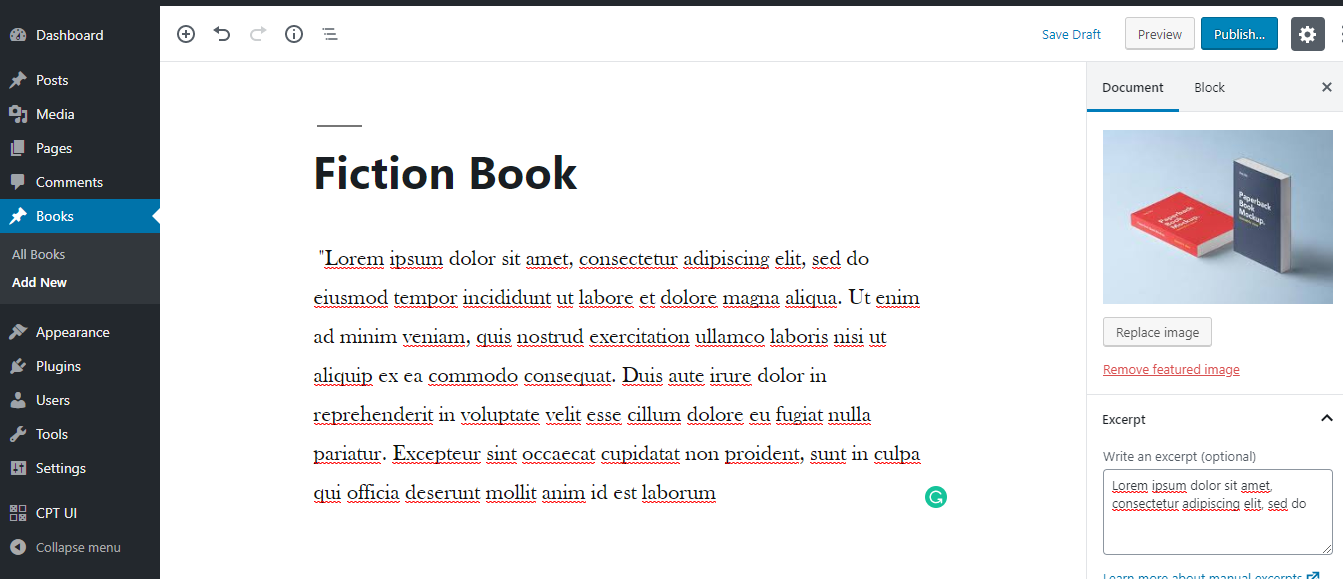
- Create your first “Book” by adding sample content and an excerpt to the post
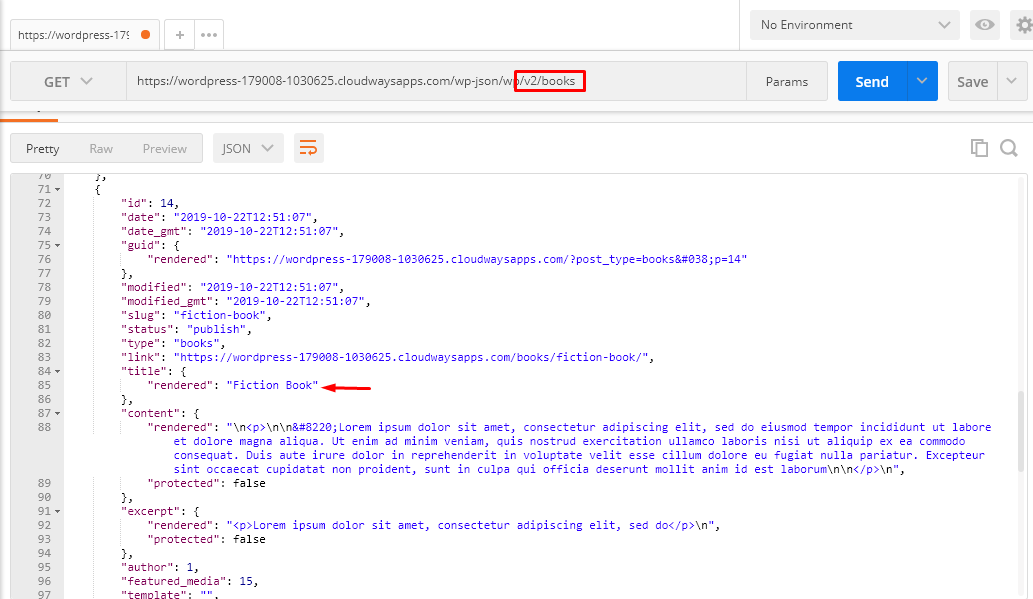
Step 5: Check and Verify
- To verify the data, send a request in Postman using your API endpoint
- The URL should look like: https://example.com/wp-json/wp/v2/books
- You can extend your data by adding custom fields (e.g., Publisher) using ACF and ACF to REST API plugins
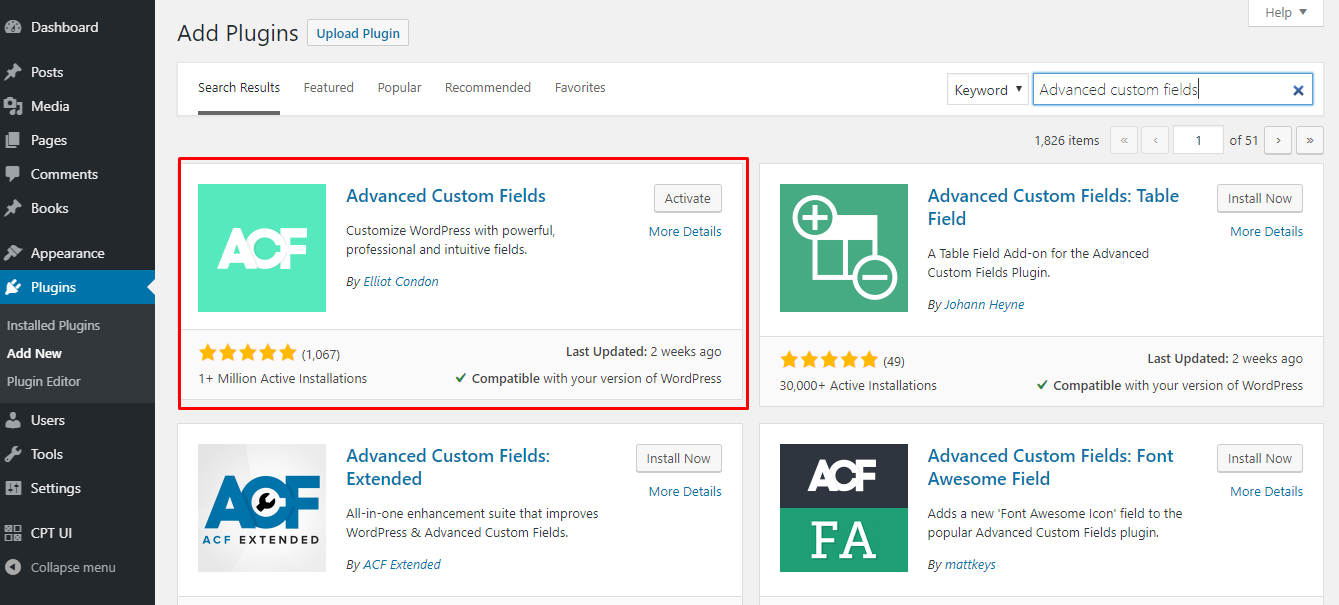
- Install and activate both plugins to enable custom fields in the REST API
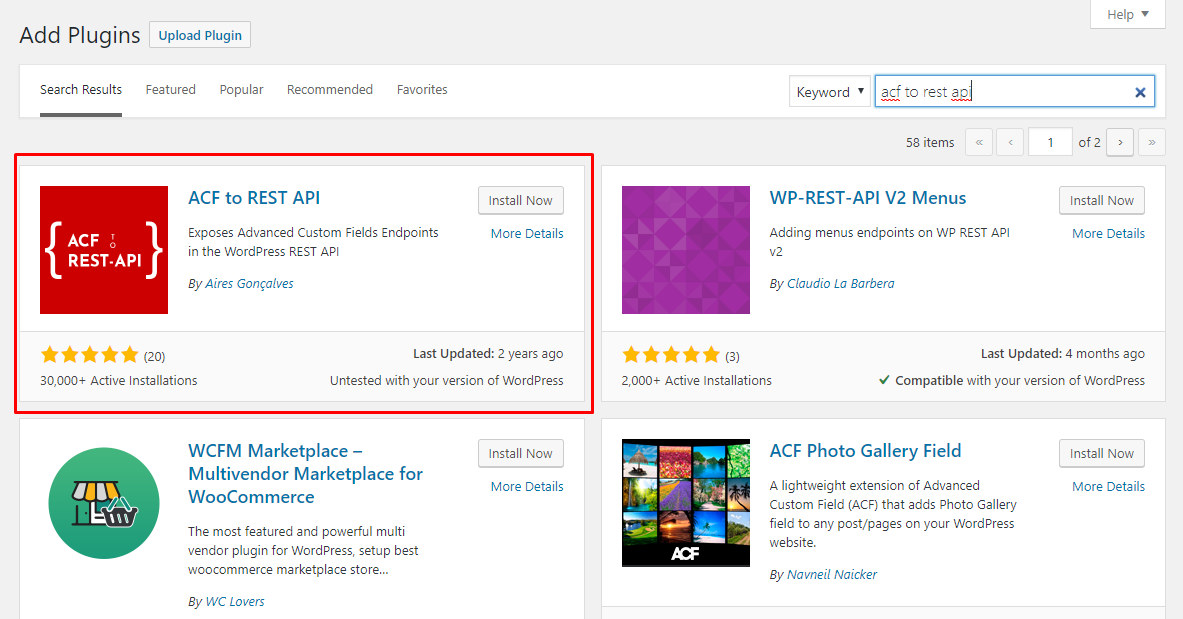
- By default, ACF does not integrate with the WordPress REST API, so you need to install the ACF to REST API plugin to enable this functionality
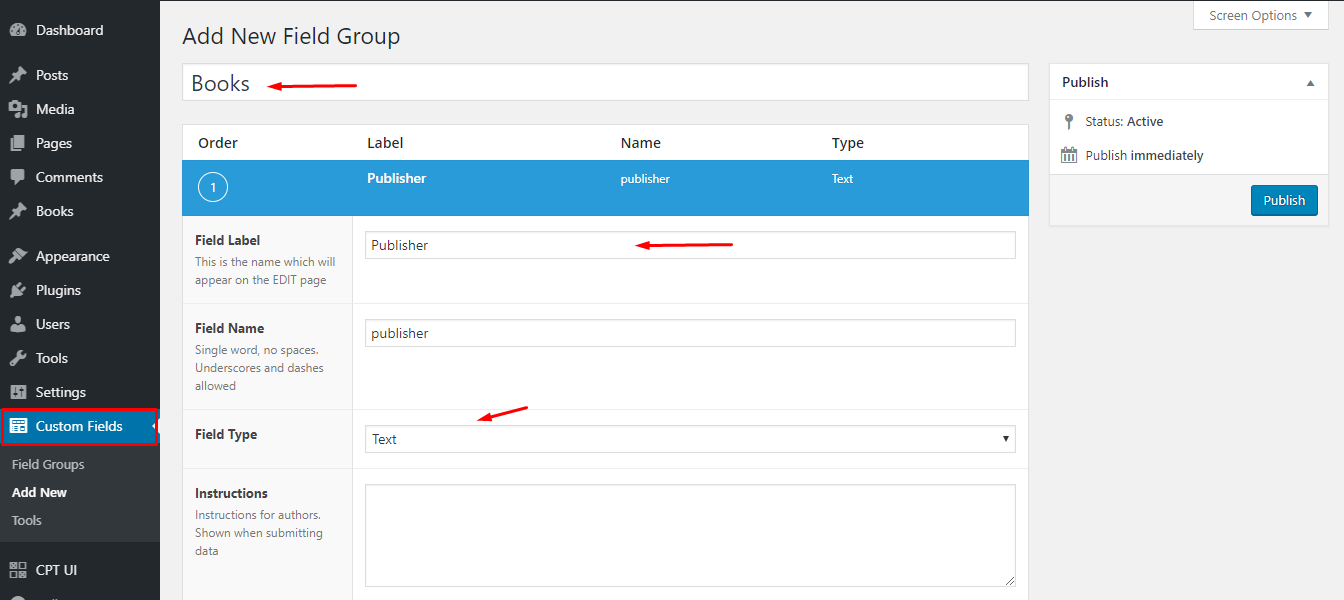
- Use the custom fields plugin to add a “Publisher” field to your Book post type
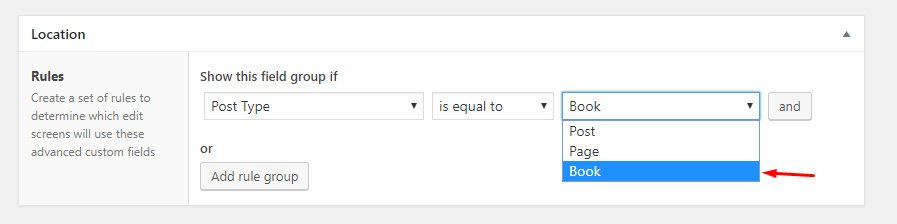
- Select the appropriate post type from the list, then click “Publish” to apply the changes
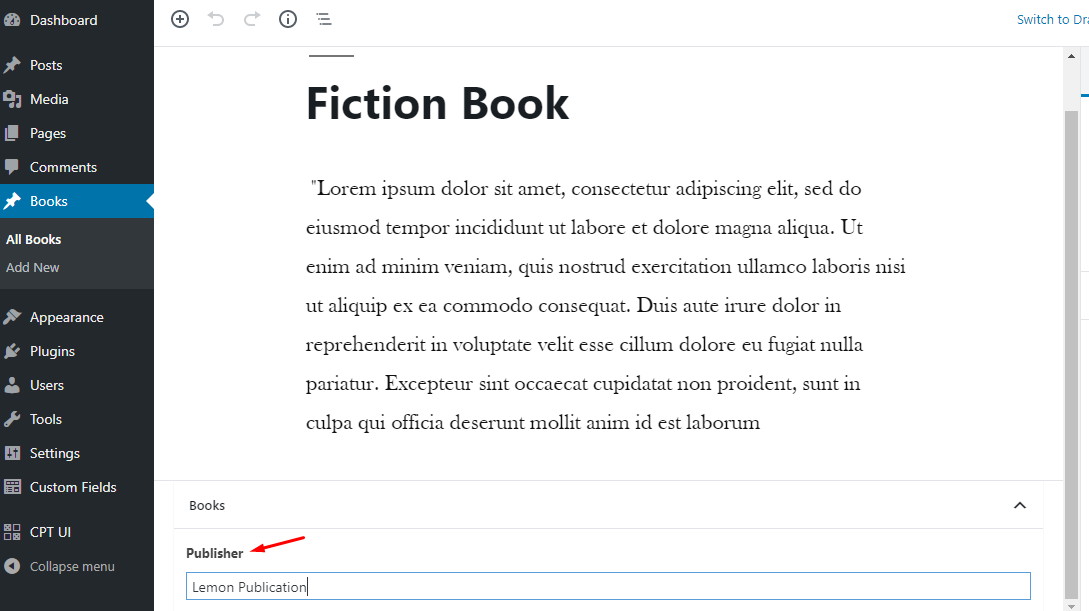
A new field will now appear in your custom post type, allowing you to define the publisher for each book. With this setup complete, your WordPress backend is fully prepared to deliver data to your ReactJS application.
Frequently Asked Questions
1. Is Headless WordPress better for SEO?
Yes, it can improve SEO by enabling faster load times, better Core Web Vitals, and more control over frontend performance. However, proper implementation is required.
2. Do I need a developer to use Headless WordPress?
Yes, in most cases. Headless WordPress requires knowledge of APIs and frontend frameworks, so it’s more suitable for developers or technical teams.
3. Is Headless WordPress more expensive?
It can be more expensive due to separate frontend development and hosting, but it offers better scalability and performance in the long run.
4. When should I use Headless WordPress?
You should consider it when you need high performance, multi-channel content delivery, or a highly customized frontend experience.
5. Is Headless WordPress suitable for small businesses?
It depends. For simple websites, traditional WordPress may be more cost-effective. Headless is better suited for projects that need scalability and advanced features.
Conclusion
Headless WordPress offers a powerful way to build modern websites by separating the frontend and backend, resulting in better performance, flexibility, scalability, and security. From multichannel content delivery to improved Core Web Vitals, it’s a strong solution for businesses looking to create fast and dynamic digital experiences.
At Arestós, we specialize in WordPress and Headless WordPress development, helping businesses design, build, and optimize high-performance websites tailored to their needs. Whether you’re starting from scratch or upgrading your existing system, our team is here to support you every step of the way.
Contact us today to explore how Headless WordPress can transform your website.
Subscribe to our newsletter!
Get updated to
the lastest IT trends
Related Posts
Update the latest technology trends for your business