
Back to featured insights
SEO for WooCommerce Stores: How to Optimize Your Site
Want to grow your ecommerce business? Discover practical SEO strategies for WooCommerce stores, from optimizing product pages and Core Web Vitals to improving content, rankings, and organic traffic for long-term online growth.
Table of Content
Share
SEO for WooCommerce stores is essential for improving search visibility and attracting more potential customers to your online business. A strong WooCommerce SEO strategy can help increase organic traffic, improve user experience, and drive higher conversions and sales.
Whether you run a small online shop or a large ecommerce website, optimizing your WooCommerce store is crucial for long-term growth. In this guide, you’ll learn the best practices and actionable tips to optimize your WooCommerce store for better SEO performance.
What is SEO?
SEO (Search Engine Optimization) is the practice of optimizing a website to improve its visibility on search engines like Google. The main goal of SEO is to help a website appear higher in search results when users search for relevant keywords or topics.
SEO involves improving different aspects of a website, including its content, structure, performance, and overall user experience, so search engines can better understand and rank the site. A strong SEO strategy helps businesses attract more organic traffic, reach their target audience, and increase online visibility without relying solely on paid advertising.
Why SEO Matters for WooCommerce Stores
SEO plays a crucial role in the success of WooCommerce stores by helping businesses increase their online visibility and attract potential customers through organic search results. With thousands of eCommerce websites competing for attention, a strong SEO strategy helps WooCommerce stores stand out and reach users who are actively searching for relevant products.
A well-optimized WooCommerce store can generate consistent organic traffic without relying entirely on paid advertising. Higher search rankings also improve brand credibility, as users often trust websites that appear at the top of Google search results.
In addition to driving traffic, SEO enhances the overall user experience by improving site structure, page speed, mobile responsiveness, and content quality. These improvements not only help search engines understand the website better but also encourage visitors to stay longer and complete purchases.
Learn more about how AI SEO can help improve content optimization, keyword research, and search visibility for WooCommerce stores.
How to Optimize Your Store for Search Engines
Below are some essential SEO tips to help optimize your WooCommerce store for better search engine visibility and higher organic traffic.
Set up SEO foundations for your WooCommerce store
A strong SEO strategy for WooCommerce stores starts with building a solid technical foundation. Before optimizing content or targeting keywords, it’s important to ensure that your website is properly configured for performance, security, and search engine accessibility.
Many of these optimization steps align with general WordPress SEO best practices, but they are especially important for WooCommerce websites because online stores often contain a large number of product and category pages. A well-structured and technically optimized store helps search engines crawl your site more efficiently while also improving the shopping experience for visitors.
Below are some essential steps to create a strong SEO foundation for your WooCommerce store:
- Choose a high-performance hosting provider: Your hosting service directly affects website speed, uptime, and overall performance. A reliable WooCommerce hosting provider should offer optimized WordPress servers, caching features, and CDN integration to help reduce loading times and improve user experience.
- Enable HTTPS with an SSL certificate: An SSL certificate secures data transferred between your website and visitors, especially sensitive information such as login credentials and payment details. HTTPS also acts as a ranking signal for Google and increases trust among online shoppers.
- Check WordPress search engine visibility settings: WordPress includes an option that prevents search engines from indexing your website. While useful during development, this setting should be disabled once your store goes live to ensure your pages can appear in search results.
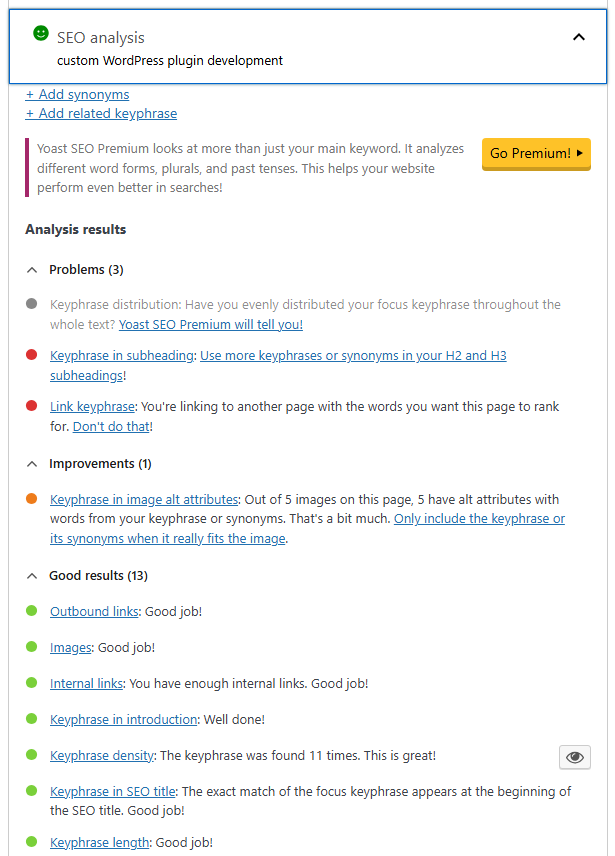
- Install an SEO plugin: SEO plugins like Yoast SEO, Rank Math, or All in One SEO help simplify SEO management by handling features such as meta tags, XML sitemaps, schema markup, and on-page SEO recommendations. These tools make it easier to optimize your WooCommerce store without advanced technical knowledge.
Optimize product titles
Product titles play an important role in WooCommerce SEO because they are often the first thing users see in search engine results. A clear and optimized title can improve click-through rates, help search engines understand your product, and attract more qualified traffic to your store.
To create SEO-friendly product titles, consider the following best practices:
- Use relevant keywords naturally: Include primary keywords that accurately describe the product while keeping the title readable and natural. Avoid keyword stuffing, as it can negatively affect both SEO and user experience.
- Target long-tail keywords: Long-tail keywords are more specific search phrases that often indicate stronger purchase intent. For example, “RFID Blocking Brown Leather Wallet” is more targeted and SEO-friendly than simply “Leather Wallet.”
- Keep titles concise: Shorter titles are easier for users to read and are less likely to be cut off in search results. In most cases, keeping product titles under 60 characters is recommended.
- Include important product details: Adding details such as product type, key features, size, color, or target audience can improve relevance and help users quickly understand what the product offers.
- Optimize SEO titles separately: Many SEO plugins allow you to create custom SEO titles specifically for search engines. This gives you more flexibility to write titles that are optimized for rankings and click-through rates while keeping your product page title user-friendly.
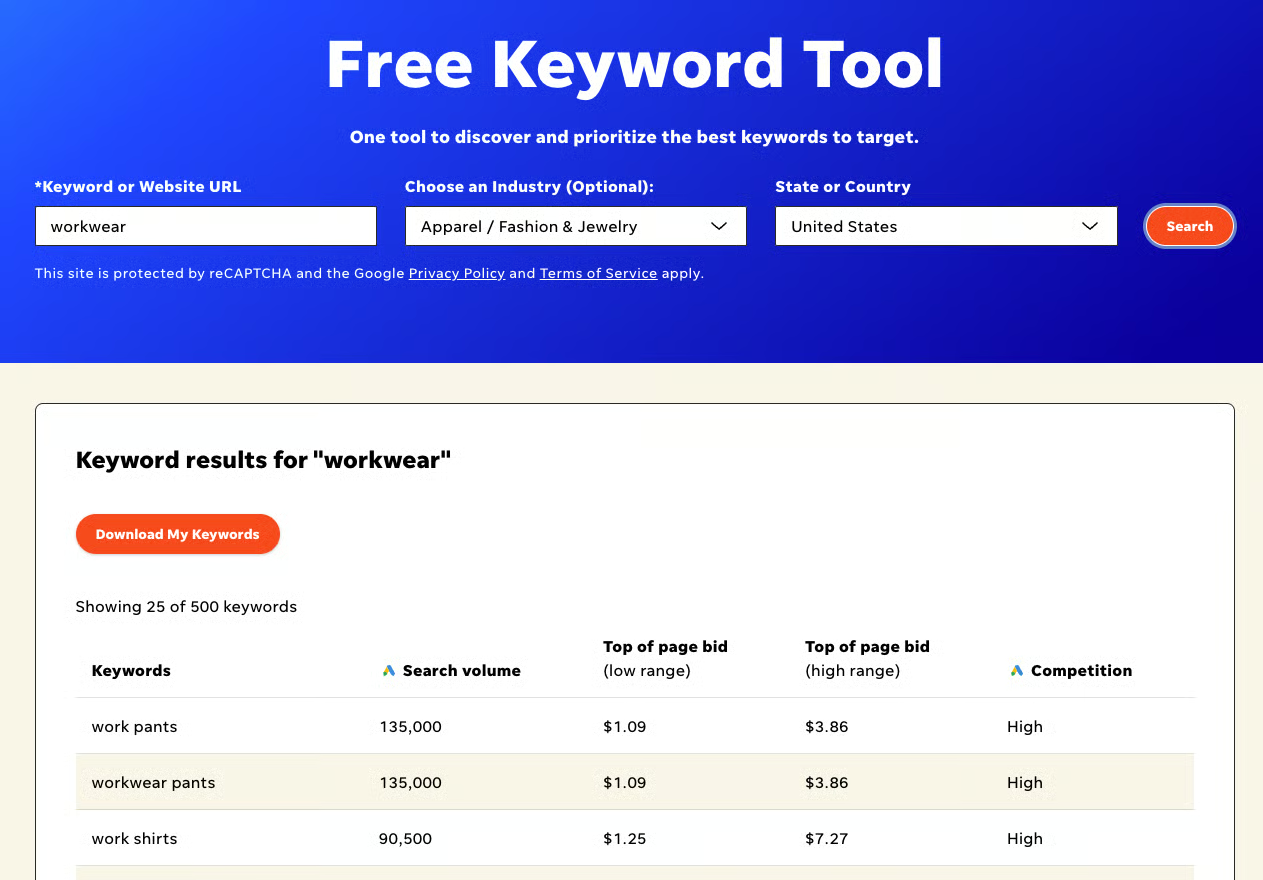
Tools like Semrush, Moz Keyword Explorer, and WordStream can help identify relevant keywords, search volume, and keyword difficulty to improve your product title strategy.
Write unique product descriptions
Product descriptions are essential for both SEO and conversions because they help search engines understand your product while also encouraging customers to make a purchase. A well-written description should provide useful information, highlight product value, and naturally include relevant keywords.
Here are some best practices for creating SEO-friendly product descriptions:
- Avoid duplicate content: Instead of copying descriptions from manufacturers or other websites, create original content that is unique to your store. Duplicate content can negatively affect search rankings and reduce the credibility of your website.
- Write naturally for users: While keywords are important, product descriptions should always sound natural and easy to read. Overusing keywords can harm both user experience and SEO performance.
- Highlight benefits, not just features: Explain how the product improves the customer’s experience rather than simply listing technical details. Combining product features with real customer benefits makes descriptions more persuasive and SEO-friendly.
- Understand customer needs: Effective product descriptions address customer pain points and position the product as a solution. This helps create stronger engagement and improves conversion potential.
- Use descriptive and engaging language: Clear and vivid wording can make products feel more appealing, especially in online shopping where customers cannot physically interact with the item.
- Improve readability with proper formatting: Use short paragraphs, bullet points, headings, and whitespace to make descriptions easier to scan. Well-structured content improves both user experience and search engine readability.
Use clean product slugs
Product URLs and permalinks are important for WooCommerce SEO because they help search engines and users understand what a page is about. Clean and descriptive URLs can improve search visibility, enhance user experience, and make links easier to share.
Here are some best practices for optimizing WooCommerce product URLs:
- Keep URLs short and keyword-focused: Use concise URLs that include the main product keyword. Short and descriptive slugs are easier for users to read and help search engines better understand page content.
- Use clean and simple structures: Avoid unnecessary numbers, symbols, special characters, or filler words in URLs. Using hyphens to separate words improves readability and keeps URLs organized.
- Maintain a consistent permalink structure: A clear and consistent URL structure across product and category pages helps improve website organization and crawlability for search engines.
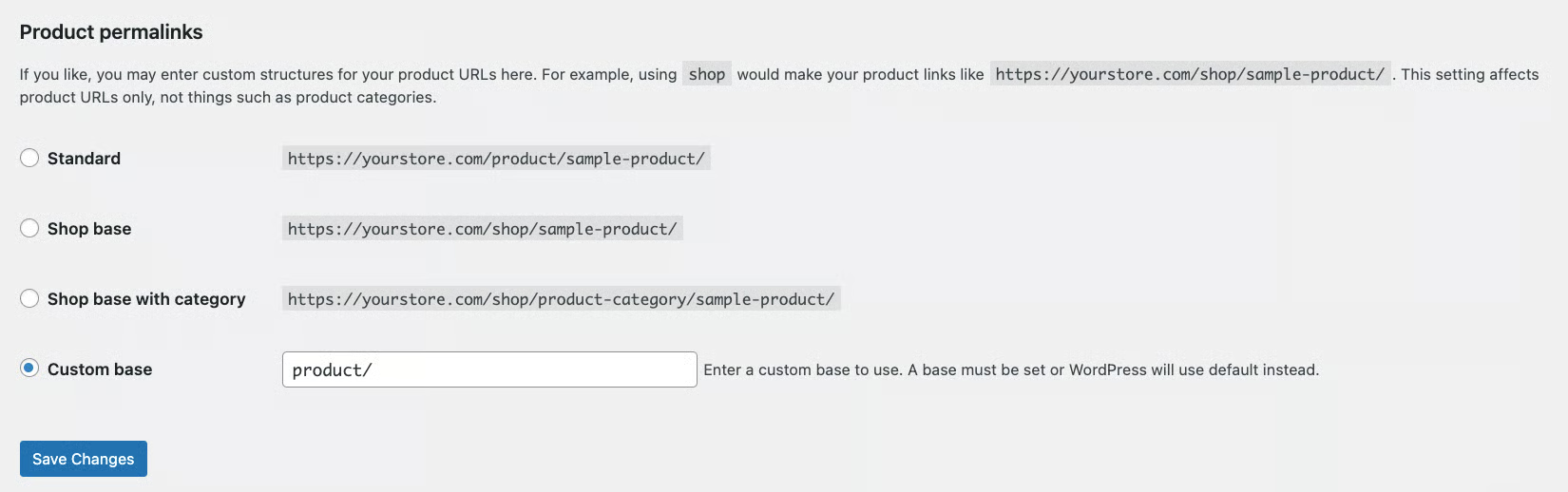
- Customize default WooCommerce permalinks: WooCommerce often includes default URL structures such as /product/ in product links. Simplifying these URLs can create cleaner and more user-friendly permalinks.
- Use redirects when changing URLs: If you update existing product URLs, set up 301 redirects to prevent broken links and preserve SEO value from old URLs.
- Configure permalinks in WordPress settings: WooCommerce permalink settings can be managed directly in the WordPress dashboard under Settings → Permalinks, where you can customize the structure for products and categories.
Optimize the product images
Product images are an important part of WooCommerce SEO because they improve user experience, build customer trust, and help products appear in Google Image Search results. Proper image optimization can also improve website performance and loading speed, which are important ranking factors for search engines.
Here are some best practices for optimizing product images in WooCommerce:
- Add descriptive alt text: Alt text helps search engines understand image content while also improving accessibility for users with screen readers. Use clear and descriptive text that naturally includes relevant keywords when appropriate.
- Use SEO-friendly file names: Rename image files before uploading them to WordPress. Instead of generic names like IMG_001.jpg, use descriptive file names that clearly identify the product.
- Compress images to improve site speed: Large image files can slow down your WooCommerce store and negatively affect SEO performance. Compressing images helps reduce file size while maintaining image quality for faster loading times.
- Use a CDN for faster image delivery: A Content Delivery Network (CDN) stores and delivers images from servers closer to users, helping improve loading speed and overall website performance.
- Avoid duplicate image uploads: Reusing existing images from the WordPress media library helps save storage space and keeps media management more organized.
- Choose the right image format: Modern formats like WebP can help reduce file sizes and improve performance while maintaining good image quality.
Structure product categories and tags for SEO
Product categories and tags help organize your WooCommerce store, making it easier for both users and search engines to navigate your website. A well-structured taxonomy system can improve crawlability, enhance user experience, and increase the visibility of category pages in search results.
Here are some best practices for optimizing WooCommerce categories and tags:
- Use categories and tags strategically: Categories should be used for broad product groupings, while tags should describe specific product attributes or characteristics. This creates a more organized store structure and improves navigation.
- Avoid duplicate taxonomy names: Using the same names for categories and tags can confuse search engines and create unnecessary duplication issues. Keep naming conventions consistent across your store.
- Optimize category pages for broader keywords: Category pages often have stronger ranking potential for competitive keywords than individual product pages. Optimizing category pages with relevant high-volume keywords can improve overall search visibility.
- Add unique content to category pages: Writing original category descriptions helps search engines better understand the page content while also providing useful information for shoppers. Avoid duplicate descriptions across multiple categories.
- Highlight important or popular products: Featuring bestselling or high-priority products on category pages can improve user engagement and help distribute internal link authority to important pages.
- Optimize SEO titles and meta descriptions: Custom SEO titles and meta descriptions help category pages appear more relevant in search results and can improve click-through rates from Google.
Enable breadcrumbs for better navigation
Breadcrumbs are navigational links that display a page’s position within the website hierarchy, helping users and search engines better understand your site structure.

Enabling breadcrumbs can improve both WooCommerce SEO and user experience by helping search engines and visitors better understand your website structure.
- Improve internal linking and SEO: Breadcrumbs create internal links between pages, categories, and products, helping search engines better understand your site hierarchy and improving overall crawlability and SEO performance.
- Increase visibility in search results: Breadcrumbs can appear directly in Google search results as rich snippets, making your listings more organized and potentially improving click-through rates (CTR).
- Enhance user experience: Breadcrumbs help customers easily navigate back to previous categories or related pages, making product browsing more convenient and user-friendly.
Because of these SEO and usability benefits, enabling breadcrumbs on your WooCommerce store is highly recommended. With SEO plugins like Yoast SEO, the setup process is relatively simple.
To add breadcrumbs in WordPress:
- Go to Appearance → Theme Editor in your WordPress dashboard.
- Open the single.php file to display breadcrumbs on blog posts, or edit header.php to add breadcrumbs sitewide.
- Paste the breadcrumb code snippet into the appropriate location within the file.

- Click the Update File button to save your changes.
- In the WordPress sidebar, go to Yoast SEO → Settings.
- Open the Advanced section and select Breadcrumbs.
- Enable the Breadcrumbs for your theme option to activate breadcrumbs on your WooCommerce store.
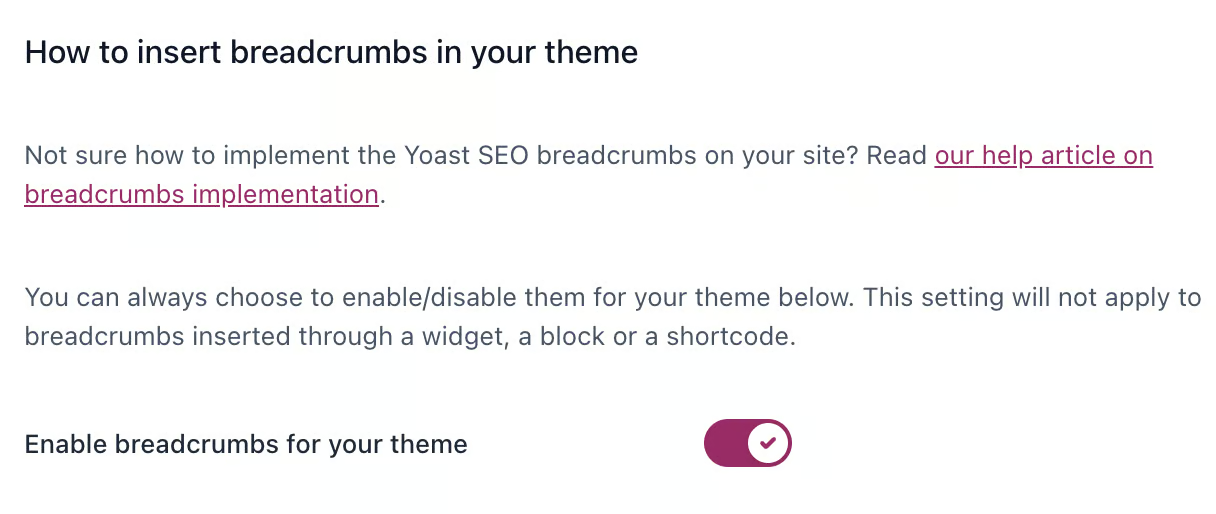
- Click the Save changes button to apply the settings.
If you prefer using other plugins or methods, you can also follow a dedicated guide for enabling breadcrumbs in WordPress.
Add product schema markup to enable rich snippets
Schema markup is structured data added to your WooCommerce store that helps search engines better understand your product information. It can include details such as product prices, availability, reviews, ratings, and other important attributes.
When implemented correctly, schema markup can enhance your search listings with rich snippets — additional information displayed directly in search engine results pages (SERPs). These rich snippets often include elements like star ratings, pricing, stock status, and review counts, making your products more visible and attractive to potential customers.
Using schema markup can help improve click-through rates (CTR), increase product visibility in search results, and provide users with more useful information before they visit your website.
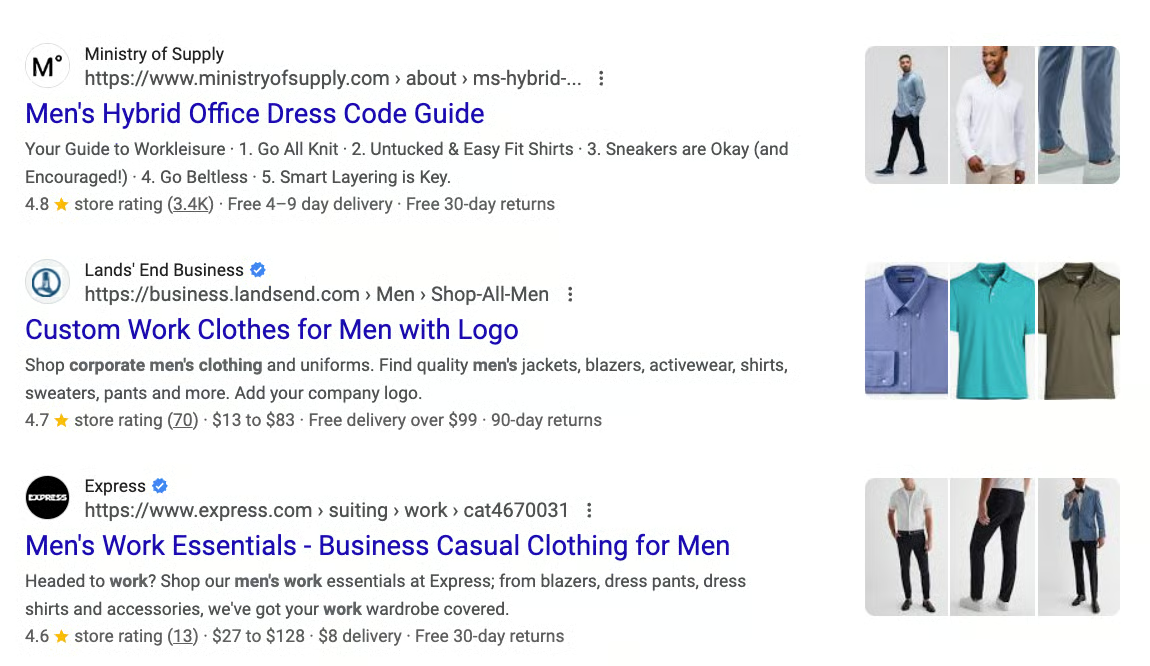
Many WooCommerce themes already include built-in schema markup support. To check whether schema markup is enabled on your website, you can use tools like the Schema Markup Validator to analyze your pages and identify active schema types or potential errors.
If your WooCommerce store does not include schema markup by default, you can add it manually or use a plugin such as Schema to simplify the setup process.
Another option is to switch to a WooCommerce theme that comes with built-in schema markup support for better SEO optimization and easier implementation.
Improve Core Web Vitals
Core Web Vitals (CWV) are performance metrics used by Google to measure user experience on a website. These metrics evaluate how fast a page loads, how quickly users can interact with it, and how visually stable the page remains while loading.
Core Web Vitals are important for WooCommerce SEO because website performance directly affects both search rankings and user experience. A fast and responsive online store can keep visitors engaged, improve conversions, and reduce bounce rates.
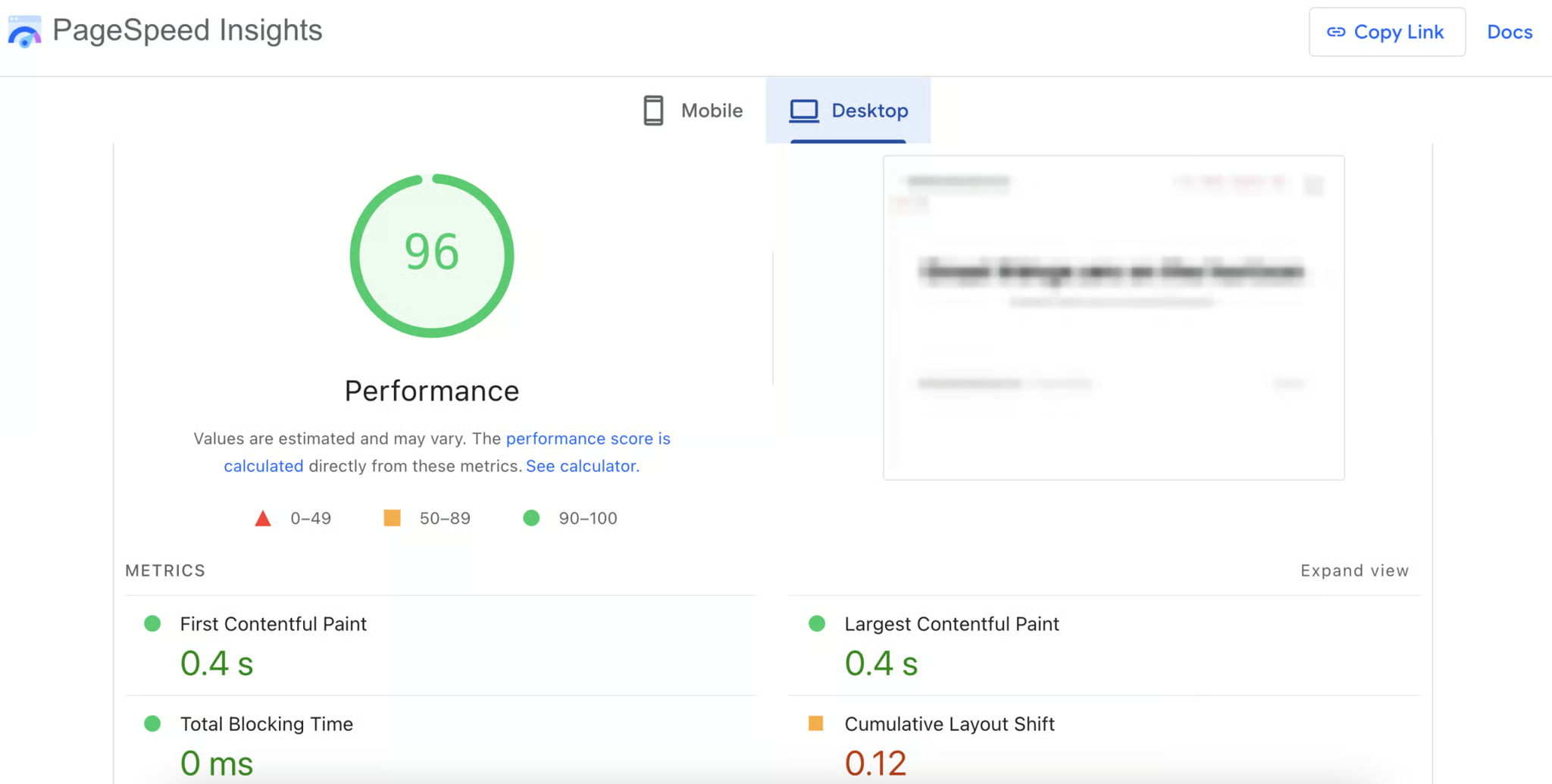
You can measure your WooCommerce store’s Core Web Vitals performance using tools like Google PageSpeed Insights or GTmetrix. These tools help identify performance issues that may affect both SEO rankings and user experience.
Here are some effective ways to improve Core Web Vitals for WooCommerce stores:
- Choose reliable hosting: High-quality hosting plays a major role in website speed and stability. WooCommerce-optimized hosting solutions can better handle traffic, product data, and transactions while maintaining strong performance.
- Enable caching: Caching stores static versions of your website content, reducing server load and improving page loading times for visitors.
- Optimize images and media files: Compress images, use modern formats like WebP, and enable lazy loading so media files only load when needed. This helps reduce page weight and improve loading speed.
- Limit unnecessary plugins: Too many plugins can slow down WooCommerce stores and increase resource usage. Regularly audit installed plugins and remove unused or redundant extensions.
- Minify CSS, JavaScript, and HTML files
Minification removes unnecessary characters and reduces file sizes, helping pages load faster and improving performance metrics. - Keep PHP and WordPress updated: Using the latest PHP version and updated WordPress components improves security, compatibility, and execution performance.
- Clean and optimize the database: Removing unnecessary data such as old revisions, expired transients, and unused tables can improve database efficiency and website responsiveness.
Learn more about our WordPress Speed Optimization Services to improve your WooCommerce store’s speed and Core Web Vitals performance.
Use blog content to attract organic traffic
Creating blog content is an effective way to improve WooCommerce SEO, increase brand authority, and attract organic traffic that can convert into customers. A strong content strategy helps your store rank for a wider range of keywords while guiding users through different stages of the buying journey.
To build an effective SEO content strategy for WooCommerce, it’s important to target different types of keywords:
- Informational keywords: These keywords target users who are researching topics or looking for answers. Content built around “what is,” “how to,” or educational searches helps increase brand awareness and establish topical authority.
- Commercial keywords: Commercial keywords target users who are comparing products or considering a purchase. These searches often include phrases like “best,” “top,” or “review,” and typically have stronger buying intent.
After identifying target keywords, use tools like Google Trends or Ahrefs to research relevant blog topics and long-tail keyword opportunities with lower competition.
When creating blog content, follow these SEO best practices:
- Build topical authority with content clusters: Organize related blog posts around core topics and connect them through internal linking. This helps search engines understand your expertise within a specific niche.
- Place keywords strategically: Include target keywords naturally in titles, headings, meta descriptions, and internal anchor text to improve content relevance.
- Use internal links to guide users: Link blog posts to relevant product pages, category pages, or conversion-focused pages to move readers further into the sales funnel.
- Keep content updated and relevant: Regularly refresh older blog posts to improve rankings, maintain content accuracy, and signal website activity to search engines.
- Maintain a consistent publishing schedule: Using a content calendar can help organize blog topics, target keywords, and publishing timelines to support long-term SEO growth.
Frequently Asked Questions
1. Is WooCommerce good for SEO?
Yes, WooCommerce is considered SEO-friendly because it is built on WordPress, which offers strong SEO capabilities. With proper optimization, WooCommerce stores can achieve high rankings in search engine results.
2. What are the best SEO plugins for WooCommerce?
Some popular SEO plugins for WooCommerce include Yoast SEO, Rank Math, and All in One SEO. These plugins help manage meta tags, XML sitemaps, schema markup, and other SEO settings.
3. How often should I update WooCommerce SEO content?
WooCommerce SEO content should be reviewed and updated regularly to maintain accuracy, improve rankings, and keep up with search engine algorithm changes. Updating older content can also help improve organic traffic over time.
4. What are the most important ranking factors for WooCommerce SEO?
Some of the most important ranking factors for WooCommerce SEO include high-quality content, keyword optimization, page speed, mobile responsiveness, internal linking, schema markup, and strong user experience.
5. Can blogging help improve WooCommerce SEO?
Yes, blogging can significantly improve WooCommerce SEO by targeting informational and long-tail keywords, building topical authority, and attracting more organic traffic from search engines.
Conclusion
Optimizing SEO for WooCommerce stores is essential for improving search visibility, attracting organic traffic, and increasing online sales. From optimizing product pages and site structure to improving Core Web Vitals and content marketing, a strong SEO strategy helps WooCommerce businesses stay competitive and deliver a better shopping experience for customers.
At Arestós, we provide WooCommerce solutions designed to help businesses build scalable, high-performing, and SEO-friendly online stores. Our team focuses on creating optimized ecommerce experiences that support long-term growth and better user engagement.
Contact us today to discover how our WooCommerce experts can help optimize your online store for better rankings, traffic, and conversions.
Subscribe to our newsletter!
Get updated to
the lastest IT trends
Related Posts
Update the latest technology trends for your business